-
How to Add Rotate Animation to Images in PowerPoint 2010
Posted on January 17th, 2012 No commentsYou know, we can click “Insert” → “Picture” to add one image to the PowerPoint slide, or “Insert” → “Photo Album” to add multiple images to create a PowerPoint photo album with one picture on each slide. After we inserted the image into PowerPoint, it is placed in one location stagnant. We can leave it there or we can animate it. The following will show how to add the animation effect to make the image rotate on an axis when show up in PowerPoint 2010.
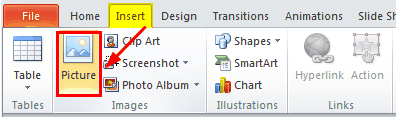
1. Import the image into PowerPoint 2010 by clicking “Insert” → “Picture” and then select the image you want to animate and click “Insert”.
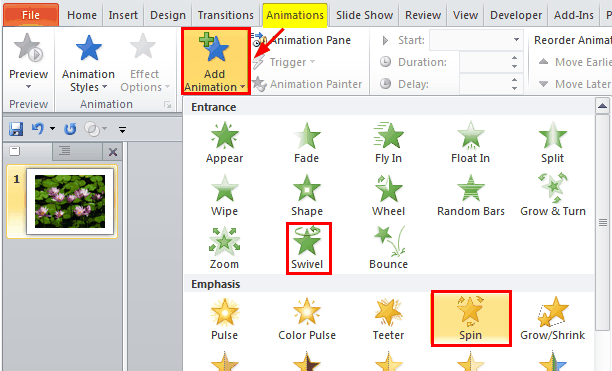
2. Select the image and click “Animations” tab on the ribbon → “Add Animation” → choose “Swivel” or “Spin” as the animation.
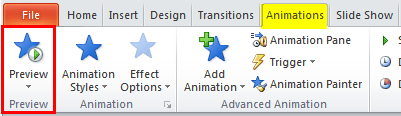
3. Now click “Preview” to test the animation.
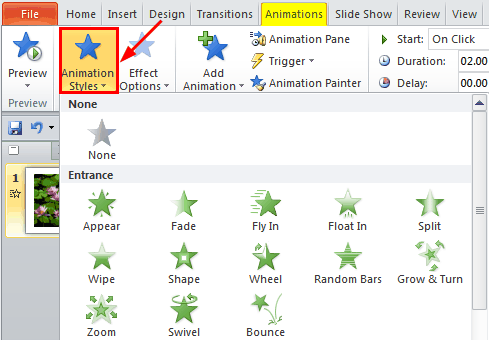
4. If you don’t like the animation, you can click “Animation Styles” to change to another one.
In PowerPoint 2007, the animations are a bit diifferent. Click “Animations” → “Customize Animation” to add an animation effect to the image. You can chosse “Spinner“, “PinWheel” or “Swivel” to get the simliar effects.
займ на карту rusbankinfo.ru
-
How to Set a Video as the Background in PowerPoint 2007
Posted on December 29th, 2011 No commentsQuestion:
I am making a PowerPoint presentation using PowerPoint 2007. How can I set a video as the background without paying for extra software?
You know when you have inserted a picture into PowerPoint 2007 → right click on it → choose “Send to Back” → now you have set the picture as PowerPoint background. Then you can add text, picture, animations, transitions, etc. on it. Can we do that to a video to make it as the background in PowerPoint 2007? Let’s have a try!
Before that, you should know PowerPoint 2007 doesn’t support MP4 or FLV format, so you’d better find an AVI or WMV background video.
Step 1: Open your PowerPoint 2007 and add a new PowerPoint slide. Click “Insert” tab on the ribbon. Click “Movie from file” and browse the video file and click “OK”.

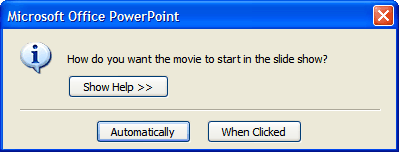
A prompt will pop up; choose the video to start “Automatically”.
Using the edge points, resize the video so that it covers the whole slide page.
Step 2: Select the video, under the “Options” tab of “Movie Tools”, click “Send to Back” to set the video as background. You can use the “Corrections” to adjust the brightness and contrast. Many other video format settings are available too.
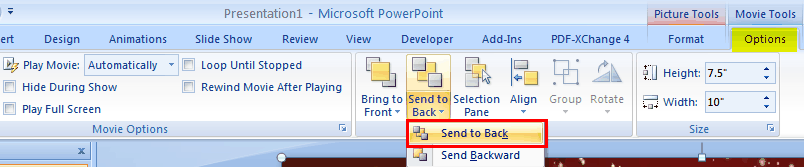
You can also right click on the video and choose “Send to Back”.
Step 3: Now set the video playback options. Set it to “Play Movie Automatically”, Check “Loop Until Stopped” and “Rewind Movie After Playing” boxes.

Step 4: Add text in the text box and animations to the text. Remember to set the animations “Start with Previous”.

Finally, press “F5” to preview your PowerPoint and see whether the video is playing as the background in PowerPoint 2007. The answer should be yes!
займ на карту rusbankinfo.ru
-
How to Animate Picture and Text in PowerPoint 2010
Posted on December 20th, 2011 No commentsIf you want to make your PowerPoint presentation attract your audiences’ eyes, Animation is one of the best tools you should learn to use. Adding animations in PowerPoint 2010 is a bit different from previous versions for many buttons we are used to have been changed, removed or emerged into one. Basically animations are added to pictures and texts; now let’s take a look at how to animate picture and text in PowerPoint 2010.
Adding Animation to Picture:
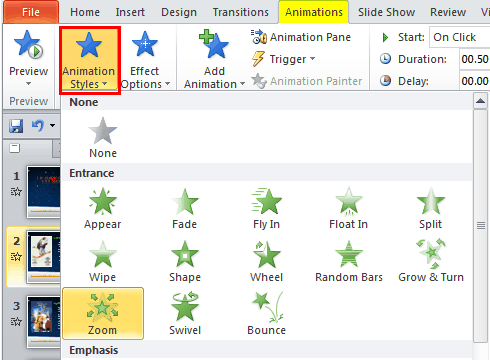
Select the picture first and click “Animations” tab on the ribbon. Below in the “Animation” group choose “Animation Styles” and select one animation.
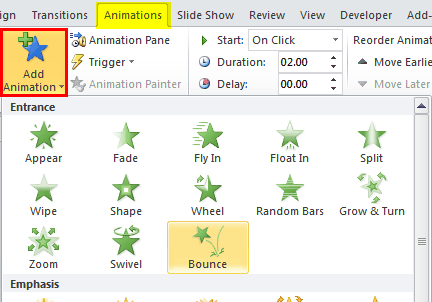
Click the “Add Animation” button in the “Advanced Animation” group and you can add multiple animations to one object.
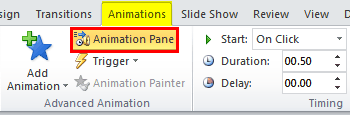
Click “Animation Pane” (same to “Customize Animations” for PowerPoint 2007) so you can further adjust the settings of the animations, like trigger, timing and other effect options.
Adding Animation to Text:
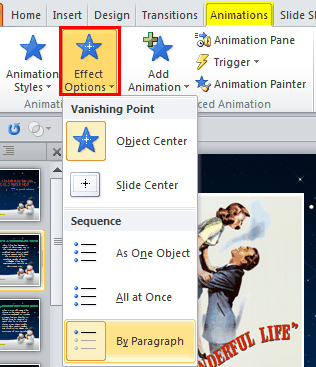
Adding animation of text is almost the same as picture. But there are some differences for text have some different “Effect Options”. For example, choose “Zoom” from the “Animation Styles”. By selecting a sequence, you decide whether the text appears as one object, all at once, or by paragraph.
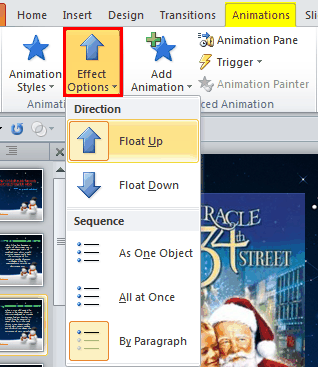
If you choose “Float in” animation, when you click “Effect Options”, you can choose which direction you want the text to float in.
Preview Your Animations:
Click on the “Preview” button anytime to see what the animation looks like and modify if necessary.

-
How to Insert One PowerPoint File into Another PowerPoint File
Posted on November 4th, 2011 No commentsSurely you are not using Microsoft PowerPoint for the first time, and you may have inserted picture, music and video clips into PowerPoint slide for many times. But in some other situations, when you are presenting one PowerPoint but you need to refer to another PowerPoint file for details, last time we have talked about how to switch from one PowerPoint presentation to another smoothly, today you are going to learn how to insert one PowerPoint into another PowerPoint file.
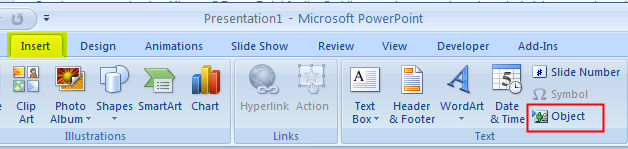
Step 1: Open you PowerPoint file and click Insert > Object.
Step 2: In the pop up Insert Object dialog box, choose Create from file and then browse the desired PowerPoint file you want to insert.
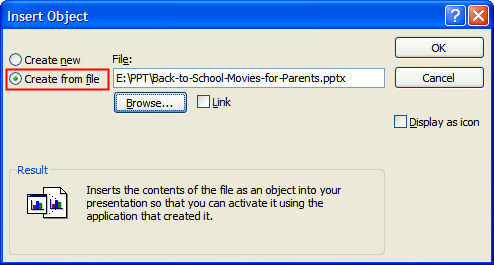
You have inserted the PowerPoint. It will be played after you click on it. Now let’s go a little further, when you switch to the slide where the PowerPoint is inserted, how to make it play automatically?
Step 3: For PowerPoint 2007, go to the Animations tab, then select Custom Animation. Choose Add Effect > Object Actions > Show.
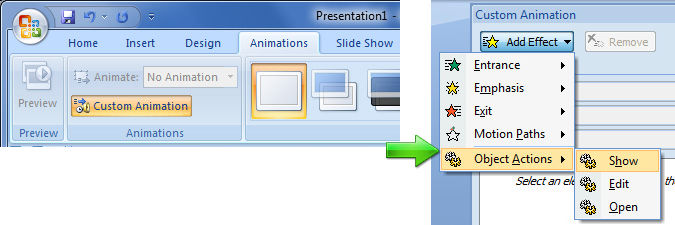
For PowerPoint 2010, the buttons are somewhat different. Go to the Animation tab, click Add Animation and select OLE Action Verbs. In the opened window select Show.

Then set the animation as start After Previous.

-
How to Add Slide Numbers in PowerPoint 2007
Posted on October 28th, 2011 No commentsWhen we are reading a book, we tend to keep an ey on the page numbers to follow up. Likewise, adding slide numbers can be a great way for the presenter to keep track of where they are in a presentation. Also it would be quite useful to organize the handouts when the PowerPoint slides are printed out.
How to add slide numbers in PowerPoint 2007:
- 1.Click on the “Insert” tab and choose “Slide Number” in the “Text” section.

- 2.In the “Header and Footer” dialogue box, check the box for “Slide number” and click the “Apply to All” button. Then a number will be show on every slide on the lower right corner. But the default font size is too small and color isn’t clear enough.

How to adjust the slide numbers’ font size and other options:
The font size and style of the number and other options can be edited by accessing the Slide Master.
- 1.Click on the “View” tab and choose “Slide Master” in the “Presentation Views” section.
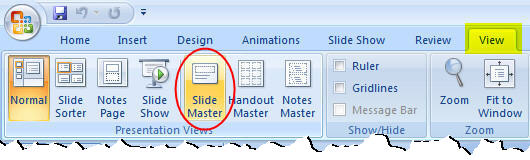
- 2.The slide master will open on screen. On the left you will see thumbnail images of the slides. Select the first slide so that you the changes in this slide can be applied to all other slides. Click on the lower right section and choose the font size, font style, color, etc.

Once you have made all the changes to the slide master, click on the “Close Master View” and all the PowerPoint slides will take the changes you made.
Tips
The slide numbers will automatically update if you rearrange slides after you have added the slide numbers to your presentation.
займ на карту rusbankinfo.ru
- 1.Click on the “Insert” tab and choose “Slide Number” in the “Text” section.





Recent Comments