How to convert WMV to AVI with Leawo Video Converter?

Leawo Video Converter is a professional WMV Video Converter to convert videos among all popular formats, including wmv to avi conversion as well. You may import your WMV files purchased from movielink, or made by Windows Movie Maker, or home videos into the program, and then convert them to an AVI format. But with this WMV to AVI Converter, you can freely convert your Windows Movie file WMV to AVI video file with excellent quality.
Moreover, it lets you delete the bad shots and undesired clips, leaving only the best scenes. It helps to crop a WMV video dimension for your AVI player screen, saving size for store.
Do your WMV to AVI conversion with simple clicks and drags!
Full Guide

Import WMV videos
Drag your WMVs in the program, or click add icon to browse in your WMVs. Double click the file name to have a preview.
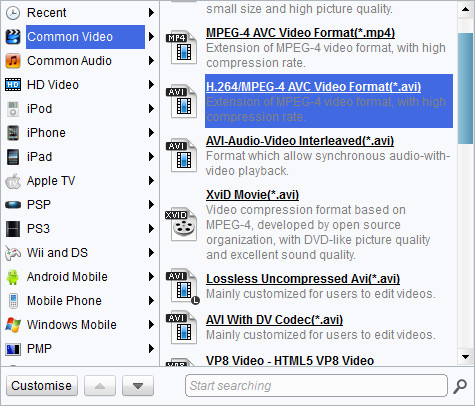
Choose output video format
(1) Click drop-down button next to "Profile" on the main interface to find the suitable quality for your output.
(2) Click "Settings" to open the "Settings" interface to make detail settings for output audio and video, such as audio and video codec, quality, bit rate, video frame rate, video size, audio sample rate, etc.

Edit video with customized features
Click "Edit" to adjust the video effects, trim a video clip you like, and crop for a video dimension to your screen.
- Under "Trim", set the "Start Time" and "End Time" points for a video length.
- In the droplist of "Letter Box", select a "Crop" style, or adjust the offset values for a precise cropping.
- Under "Effect", drag the slides of "Brightness", "Contrast" and "Saturation" for a better visual effect. Drag "Volume" slide to adjust the volume.
- The "Watermark" part offers functions to give image watermark or text watermark on the video.

Start WMV to AVI conversion
Click "Convert" in the bottom right to start the conversion, and DONE. Fast
Extended Knowledge
WMV (short for Windows Media Video) is a video compression format for several proprietary codecs developed by Microsoft. The original video format, known as WMV, was originally designed for Internet streaming applications, as a competitor to RealVideo. The other formats, such as WMV Screen and WMV Image, cater for specialized content. Through standardization from the Society of Motion Picture and Television Engineers (SMPTE), WMV 9 has gained adoption for physical-delivery formats such as HD DVD and Blu-ray Disc.
Share this post













 العربية
 繁體中文
繁體中文 Dansk
Dansk Nederlands
 Suomi
Suomi Français
 Deutsch
 Italiano
 한국어
한국어 Norsk bokmål
 Português
 Русский
 Español
 Svenska