


Actually, Leawo MP4 to WMV Video Converter is a little software, which is quite easy and simple to use. Leawo Video Converter is an all-in-one video converter for converting videos and audios among popular formats, such as converting MP4 to WMV! By converting MP4 to WMV with this MP4 to WMV converter, you may get the specific format of MP4 watched on TV, played on portable media players, loaded to mobile phones, or put on websites, etc. Import video in the software, customize, and convert, these 3 steps will achieve all the conversion tasks for you!
Download Leawo Video Converter, the best MP4 to WMV Video Converter.
Full Guide

Open the converting program and add files
Click "Add Video" icon to import your MP4s in or select them and drop in! Double click the file name to have an instant preview.
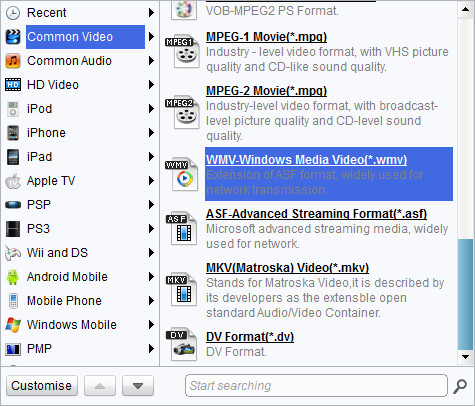
Do some settings with the selected profile
Choose output file format. Select your file, and choose "WMV-Windows Media Video (*.wmv)" in the droplist of "Profile".

Edit video with customized features
Click "Edit" icon to adjust the video effects, trim for a video clip and crop for a proper video dimension.
- Under "Trim", set the "Start Time" and "End Time" points for a video length.
- Under "Crop", adjust the offset values for a precise cropping.
- Under "Effect", drag the slides of "Brightness", "Contrast" and "Saturation" for a better visual effect. Drag "Volume" slide to adjust the volume.
- Under "Watermark", add an image or text over the video as watermark.

Begin the MP4 to WMV Conversion
Click "Convert" in the bottom right to start the conversion, and done. Fast conversion speed!
Extended Knowledge

MP4 is short for Moving Picture Expert Group-4. MP4 is also known as MPEG-4 AVC, or advanced video coding. This new technology is going to make video files decrease in size so that they are easier to work with and support. What used to be massive video files of motion and audio are now compressed versions of the same material, called MP4s.
WMV (short for Windows Media Video) is a video compression format for several proprietary codecs developed by Microsoft. The original video format, known as WMV, was originally designed for Internet streaming applications, as a competitor to RealVideo. The other formats, such as WMV Screen and WMV Image, cater for specialized content. Through standardization from the Society of Motion Picture and Television Engineers (SMPTE), WMV 9 has gained adoption for physical-delivery formats such as HD DVD and Blu-ray Disc.
-

MovPilot Review: Reliable Video Downloader or Not?
-
Easy Guide: How to Watch Amazon Prime on Chromecast?
-
YT Saver Video Downloader Review: All That You Should Know
-
QuickTime Player Review: Is It Still the Best for Mac?
-
WinX DVD Copy Pro Review: All Details Explianed
-
7 Best TikTok MP3 Converters for High-Quality Audio
-
MakeMKV Review (2026): Pros, Cons, Features
-
The Ultimate Guide to Extract Audio from DVD
-
Best Ways to Screenshot Facebook Stories on Any Device
-
How to Convert TikTok Audio to MP3 in Seconds?










-
Best Twitter Porn Accounts You Shouldn’t Miss
-
How to Download Pornhub Videos? Ways to Download from Pornhub
-
Full Review of Savethevideo: Is Savethevideo Safe & How to Use it?
-
Top 5 OnlyFans Viewer Tools to View OnlyFans Content for Free
-
Netflix Download Limit: What it is & How to Avoid
-
How to Import Bookmarks from Safari to Chrome
-
Full Guide to YouTube Members Only Videos: Watch, Download
-
How to Download MissAV Porn Videos in HD for Offline Viewing?
-
4 Methods to Burn ISO Files to Blu-ray Discs Easily
-
How to Download Videos from Fansly with Fansly Downloader















 العربية
 繁體中文
繁體中文 Dansk
Dansk Nederlands
 Suomi
Suomi Français
 Deutsch
 Italiano
 한국어
한국어 Norsk bokmål
 Português
 Русский
 Español
 Svenska