WinX DVD Copy Pro Review: All Details Explianed

Summary:
If you need a solid tool to back up DVDs, read our full WinX DVD Copy Pro review. We check how it works, how fast it runs, what it costs, and which rival programs Windows users besides Mac owners should consider.
A tool made by Digiarty for Windows, WinX DVD Copy Pro helps keep your DVDs safe. This software moves data from discs straight to your computer. Whether they are old, damaged, or locked with protection, most types will work here. Pick how you want the result – copy one disc directly onto another, save everything as an ISO image, or store it all inside a VIDEO_TS collection. Even users new to tech can save films flawlessly thanks to a straightforward design along with automatic decoding. Below, we list what the tool does, how much it costs, where it shines, where it falters, and which other apps deliver similar results.
OutlineCLOSE
1. What Is WinX DVD Copy Pro?
Digiarty makes WinX DVD Copy Pro for Windows machines. This tool grabs everything off a DVD, whether that means copying the full disc, making an ISO image, or pulling files into a VIDEO_TS directory. Instead of needing separate apps, it handles encrypted movies plus those locked by regional settings. Even tricky formats like DVD-RW, DVD-RAM, and double-sided DVD-9 work without issues. As installation runs, protection layers get removed automatically – no additional steps required. Picture and sound stay identical in the last copy. Straight from Digiarty’s website, you can download the installer file, the site follows PCI-DSS rules for secure delivery and payment.
2. Core Features and Real-World Performance
WinX DVD Copy Pro comes loaded with practical features that make DVD backup fast and reliable.
True DVD Copy: A real DVD duplicate shows up with every menu, chapter, subtitle, while keeping each sound intact. My standard desktop handled a 4.7 GB disc in roughly thirteen minutes – no drop in sharpness or depth. The clone played exactly how the source did.
Multiple Copy Modes: Backup choices? Nine ways to do it. Pick one based on what you want saved, full disc, only the film, or specific parts like scenes or sound. Each option changes how much gets copied.
Protection and Region Handling: Most of the time, it takes care of DVD copy safeguards and regional limits found on commercial discs. That means less hassle dealing with them yourself.
DVD Types & Output Options: Also, there is a built- in utility to test an ISO file prior to burning it, or to perform the burning process. Burning a DVD lasted less than 15 minutes for me, and the playback was fine.
ISO Mounting & Burning: There’s also a built-in tool that lets you check an ISO file right inside the app before writing it. Instead of rushing out to test later, you can preview how it will run. Writing to a disc? That task finished in under fifteen minutes when I tried it personally. Playback started smoothly, without hiccups.
Performance: Performance is reliably strong as it relies on your computer’s hardware to provide the necessary speed. Most full disc copies finish between twelve and seventeen minutes while asking almost nothing from your system. When scratches appear, the tool jumps over damaged spots instead of stopping. This smart skip keeps the process moving, avoiding crashes even when the surface shows wear and tear on the disc.
3. Pros and Cons
We have summarized the advantages and disadvantages of WinX DVD Copy Pro based on our detailed review below to help you make a faster decision on whether to try this tool out.
Pros:
- A very user-friendly interface
- Can automatically removes most DVD protections and region locks
- True 1:1 lossless backups, preserving menus, chapters, audio, and subtitles
- Supports for almost all DVD formats and outputs to disc, ISO, or folder
- Constant updates to handle new disc
- Competitive pricing
Cons:
- Windows only; no macOS or Linux version
- Cannot compress or convert DVDs; copies only in original format
- Nine copy modes may overwhelm some users
- Many times discs fail to copy
- Auto-renewal of licenses can be tricky to manage
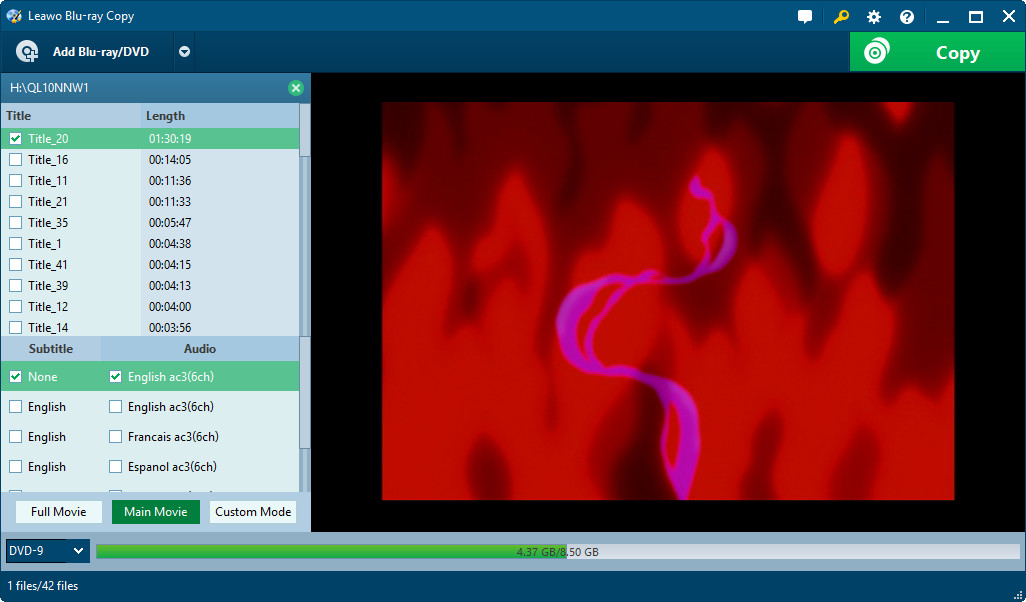
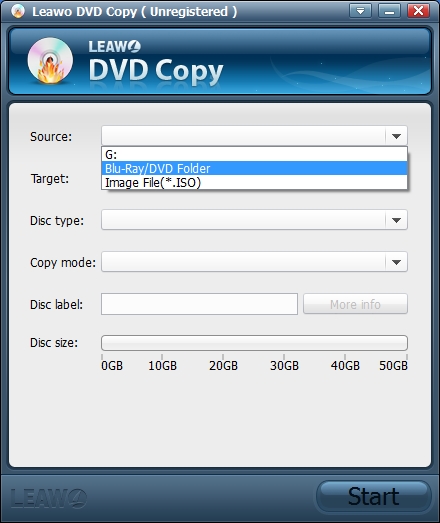
If you have gone through the pros and cons section and are not satisfied with the result, you might be thinking about an alternative to WinX DVD Copy Pro. Don’t worry, we’ve got your back. This is where Leawo DVD Copy shines through.
Leawo DVD Copy is designed specifically for cloning and backing up DVDs (and in related tools, Blu-rays) with a focus on ease of use, protection removal, and flexibility.

-
- Copy DVDs in lossless quality.
- Compress DVD-9 to DVD-5 with high quality.
- Remove DVD copy protection and region restriction.
- Copy DVD between disc, folder and ISO file.
- Support 1:1 disc to disc copy with no quality loss.
- 3 copy modes for multiple DVD copy purposes.

Overall, Leawo DVD Copy stands out as a more versatile cross-platform choice if macOS support is important to you, or if you want a cleaner, less overwhelming set of options while still getting reliable protection bypassing and lossless results. It’s particularly appealing for users who value compatibility across devices and at a lower price.
4. Pricing and Plans
WinX DVD Copy Pro offers a free trial plus a tiered paid license. Below is what it has to offer.
| Plan / License Type |
Price |
Devices |
Duration |
Features / Notes |
|
Free Trial |
Free |
1 PC |
Limited |
Limited features for testing purposes |
|
Standard (Annual) |
$34.95/year |
Up to 3 PCs |
1 Year |
Includes 1 year of upgrades, 30-day money-back guarantee |
|
Premium (Lifetime) |
$42.95 (one-time) |
1 PC |
Lifetime |
Lifetime upgrades, priority support, includes 3-month WinX DVD Ripper Platinum license |
|
Bundle (DVD Copy Pro + DVD Ripper Platinum) |
$79.95 (one-time) |
1 PC |
Lifetime |
Lifetime upgrades, priority support, and both software included |
Users should be aware that the Standard plan auto-renews, so it is advisable that they manage renewal settings accordingly.
5. How to Use WinX DVD Copy Pro (Step-by-Step Guide)
If you want to know how to use WinX DVD Copy Pro, here is a walkthrough that makes copying DVDs a matter of minutes.
Step 1: Get the software through downloading and install it on your Windows PC. Run the program. Initially, you will be able to try the program’s limited features for free, after which you can pay for the full version.
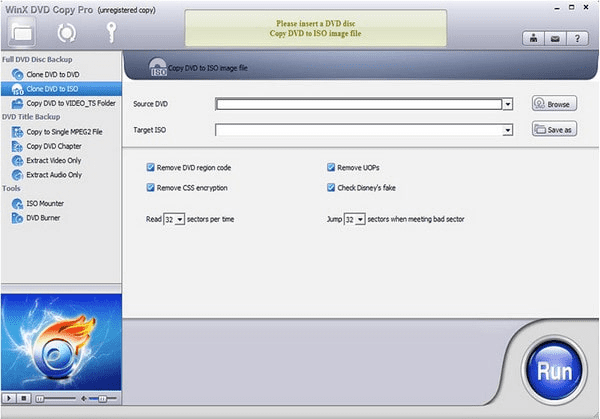
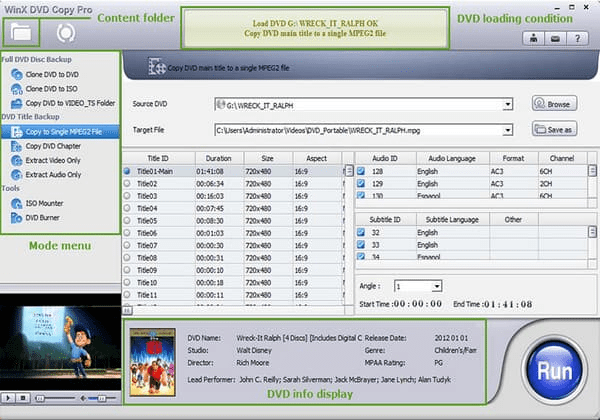
Step 2: Just put your DVD inside the DVD drive and click the folder icon at the top left corner to load it. The DVD content displays on the screen. Titles are there. Chapters are there as well. If it is your first time to do it, check out the copy modes because there are nine of them which you can initially explore on the left menu in order to know what they are.
Step 3: For a direct duplication, choose the first mode: Clone DVD to DVD, confirm the Source DVD and, set the Target DVD Burner, then click the Run icon to start copying. And, if you have multiple DVD Drives. Use the Browse option. Pick the source disc.
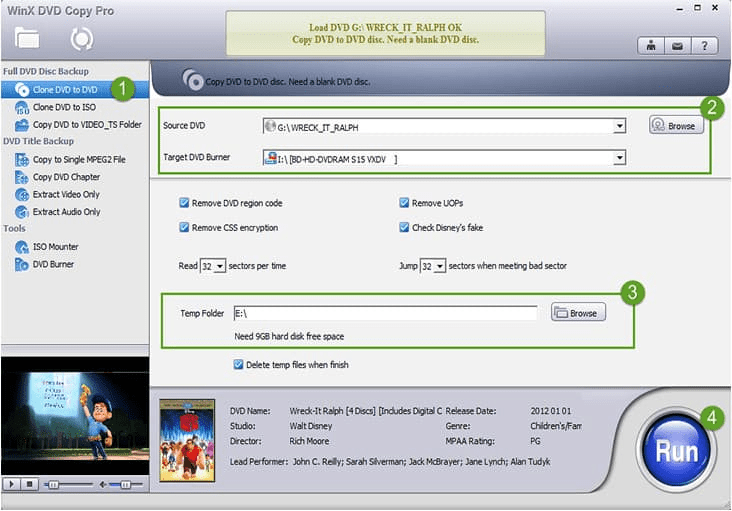
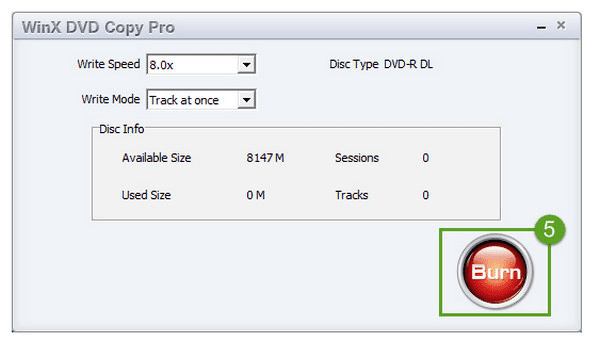
Step 4: if your PC has one DVD drive, you’ll first set a folder to store DVD content then when the backup finishes you insert a blank DVD and click Burn in the pop up window to finalize the copy. For computers with multiple DVD drives, insert a blank DVD into the second drive. The software will burn the copy after duplication. WinX DVD Copy Pro makes it easy to create exact duplicates of your DVDs. It preserves all menus. It preserves all chapters. It preserves all special features.
6. FAQs
Does WinX DVD Copy Pro support copy-protected or encrypted DVDs?
Yes. It doesn’t require user assistance for decrypting CSS, bypasses UOPs, RCE, Sony ARccOS, and Disney X, project DRM, thus allowing you to copy most commercial and region-locked DVDs without any errors.
Is WinX DVD Copy Pro compatible with Windows 11 and earlier versions?
Yes. It is compatible with Windows 2000/XP up to Windows 11. There is no support for macOS or Linux.
Is WinX DVD safe?
When downloaded from the official WinX website, the software is secure. The installer and payment system comply with PCI-DSS standards.
Share this post








 العربية
 繁體中文
繁體中文 Dansk
Dansk Nederlands
 Suomi
Suomi Français
 Deutsch
 Italiano
 한국어
한국어 Norsk bokmål
 Português
 Русский
 Español
 Svenska