
Leawo Photo Enhancer

Leawo Photo Enhancer

Automatic Artificial Intelligence Photo Enhancer. Let Leawo Photo Enhancer Lessen Your Work!

AI-powered image enhancement solution designed to automate photo processing and reduce manual workload. It enhances images in batch using advanced AI algorithms to improve visual quality, supporting efficient image optimization for content creation and media workflows.

Works on:WindowsMac
Key Features

Enhance Portraits in One Click

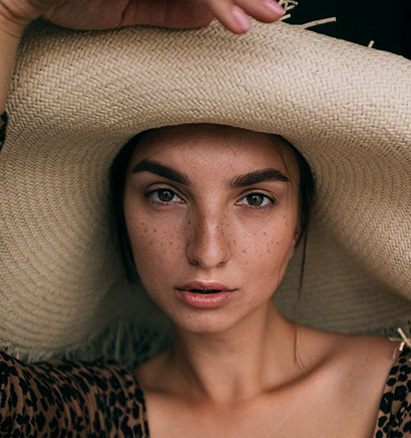
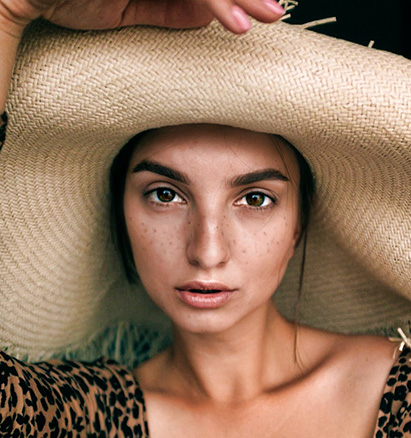
  • Make Eyes Large and Bright

    Powered by AI-based portrait enhancement, the software improves key facial features such as eye clarity and brightness to deliver consistent, high-quality portrait outputs for professional image processing workflows.

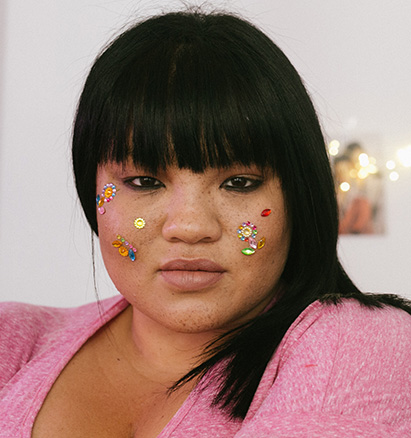
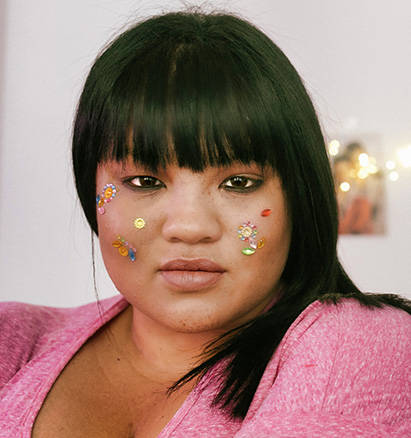
  • Smooth Skin to Be Newborn

    Photo Enhancer applies AI-driven facial optimization to reduce skin imperfections such as freckles and wrinkles, while automatically adjusting brightness levels to produce consistent, high-quality portrait outputs for image processing workflows.

  • Compare Image 0
  • Compare Image 1
  • Compare Image 2
beforeafter
before
after
Key Features
beforeafter
before
after

One Click to Bring You Back to Shooting Scene

  • Make Photos Clear by Blowing Away the Haze

    Key Features
    Smart dehaze magically blows away haziness and fogginess, bringing more details, saturation and contrast to what the scene is supposed to be.
  • Always Bring You a Better Mood with Brighter Sky

    Key Features
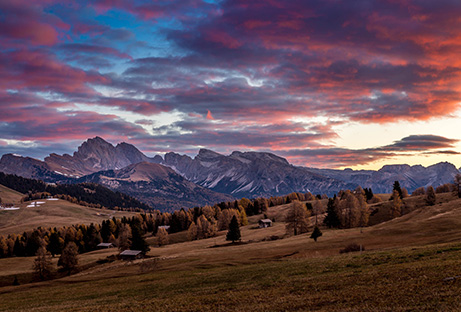
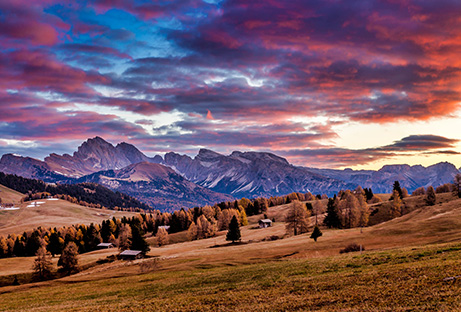
    Photo Enhancer also acts as an AI sky enhancer. It can automatically restore the most immersive sky, taking you to relive the scene where you shot.
Key Features

Improve Photo Quality with Advanced AI Technology

  • Fix Photo Explosure and White Balance Issues with AI

    Photo Enhancer optimizes image exposure by controlling highlights and enhancing shadow details, while automatically correcting white balance through color temperature adjustment to deliver accurate and consistent visual outputs for image processing workflows.

  • Boost Photo Colors and Optimize Photo Tints

    Photo Enhancer applies advanced color optimization algorithms to correct tonal balance and enhance color accuracy, delivering vivid and consistent visual outputs for professional image processing workflows.

beforeafter
before
after
Key Features
beforeafter
before
after

Support Processing RAW and JPG Files Automatically

  • Process RAW Files from Any Camera

    Compatible with a wide range of camera sources, the AI-driven processing optimizes RAW files for consistent output quality. It also includes automatic lens correction to address issues such as chromatic distortion, aberration, and vignetting, supporting reliable image standardization across different capture conditions.

  • Optimize JPG Images

    Photo Enhancer improves low-quality or compressed JPG images by reducing noise, minimizing blur, and enhancing detail clarity. It helps restore image sharpness and stability, delivering cleaner and more precise outputs for image processing and content preparation workflows.

Why Choose Photo Enhancer?
Key Features

1.The most powerful and the most advanced AI photo processing.

Key Features

2. Batch processing massive photos at lightning speed.

Key Features

3. Easy to use. One Click to get desired effects.

How Does Leawo Photo Enhancer Work

How to Use Photo Enhancer?

step1

Step 1 : Import Source Photos

step2

Step 2 : Enhance Photos

step3

Step 3 : Output Settings

Guiding diagram 0
Guiding diagram 1
Guiding diagram 2

Pricing Plans of Photo Enhancer

Pricing Plans of Photo Enhancer for Mac

Choose Your Pricing Plan

Windows
Mac

Basic Plan

One Year

$29.95

  • 1 License for 1 PC
  • All Features for 1 Year
  • Auto-renewal. Cancel Anytime
  • 5 Days Money Back Guarantee
  • Unlimited Free Upgrades

Professional Plan

Lifetime

$39.95

  • 1 License for 1 PC
  • All Features for Lifetime
  • One-time Payment
  • 14 Days Money Back Guarantee
  • Unlimited Free Upgrades

Recommended

Purchase 2 or more modules, Get higher discount.

30%

Tech Specs

Supported OS :Microsoft Windows 7, 8,10 (64-bit)

Graphics card :Open GL 3.3 or later compatible Graphics Cards

Processor :Intel® Core i3 or AMD Athlon® 64 processor; 2 GHz or faster processor

RAM :4 GB of RAM (8 GB recommended)

Screen display :1024 x 768 display (1280x800 recommended)

Hard drive space :4 GB of available hard-disk space, SSD for best performance

Adapter :DirectX 10-capable video adapter

Others :Internet connection and registration are necessary for required software activation, validation of subscriptions, and access to online services.

Supported OS :macOS Yosemite (10.10), macOS X El Capitan (10.11), macOS Sierra (10.12), macOS High Sierra (10.13), macOS Majave (10.14), macOS Catalina (10.15), macOS Big Sur (11), macOS Monterey(12), macOS Ventura(13), macOS Sonoma (14), macOS Sequoia (15), macOS Tahoe (26)

CPU :1 GHz or above Intel Processor and Apple M1/M2 chip(Rosetta required)

RAM :4GB RAM or more (8GB is recommended)

Hard drive space :4GB of available hard-disk space, SSD for best performance

Display :1440x900 pixels resolution (1920x1080 or better is recommended)

Adapter :DirectX 10-capable video adapter

Others :Internet connection and registration are necessary for required software activation, validation of subscriptions, and access to online services.

Testimonials

What Client Say About Leawo Photo Enhancer

I didn't really expect much from the free version I got from "Giveaway of the Day", but I am positively stunned by the quality of the output. A nice picture of an Item I put on Ebay was enhanced to professional quality.

avatarBy Richard Easton

I have to be honest, I never write reviews. I just don't have the time. But this app is amazing. I don't do a lot of photo editing, but if you do, this app is for you. I don't even know how it works. I just used it and it made my photos look amazingly better, and it's soooo much faster than Lightroom. I don't even know how they did it, but it's not even expensive! I don't usually give reviews, but it's worth it. So check it out and thank me later; )

avatarBy Adictec

I use google picasa frequently but it isn't available for mac. This Photo app has provided the functionality I really liked. (I'm feeling lucky filter)

avatarBy Nicole
Testimonials