How to Screen Record HBO Max Without Black Screen (Step-by-Step)

Summary: To avoid a black screen when recording HBO Max, you can use another browser, turn off hardware acceleration, and choose third-party recorders.
I liked to watch House of the Dragon and Euphoria on HBO Max, and sometimes I want to record them for later review. However, the recording fails, and there is a black screen. I bet there are so many friends like me. Here is the question: Can you screen record HBO Max? To target this problem, I have searched for all the methods around and fixed the issue. In this guide, you can discover detailed step-by-step instructions to learn how to screen record HBO Max without hassles.
Quick Preview
If you are looking for a quick fix to the HBO Max black screen issue, check the table below to find the best solution for your needs:
| Method | Best For | Effectiveness |
|---|---|---|
| Switch Browsers | Quick, temporary fixes (e.g., using Firefox) | Low-Medium |
| Disable Acceleration | When try to using built-in tools like Windows Game Bar, etc. | Medium |
| Third-Party Recorders | Aims for 4K recording (CleverGet Recorder and Leawo Free Screen Recorder) | High |
| Video Downloader | Permanent, offline storage without recording, but via direct downloading (official download feature and CleverGet Max Downloader) | Best |
Why does HBO Max show a Black Screen When Recording?
Not being able to record HBO Max but getting a black screen is not a tech glitch. It’s a secure method to prevent copyright infringement. Normally, they are the reasons follow:
1. DRM (Digital Rights Management)
DRM is a safeguard for copyrighted movies. The only work is to prevent content privacy. When you try to record the video, the safeguard detects your action and stops it, so you can only hear the sound but cannot see the pictures, and you cannot record the movie at all.
2. Hardware Acceleration
Most browsers use hardware acceleration to make high-quality movie playback smoother. This will put the stream into a private tunnel, but the recording program cannot access the tunnel, so what you get is only a black screen, which is a background layer, not the thing inside the box.
3. HDCP (The Security Handshake)
Think of this: HBO Max is the source, and your screen is the destination to display the content. The transmission will go through your CPU/GPU and the HDMI/DisplayPort. You can think of this whole chain as a series of actions of handshaking. When you open the recording program, the system may think you are trying to “steal” the content, so it will cut off the signal to protect the content privacy, leaving you with a black screen.
How to Screen Record HBO Max?
Well, although the actions to protect DRM are strict, there are still ways to work around them. Depending on the specific situation, you may try the methods below.
Method 1: Try Different Browsers
If you see a black box with no content, you can try this way for a quick fix. This is the easiest way: switch to a new browser. Browsers like Safari, Edge, or Chrome have very strict rules about DRM. They work closely with your computer to hide protected video. You can try Firefox, which uses its own unique way to play videos and often doesn’t trigger the “black screen” security guard. If this doesn’t fix the black screen problem, you can proceed to the next method.
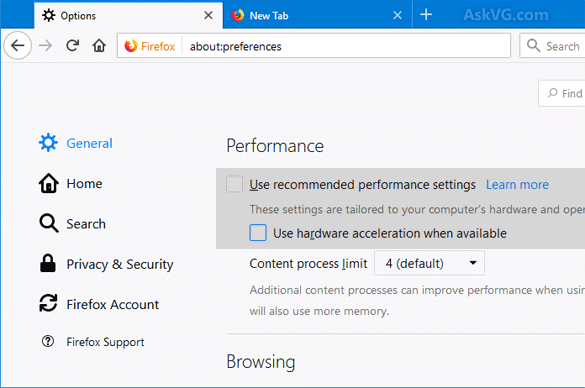
Method 2: Disable Hardware Acceleration
No matter whether you switch to a new browser or not, it is best to turn down the hardware acceleration, especially if you use the recording tools that come with your computer, like Game Bar on Windows/Screenshot tool on Mac.
Method 3: Use Third-Party Recording Tools
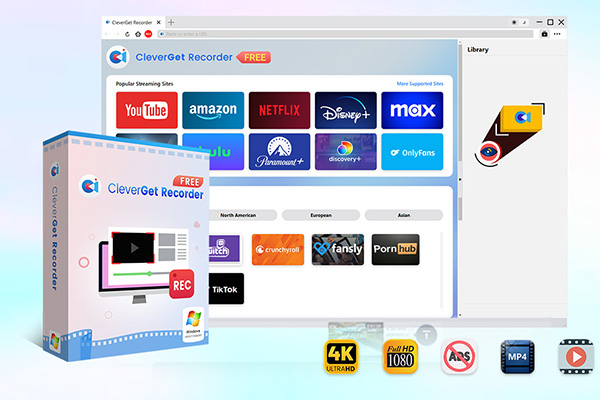
The built-in tools are just programmed to follow copyright rules, which cannot record a DRM-protected movie on HBO Max most of the time. To bypass DRM, I suggest you choose professional third-party recording tools, and the following are two of the best free screen recorders.
CleverGet Recorder is a free and strong recorder designed for DRM-protected streaming videos (on Windows 7/8/8.1/10/11 and macOS 11/12/13/14/15/26). The main advantage is that it can see the movie on HBO Max and record it as a high-quality MP4 or MKV file (up to 4K) without worrying about DRM. Most importantly, it automatically removes ads during recording, and you can even set a timer for when the recording stops.

-
- 100% free streaming video recorder.
- Record both online on-demand and live streaming videos.
- Record up to 4K 60 FPS video to MP4 or MKV.
- Schedule recording on preset recording length.
- No watermark, no time limit, and ad-skipping (beta).
If you don’t want to download any software, Leawo Free Screen Recorder is a good one for you to choose. It has a desktop version and an online page version that you can use directly from your browser. Leawo allows you to record with up to 4K resolution. It is a great 4-in-1 tool that lets you select the exact recording area, making it easy to capture just the movie window while bypassing the typical black-screen triggers.
-
- Free online recorder to record window, browser tab or entire screen online.
- Free screen recorder to record screen in full-screen or custom area at up to 4K to MP4.
- Free webcam recorder to record webcam video.
- Free audio recorder to record audio from microphone or computer to MP3.
- Free screenshot snapper to snap screenshot to JPG.

Better Alternatives to HBO Max Screen Recording
If you are still worried that the recordings are too complicated and have a black screen, there is an even better way to keep your favorite HBO Max movies offline: download them. For downloading, you have two options: one is to use the official download feature, or you can choose to use a third-party HBO Max downloader.
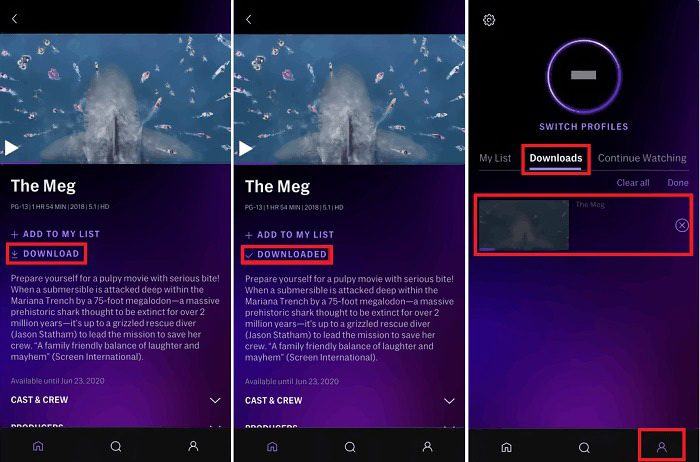
1. Use the Official Offline Viewing Feature
If you have a mobile device and have an ad-free subscription, you can use the built-in download feature to get the movie offline on your phone. This is the most direct way. However, note that there are many limits. You can only download the movies on your phone (not your computer). You cannot transfer the videos to other devices. The downloads storage is time-limited: once you start to watch, you need to finish in 48 hours, and the downloads that you never watched can only be stored for 30 days.
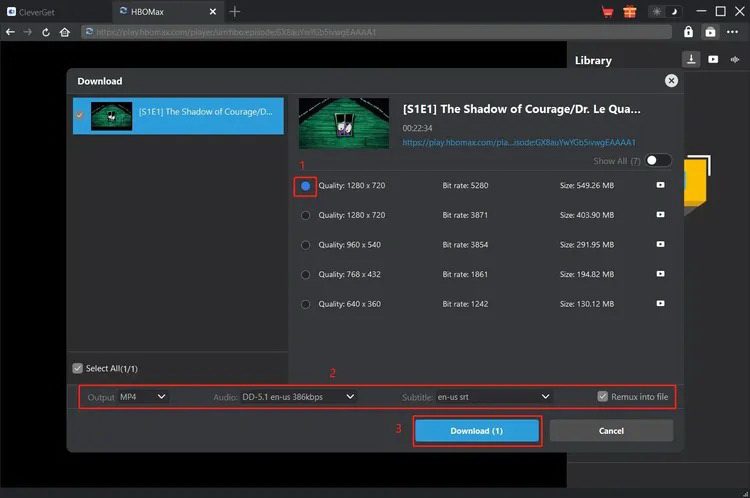
2. Use CleverGet Max Downloader
Compared with the official download feature that only allows you to watch HBO Max videos offline on phones or tablets, CleverGet Max Downloader offers you more freedom. You can download HBO Max videos on Windows/Mac in MP4 and MKV formats permanently, without being affected by membership expiration or copyright removal. And the good thing is that the quality is up to 720p with original audio tracks and subtitles being preserved. You can watch the downloads on any device you want, like a computer, a projector, etc.
Final Thoughts
Recording HBO Max is not complex. Although the DRM protection mechanism is tough and leads to a frustrating black screen, you have the above methods to resolve the problem. Besides recording, I think downloading HBO Max videos offline is even better, so you can take considerations. No matter which way you choose, they are all based on your specific needs for quality and convenience.
FAQs
1. Why does my recording have audio but no video?
This is mainly because of DRM protection. Your browser or program triggers DRM detection, which leads to the recording program not recognizing the content, leaving you only able to record the sound but not the image.
2. Does HBO Max block all screen recording apps?
HBO Max blocks partial recording apps. Examples like Windows Game Bar or QuickTime are usually blocked automatically. However, some third-party tools can bypass the DRM protection, such as CleverGet Recorder.
3. Can you screen record HBO Max on iPhone or Android?
No, mobile operating systems provide extremely high-level security for these apps. Once you attempt to run any kind of screen recording on Max using your smartphone’s built-in screen recorder, the app detects that right away and records a black screen instead.
4. Is it legal to screen record HBO Max?
If you use the recordings for personal use, like self-watching offline, no distribution, no sharing, no commercial use, it is usually considered fair use; otherwise, you violate both copyright laws and the platform’s terms of service.
5. Does HBO Max allow offline viewing instead of recording?
Yes. HBO Max app comes with a built-in download feature for those who want to watch videos offline when circumstances do not allow, like no internet, on a trip, etc. If you want to experience better downloading, using the CleverGet Max Downloader is a better alternative as it saves videos permanently without expiration dates.
Share this post










 العربية
 繁體中文
繁體中文 Dansk
Dansk Nederlands
 Suomi
Suomi Français
 Deutsch
 Italiano
 한국어
한국어 Norsk bokmål
 Português
 Русский
 Español
 Svenska