-
3 Methods to Set Timing and Speed of PowerPoint When Saving PowerPoint as Video
Posted on June 28th, 2012 No commentsUsually when we create a PowerPoint slideshow, to make it look better we would add animations, transitions, music and video clips. The problem is that how to make all these effects and components sync with each other. So here in this article we will discuss about 3 methods to help you set timing and speed of PowerPoint so that you can make a perfect video for uploading to YouTube or watching on iPad with others.
Method 1: Set Slide Transitions
Open your PowerPoint file and select each of the music and video files you have inserted. Click “Playback” tab, in the “Video Options” group, remember to set the video “Start: Automatically“. This setting enables the music and video clips to play automatically even after PowerPoint to video conversion.

Now, click “Transitions” tab on the Ribbon, uncheck the “On Mouse Click” option so that the slide will jump to next slide automatically. Then set a “Advance Slide” timings in “After” section.

Method 2: Rehearse Timings
Another way to control the slide speed is to preview the whole PowerPoint presentation and rehearse the timings for each slide. Click “Slide Show” tab on the Ribbon, choose “Rehearse Timings” in the “Set Up” group to tools.

Then you will enter the “PowerPoint Show” mode, with a timing setting dialog box on the top left. You need to pretend you are doing the PowerPoint presentation now and click “Right Arrow” to save the timing for the slide and jump to next slide. Pause and reset the timing anytime as you need.
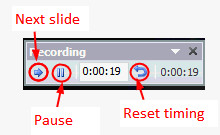
The advantage of “Rehearse Timings” function is that you can set the timing for each slide and animation really accurate. The disadvantage is that it will take quite a long time.
Method 3: Set timing in PowerPoint converter
After setting the timings using method 1 or method 2, you can then save PowerPoint as video directly in PowerPoint 2010 or using PowerPoint to video converter. Leawo PowerPoint to DVD Pro support converting PowerPoint to popular video formats besides burning to DVD or Blu-ray Discs.
Run the program and import the PowerPoint file you want to save as video. Click the “Customize” button below the preview window.
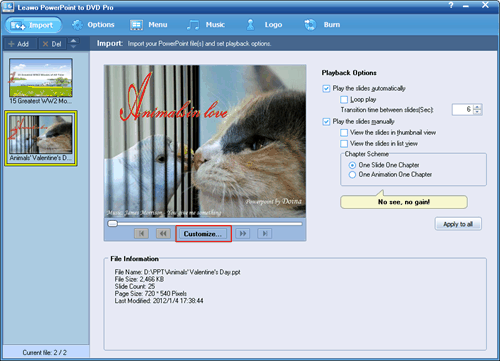
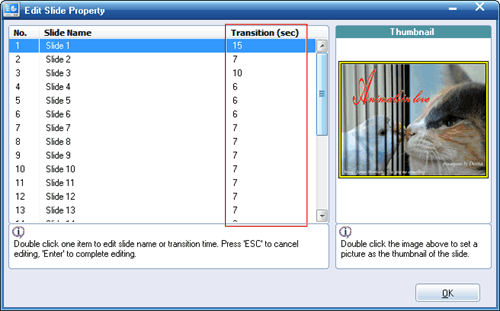
In the pop up window, if the original PowerPoint file has transition settings, the transition timing of each slide is listed there. If not, the transition section will be blank. Double click and enter a desired timing as you want whether or no.
-
How to Finish PowerPoint Presentation Effectively
Posted on June 14th, 2012 No commentsPeople always say PowerPoint is a very easy-to-use tool to make presentations, but leave an impressive impact on the audience is not. Your presentation will be soon forgotten if you are unable to end it with a convincing touch. A good PowerPoint presentation doesn’t merely mean a few good slides, but how to present the PowerPoint in an effective way. In what is to follow, we will run through a few tips to finish PowerPoint presentation effectively and hope it help to improve your next PowerPoint presentation.
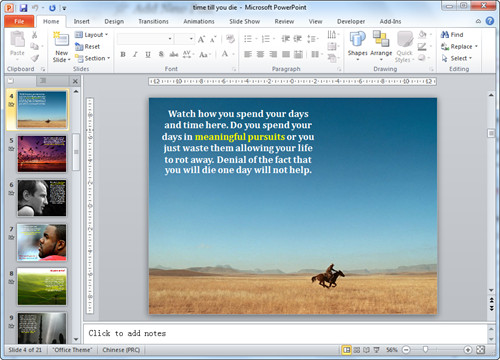

Focus on the core content
The last few slides are expected to be a concise summary of the whole presentation content or come naturally to the aim of the presentation. So when creating the last few slides, remember not to deviate from the core aim. For presentation of introducing a new product, you should make the audience believe they can benefit from the product.

Add Powerful Multimedia Impact
One of the best ways to end a PowerPoint presentation is to use powerful multimedia content with appealing sound and visual effects like adding YouTube video in PowerPoint. Many a times a message delivered with eye-catching graphics and a gripping background score can result in a convinced audience, as compared to a mute presentation.

Control the bullet points
It is old-fashioned to list bullet points on one slide. Replace the bullet points with images and illustrative words. So if you need to present a point, you can put an image on the left side of slide and list the points on the right. Do remember to add animations so that the points will drop in one at a time.
Put numbers into context
In PowerPoint you can make your numbers or statistics into a table or further a chart that shows clearly the contrast with others. However, when you explain these numbers, remember to put them into a specific context so that audience will easily remember it. For example, Cook said there were 400 million accounts on Apple’s App Store. This is just a number, what makes it meaningful is what he said next, “That makes it the store with the largest number of credit cards anywhere on the Internet.”

The sequence and timing of slides
Any experienced presenter will add animations, transitions and hyperlinks in his PowerPoint presentation. That means his presentation is more than just switch from one picture to another. The content are moving and audience are following the presenter’s guide to go through the touching content. So double check to make sure that all slides are in proper sequence and that the timing of the slides is accurately adjusted.
Hope the above presentation tips will help you to capture the attention of your audience and finish your PowerPoint presentation in a satisfactory way.
займ на карту rusbankinfo.ru
-
How to keep Fonts and Videos in PowerPoint 2010
Posted on May 30th, 2012 No commentsPeople always say PowerPoint is an easy-to-use tool for making PowerPoint presentations. That depends. After you have learnt all those PowerPoint skills and tried yourself, the answer is yes. But for many people, problem happens all the time, especially when you need to send the PowerPoint to others. In this article we will show you how to deal with the font and video problem in PowerPoint.
1. Font in PowerPoint
Different computers are likely to have different fonts, especially when the two computers have different languages. If you send a PowerPoint presentation to another computer, the font differences may cause some formatting issues.
Microsoft has offered the solution, but not enabled by default. Below is how to keep the fonts you have used in the PowerPoint file.
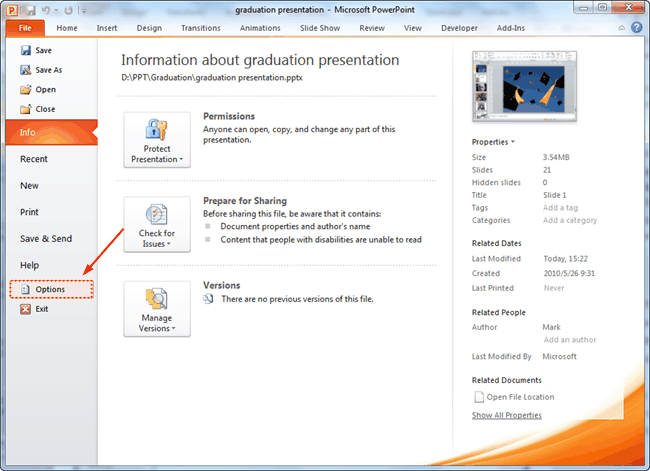
Step 1: Start by clicking “File” on the top-left and then click “Options” on the left pane.
Step 2: Once you have the PowerPoint Options window open, select the “Save” tab and then check the “Embed fonts in the file” checkbox.
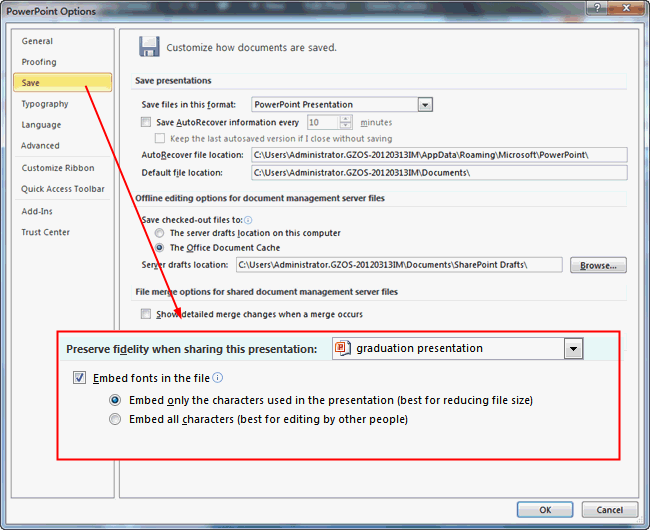
Step 3: You then have the option to include all of the characters (increases the file size) or only the characters used (reduces the file size).
2. Video in PowerPoint
Unlike pictures and music, videos are usually bigger in size and in order to keep the output PowerPoint file small. The video may not be embedded, but hyperlinked. That is to say, the video is still on your computer, so the receipt cannot view the video on his computer.
The following method will show you how to make use the Windows Media Player to play video in PowerPoint. The advantages are that you can easily control the video path and options like play, pause, skip and volume of the player in PowerPoint.
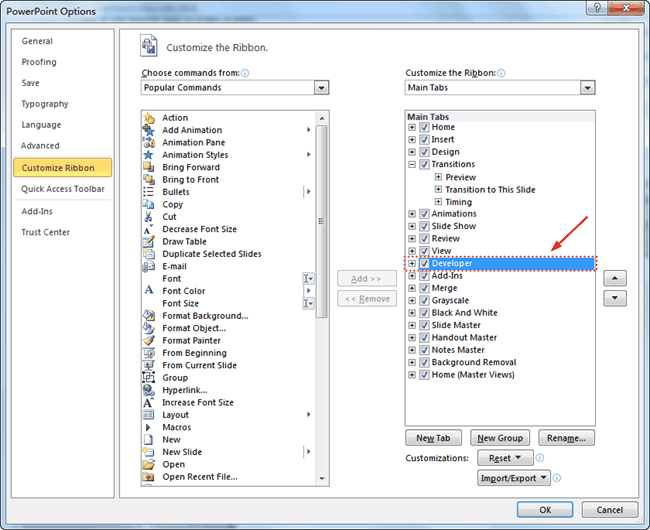
Step 1: Enable the “Developer” tab. In the PowerPoint Options → Customize the Ribbon → select the Developer option.
Step 2: Under the Developer tab, click the “More Controls” icon and a dialog window will pop up.

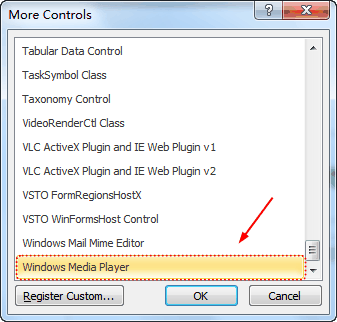
Step 3: In the More Controls dialog box, select “Windows Media Player“, and click “OK” to apply. Drag you mouse to draw a frame for the player.
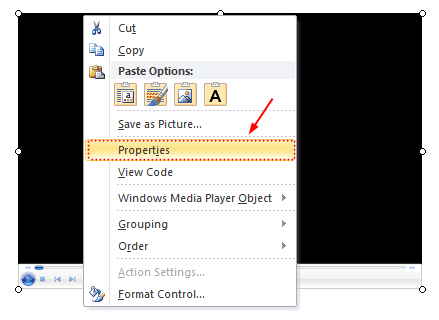
Step 4: Right click the frame and choose “Properties“.
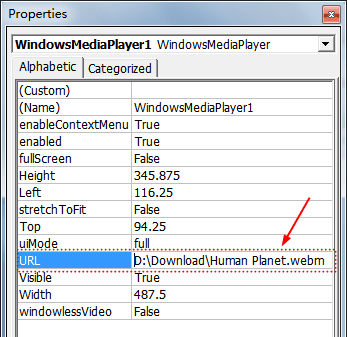
Step 5: Input the full path and name of video file in “URL” option.
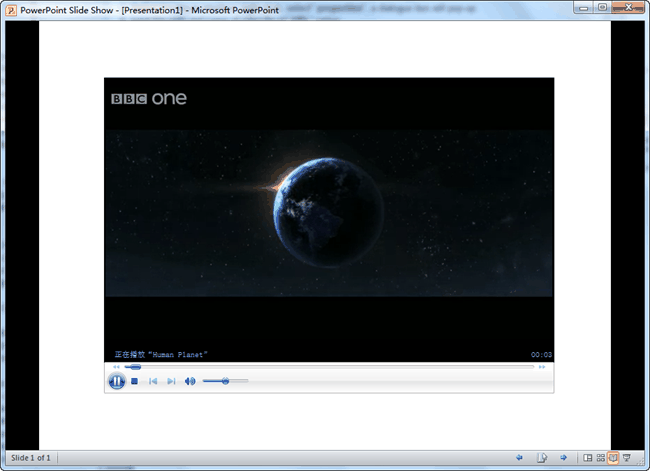
Then you can view the video in PowerPoint using Windows Media Player with all its control options.
займ на карту rusbankinfo.ru
-
How to Make a Photo Album using PowerPoint 2010
Posted on May 15th, 2012 No commentsYou may have taken a number of precious photos from time to time. In the past you may print it out and carefully put them in the family photo album book, but now they may be lying silently in your digital camera or one folder on your hard drive. Why not make a photo album with PowerPoint 2010, which helps you store and display these photos in a digital way?
Why choose PowerPoint? Microsoft PowerPoint should be installed on most of the computers, so you don’t need to find and buy other software to make a photo album. Besides, you should be familiar with PowerPoint so you don’t need to learn how to use it. PowerPoint is consisted of several slides, which are easy to be organized for you to tell a story in the right order. Besides, you can also add dynamic effects like animation, transition, background music, video clips and more to your PowerPoint photo album.
Now let’s take a look at the steps to make a photo album in PowerPoint 2010.
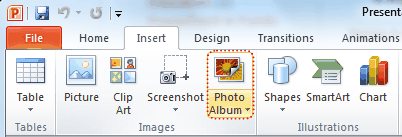
1. Open PowerPoint program, point to Insert tab, click the Photo Album button.
2. In the pop up window, click File/Disk button and choose the photos you want to include in the photo album from your hard drive. (The Photo Album function enables you to insert multiple photos to PowerPoint at a time.)
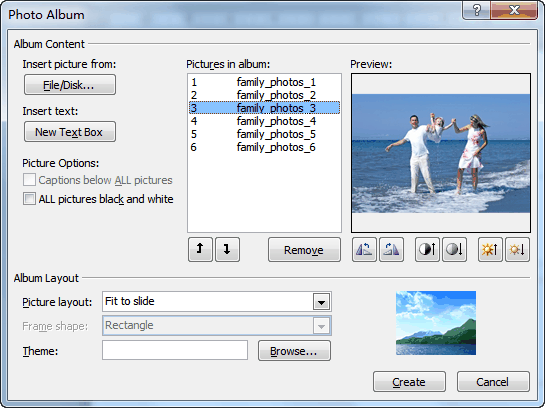
You will see the selected photos in the Picture in Album list. You can change the order by choosing a photo and clicking the Move Up or Move Down button. Below the preview of the photo, there are six buttons, which you can use to adjust the rotation, contrast and brightness of each photo.
Click Create to insert the photos.
3. The photo album can be editable, any time you want to change the photo, order or effect, you can click Edit Photo Album. On the left of the preview, you can select Captions below All pictures to add subtitle for your album.

To add title for each photo, you should click Picture layout and choose x picture with title.
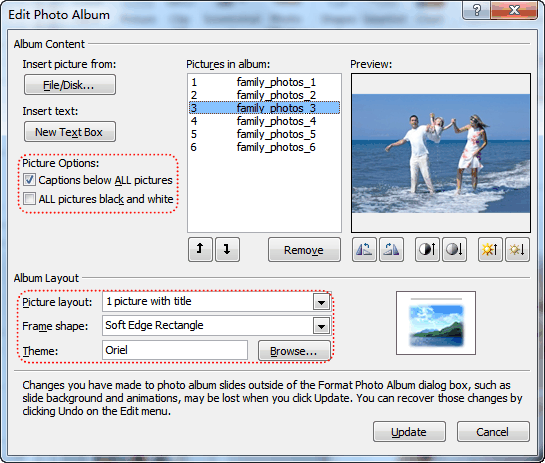
Click Update to apply the changes.
4. Apply a theme to your album
You can directly select an PowerPoint embedded theme by clicking Browse, or choose a theme from the Design tab of PowerPoint.
5. Add animation, transition, background music and video clips to the PowerPoint photo album.
Now you have finished your own photo album using PowerPoint 2010. Do you want to share your photo album with others? You can upload your self-made photo album to YouTube and let other people enjoy the happiness with you. To upload your photo album to YouTube, you should convert PowerPoint to video formats that YouTube accepts. Tool you need: Leawo PowerPoint to Video Converter.
Want to store your photo album permanently? In order to store the photo album forever and prevent from being edited, you can burn it on a DVD disc. Leawo PowerPoint to DVD Burner helps you store photo album on DVD disc for playback on TV whenever you like.
-
PowerPoint Tips – Grow/Shrink Animation to Photo
Posted on April 27th, 2012 No commentsIn this article we are going to tell you about the Grow/Shrink animation in PowerPoint 2010. Maybe you haven’t used it before, never mind, this is the right place for you to learn how. Grow/Shrink is one of the animations that original come along with PowerPoint 2010. Just like its animation brothers, it can be added to text or picture. But I think it would more useful adding to picture.
Assume that you’re making a Photo slideshow and PowerPoint is really an easy and powerful tool for you. Now, click “Insert” → and choose “Photo Album” to import all your photos into PowerPoint at one time. Each slide will have one photo on it.

Now you need to add some animations to these photos to make them alive. We have already used animations like “Fly In”, “Float In”, “Zoom” or “Bounce” too often, let’s try Grow/Shrink today!
Step 1: Select one photo and click “Animations” → “Add Animation” to add an animation to the picture. For PowerPoint 2007, this is a little different. You should click “Animations” → “Customize Animation” → “Add Effect” to add an animation.

Step 2: In the drop-down list, you will see many animations you can add to the photo and the “Grow/Shrink” animation is the one we need.

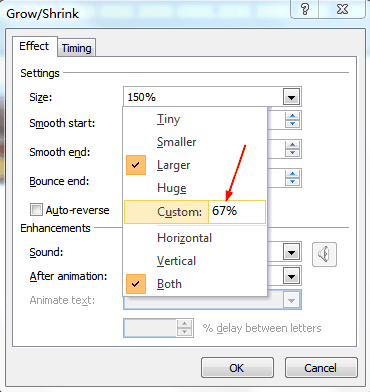
Step 3: Now click the mouse and the photo will expand to 150% larger by default (you can change the size too, you will see it later). The problem is that once clicked, the photo will remain the 150% size, and we need to shrink the photo back to normal. Insert the “Grow/Shrink” animation again. And click the “Animation Pane” to adjust the second animation.

Step 4: The “Animation Pane” section will appear on the right of the slide section. Right click on the animation 2 and click “Effect Options”.
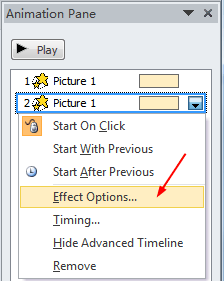
Step 5: In the pop up window, you will see the default size is “150%” (you can change the Grow size here), to click the mouse again and shrink the photo back to normal size, you should set the size as “67%” (100/150) and press “Enter”.
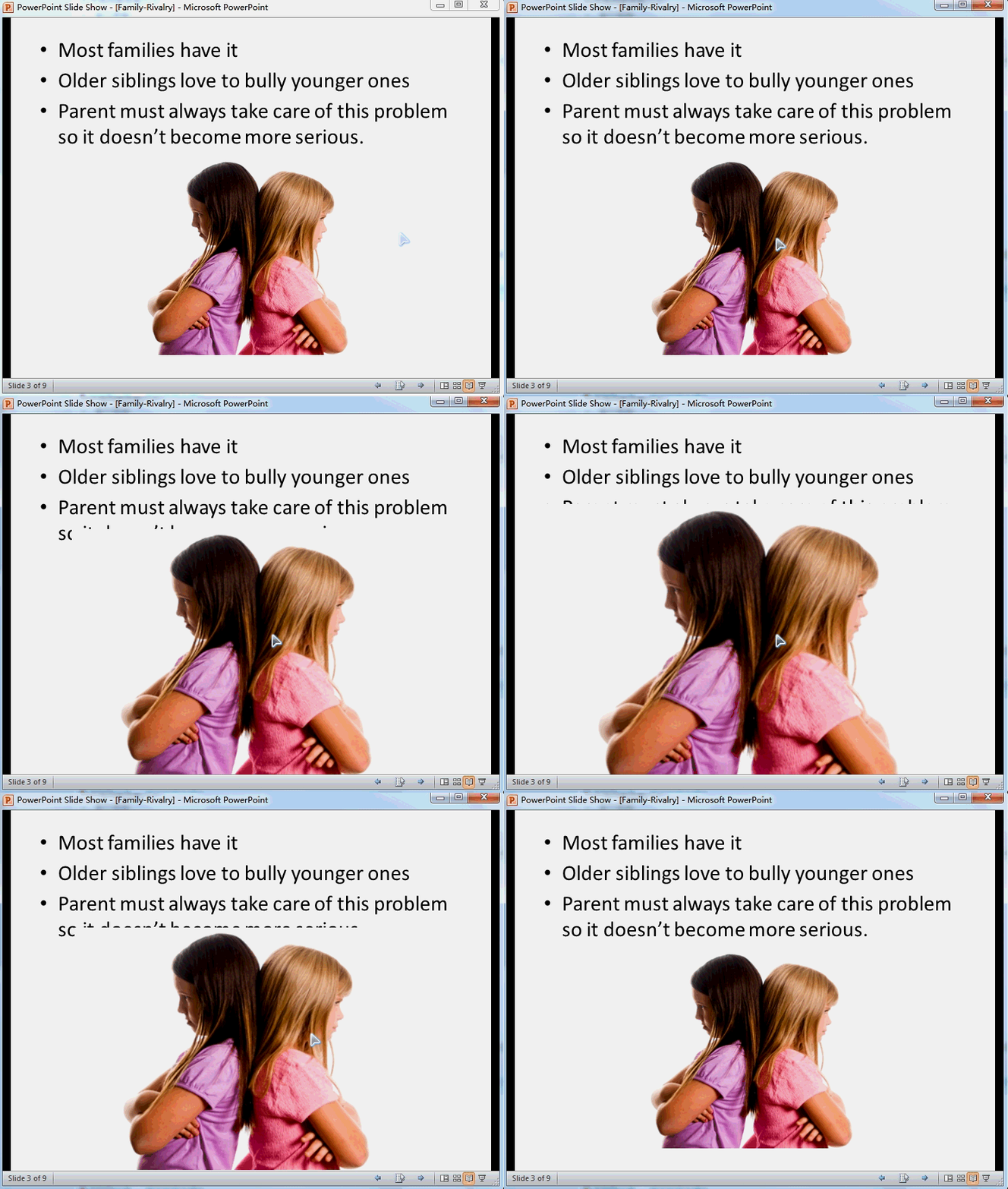
Try it! Click on the photo once and it will grow to 150% larger, click again and it will shrink back to normal, like:
займ на карту rusbankinfo.ru




Recent Comments