"How can I get my own videos on .wmv format (windows movie maker) onto my iPod? Is there a useful software program to convert wmv to iPod?" Leawo Video Converter — also can be functioned as an iPod Converter is a powerful video to iPod converter which can convert video to iPod in several clicks, including converting Windows Media WMV videos to iPod compatible MP4 format file! It supports to convert videos of any format to MP4 video for playback video on iPod. Download Leawo WMV to iPod Converter first!
Full Guide

Add Video Files
Drag and drop your WMVs into the program. Double click the file name to have a preview.
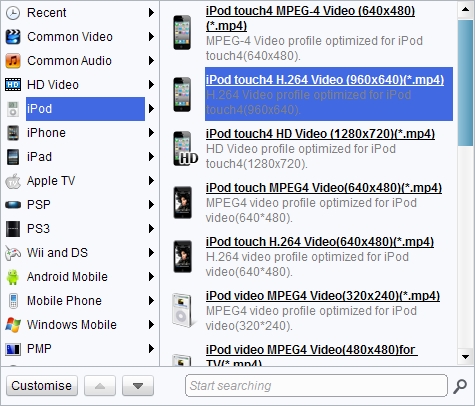
Choose Format for Output
Choose "iPod MPEG-4(320X240)(*.mp4)" in "Profile".

Edit Video
The step is only for video customization and selective, if you don't need, you may ignore them. Click "Edit" icon and add special features to the video.
- Under "Trim", set the "Start Time" and "End Time" points for a video length.
- In the droplist of "Letter Box", select a "Crop" style, or adjust the offset values for a precise cropping.
- Under "Effect", drag the slides of "Brightness" and "Contrast" for a better visual effect. Drag "Volume" slide to adjust the volume.
- The Watermark part offers functions to give image watermark or text watermark on the video.

Start to Convert WMV to iPod
Now you can click “Convert” button to start video conversion. Fast conversion speed! Then, you may get a smaller video to save size, and a proper dimension for your iPod screen.
Extended Knowledge

iPod is a portable device for storing and playing audio files encoded by MP3 or AAC compression algorithms. Designed by Apple Computer, iPods have distinctive styling and can hold anywhere from a few hundred to ten thousand songs. Popular iPod features include a calendar, address book, to-do list, alarm clock with sleep timer, games and text reader. Currently, iPod support MP4 video file in many different resolutions and sizes.
