With cell phone's video playback capability, we can carry movies with us and enjoy it wherever we go. However, if the movie is in the format of MPG, you should transform it to 3GP video with a good MPG to 3GP converter first. This guide acts as a quick tutorial on how to convert MPG to 3GP with Leawo MPG to 3GP Video Converter. You will find it is more than enough for a MPG to 3GP video conversion.
Leawo Video Converter — MPG to 3GP Video Converter is an expert tool for videos to 3GP video conversions. It provides sufficient output profiles on both 3GP and 3G2 formats. There are also 3GP profiles especially optimized for BlackBerry cell phones.
Leawo MPG to 3GP Video Converter is a friendly and efficient program. You can download the free trial version on its product page. The installation is easy and smooth. As the setup program has a optional universal codec pack with it, you don't have to install codec separately thereafter.
Full Guide

Open the program and add files for conversion
The convenient feature of drag and drop on the home interface allows you to import files by straightly move them in Leawo MPG to 3GP Video Converter and rearrange the import list order very easily.
The basic information of the video file is displayed on the standby list of Leawo MPG to 3GP Video Converter. If you want the detail information, just right click the video file and select "Property". You can rename the output file by simply click on the names in the destination column. Double click on the file title will start to play the video like most media players do.
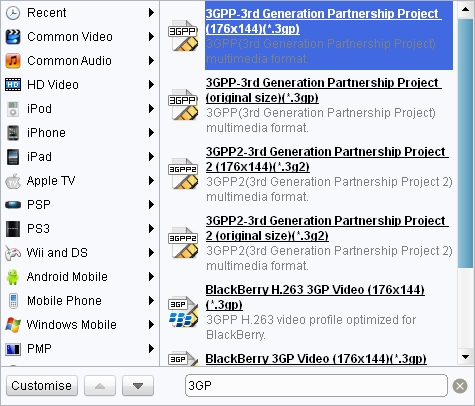
Select an appropriate profile
There are generally two different types of formats, *.3GP profiles for GSM-based cell phone and *.3G2 profiles for CDMA-based cell phones. If you are not sure of your cell phone's mode, please refer to your user manual or retailer.
Apart from the default resolution of 176*144, you can have many options in the codec setting panel. Therefore, you will always have an output video that can perfectly match your cell phone's screen.
Note that the most important are the quality settings for both video and audio codec. There are representative shortcuts on Leawo MPG to 3GP Video Converter's home interface named profile quality and audio quality. Choose the high level and you will have the best visual effect but the largest file compared to the medium and low levels.

Edit video features
It is also an easy and interesting experience to have your videos edit before conversion. Leawo MPG to 3GP Video Converter provides handy features on video edit, qualified to fulfill a slight modification to your videos.
- If you would like to make a segment from the original video, use Trim feature to cut it sharply with a high precision of millisecond.
- The Crop feature should eliminate any of the black margins of your videos. You can either adjust the frame on the preview window or give exact dimensions for a straight and accurate result.
- Under the Effect feature, you have a full range adjustment of the brightness, contrast and the audio volume of the video. You can see the changes on the preview window as you move the sliders.
- The Watermark feature allows for applying an image or a text above the video layer.

Convert MPG to 3GP
Navigate to "Options-Preferences" to increase the number of Max Process of Leawo MPG to 3GP Video Converter. This will get your CPU focus more cycles on the video conversion so that it can convert 1.5 to 2 times faster. Then click "Convert" to start the conversion.
Leawo MPG to 3GP Video Converter is also good at looking after itself and your system. Once the process starts, you can leave it alone until the end of the conversion and it will open the output folder or shut down computer according to given instructions.
Extended Knowledge
MPG video file is a variant of the MPEG (Moving Picture Experts Group) video and audio compression format, optimized for broadcast quality video. MPG videos have the file extension .mpg. MPEG stands for Moving Picture Experts Group (MPEG-1, MPEG-2, MPEG-4), one of the compression formats, is in charge of the development of standards for coded representation of digital audio and video, supported by DVD, VCD, Epson for entertainment. There are several audio/video formats which bear this group's name, such as compression formats: MPEG-1, MPEG-2 and MPEG-4.
3GP is the mpeg4 based video format used in mobile terminals, like cell phones.3GP is a multimedia container format defined by the Third Generation Partnership Project (3GPP) for use on 3G mobile phones but can also be played on some 2G and 4G phones.
