It is not a tough piece on how to convert MPEG to WMV videos with Leawo MPEG to WMV Video Video Converter. This MPEG to WMV Converter can convert MPEG to WMV easy and fast. It has also provided more extensive features like video editing and multiple tasking to increase flexibility and efficiency.
To begin with, download Leawo Video Converter. It is a clean and safe program, with smooth installation and easy cleanup. It has an excellent compatibility with NT/2000/XP/Vista/Win7.
If you are new to Leawo MPEG to WMV Video Converter, it doesn't matter because you will soon get yourself comfortably familiarized by the quick startup guide on the home interface. It also reflects the simple using style of this program, which will now be explained further in this guide.
Full Guide

Load the MPEG videos
Leawo MPEG to WMV Video Converter offers you a good efficient way to import video files, i.e. by dragging them in directly.You can click the Destination File to rename output videos. You can also double click the file name to get a preview or change the list order.
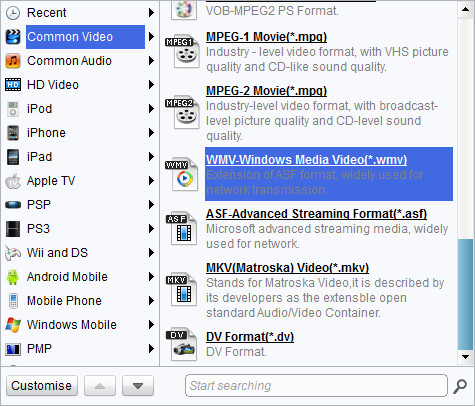
Choose output video format
Leawo MPEG to WMV Video Video Converter has a lot of output profiles for you to choose from. WMV profiles can be spotted in the Common Video catalogue or where else it makes sense. You can easily set the quality level of output under the profile box, or you can adjust advanced codec settings through Settings button. Any changes to the default profiles can be saved as a new profile. You can apply different settings to different files on the list. If you would like all the files to use the same settings, just click the "Apply to all" button.

Add features to the output videos
Leawo MPEG to WMV Video Video Converter offer very handy video edit features for slight customizations: Trim, Crop, Effect and Watermark. Click on the edit icon to gain access to the video edit panel.

Start conversion
There are some helpful advices that you may wish to use in this MPEG to WMV Video Video Converter. You can instruct Leawo MPEG to WMV Video Video Converter to either "Open the output folder" or "Shut down computer" automatically after the video conversion.
To wrap up, it is a next to zero difficulty in learning how to convert MPEG to WMV with Leawo MPEG to WMV Video Video Converter. Moreover, it is a powerful video converter which can handle almost all video formats to date, with a much acceptable investment of only $29.95 now! Leawo MPEG to WMV Video Converterwill also entitle you to value-added services such as first priority service. If you are Mac user, Mac Video Converter is an equivalent choice.
Extended Knowledge
MPEG stands for the Motion Picture Experts Group, part of the International Organization for Standardization (ISO) and International Electrotechnical Commission (IEC), charged with creating and publishing standards for various areas of technology, respectively. MPEG standards address audio and video formats used online, in television broadcasts, and in DVD media.
WMV (short for Windows Media Video) is a video compression format for several proprietary codecs developed by Microsoft. The original video format, known as WMV, was originally designed for Internet streaming applications, as a competitor to RealVideo. The other formats, such as WMV Screen and WMV Image, cater for specialized content. Through standardization from the Society of Motion Picture and Television Engineers (SMPTE), WMV 9 has gained adoption for physical-delivery formats such as HD DVD and Blu-ray Disc.
