This guide will show you how to convert MPEG to VOB videos with Leawo MPEG to VOB Video Converter and take advantages of the features of this exclusive MPEG to VOB converter. When you go through this article, you would find it is actually not difficult at all but quite entertaining to convert your MPEG to VOB formats without a hitch.
Leawo Video Converter is a well-designed program, clean and free of malwares, so feel free to download it.
Full Guide

Open the program and import the MPEG video files
Launch Leawo FLV Converter and click "Add Video" icon to input FLV files.
- You can directly drag the files in the standby list.
- You can change the order of files using the buttons below or straight move.
- You can double click on the file name to get a video preview.
- You can take a snap during the preview.
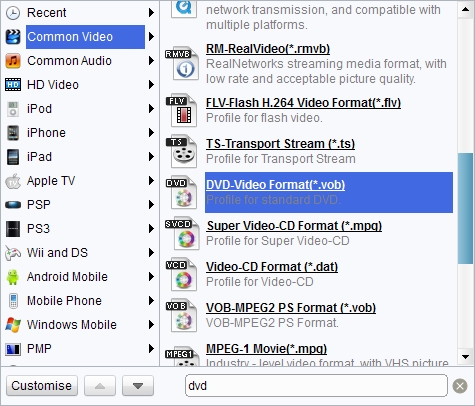
set a proper profile and change the settings
Leawo MPEG to VOB Video Converter has neatly optimized profiles for VOB outputs that are playable on DVD player or Super Video CD player.
- You can assign different profiles to different files on the list, or have them share a single profile via the button next to the profile box.
- Profile Quality and Audio Quality influence heavily on output quality. To get the best output quality, you simply need to raise both levels to high. Furthermore, you can access advanced codec settings via Settings button.

Edit the video as an entertaining
Leawo MPEG to VOB Video Converter provides several video editing features on the Customization panel. There is a preview box which you would take advantages of while making modifications to the video.

Convert MPEG to VOB
Now, you can kick off the MPEG to VOB video conversion process with expectation of smooth and quality output. Just click on the big Start button.
- You can activate more processes to push the conversion faster.
- You can set actions for Leawo MPEG to VOB Video Converter to open the output folder and shut down computer.
Extended Knowledge
MPEG stands for the Motion Picture Experts Group, part of the International Organization for Standardization (ISO) and International Electrotechnical Commission (IEC), charged with creating and publishing standards for various areas of technology, respectively. MPEG standards address audio and video formats used online, in television broadcasts, and in DVD media.
VOB (Video Object) is a container format in DVD-Video media. VOB can contain video, audio, subtitle, menu and navigation contents multiplexed together into a stream form. VOB is based on the MPEG program stream format, but with additional limitations and specifications in the private streams. The MPEG program stream has provisions for non-standard data (as used in VOB files) in the form of so-called private streams. VOB files are a very strict subset of the MPEG program stream standard. While all VOB files are MPEG program streams, not all MPEG program streams comply with the definition for a VOB file.
