MKV and WMV are two video formats which are used in different areas. MKV bears the duty to promote HD videos because of its advanced architecture in compression rate and compatibility. WMV, namely Windows Media Video, is the primary video format supported across all Windows systems and devices. As a latecomer, MKV often seeks for ways to turn into WMV or other video formats to get higher compatibility. To diminish the difficulty in the format transformation, Leawo Video Converter comes up with an easy and fast solution. Today this guide is to shoot all the troubles you may come across during the MKV to WMV video conversion.
Full Guide

Add video files to the program
You can simply drag in the MKV files and arrange them in Leawo MKV to WMV Converter, where you can change the processing order, rename the file for output and preview the video after import.
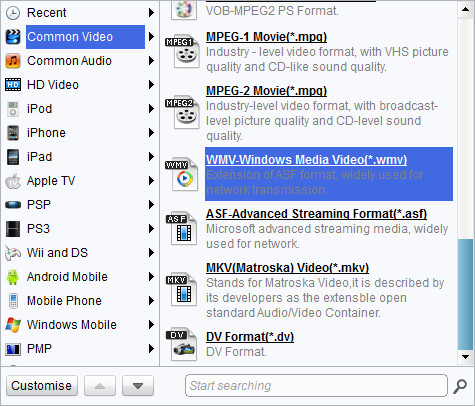
Pick a WMV profile for MKV to WMV conversio.
If you don't go the same way with the default settings, you can access the codec setting panel via "Settings" button. There will be a full list of codec parameters for you to adjust. Making and saving the changes to your own profiles is allowed by the program for your convenience.

Add video editing features
Leawo MKV to WMV Converter can also serve you well in some video editing. The customize panel provides several useful functions: Trim, Crop, Effect and Watermark.
- The Trim customization focuses on assigning new video length.
- The Effect customization focuses on changing and improving audiovisual effect of the video.
- The Crop customization focuses on defining new video screen size.
- The Watermark customization focuses on applying image or text as watermark.

Click the start button to begin the conversion
Leawo MKV to WMV Converter does its duty to secure a smooth process by showing you the estimate time and file size. If the process takes long on the list, you may want to use after-done actions which can instruct the program to open the output folder or shut down computer after the conversion is done.
Extended Knowledge
MKV is the filename extension for Matroska Multimedia Container, an open-standard free container format. A Matroska file can hold a number of audio, video and subtitle streams, besides attachments like graphics and decoder filters all at the same time, thus allowing a complete movie to be stored in a single file.
WMV (short for Windows Media Video) is a video compression format for several proprietary codecs developed by Microsoft. The original video format, known as WMV, was originally designed for Internet streaming applications, as a competitor to RealVideo. The other formats, such as WMV Screen and WMV Image, cater for specialized content. Through standardization from the Society of Motion Picture and Television Engineers (SMPTE), WMV 9 has gained adoption for physical-delivery formats such as HD DVD and Blu-ray Disc.
