PSP is a very popular handheld game player among people. It has an ability to render game frames as well as video frames. It supports MP4 videos rather than MKV, which is a preferred container format for HD videos. To get MKV HD videos to play on your PSP, Leawo Video Converter, which acts like a professional MKV to PSP Converter, holds an offer for a complete solution for you to convert video to PSP so as to let you freely watch video on PSP without limitation. This MKV to PSP converter is an all-in-one best video converter for downloading to convert videos among popular formats for various portable devices. For Mac users, Leawo Mac Video Converter provides the best solution for you to convert video to PSP on Mac, just like an expert MKV to PSP converter for Mac. With Leawo MKV to PSP converter, you can also freely edit video and convert 2D video to 3D video for unlimited 3D movie enjoyment.
Full Guide

Import source MKV video files
Open Leawo MKV to PSP Converter and import MKV files to PSP converter for converting. You may conveniently drag and drop files from the file folders.

Choose output profile for PSP
Leawo MKV to PSP Converter provides various profiles with different resolution and different encoding measures for you to choose from. You can choose output profile from Common group or directly from PSP group for your PSP.

Edit MKV video for PSP (optional)
Besides the necessary codec settings, Leawo MKV to PSP Converter has extra options for video customization for those who would like a better or unique visual effect upon conversion output. The video customization is in 5 subs: Effect, Trim, Crop, Logo and Text.

Convert MKV to PSP video
Click the convert button to convert MKV to PSP video within Leawo MKV to PSP Converter. After you convert MKV to PSP video, you can freely transfer MKV to PSP and watch MKV on PSP without limitation.
If you want to rip Blu-ray/DVD to PSP video, please use Leawo Blu-ray Ripper .
Extended Knowledge
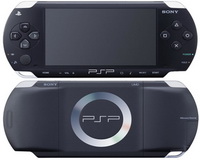
The PlayStation Portable is a handheld game console manufactured and marketed by Sony Corporation Development of the console was announced during E3 2003, and it was unveiled on May 11, 2004, at a Sony press conference before E3 2004. The system was released in Japan on December 12, 2004, in North America on March 24, 2005, and in the PAL region on September 1, 2005. The PlayStation Portable is the first and only handheld video game console to use an optical disc format, Universal Media Disc (UMD), as its primary storage medium. Other distinguishing features of the console include its large viewing screen, robust multi-media capabilities, and connectivity with the PlayStation 2, PlayStation 3, other PSPs, and the Internet.
