The prosperity of HD videos is asking for new video container format, and this is the reason why MKV has been invented. HD videos often place high requirements on system. If your computer does not meet up with the requirements or you don't have a large screen monitor, playing MKV videos would not exceed the experience with MPEG ones. To convert MKV to MPEG videos, Leawo Video Converter, the best MKV to MPEG Converter is a cutting-edge solution, which suits your needs with all handy and powerful features. Now this guide will introduce how the program converts MKV to MPEG videos.
The program supports Windows NT/2000/XP/Vista/Win7. At the end of the installation, you will be asked if K-lite codec pack should be installed as well. Since the enhancement it will bring to the program's performance, we recommend that you install it as well.
Full Guide

Bring the MKV files to the process list
Here is a tip on an easy way to import your MKV files. You can firstly browse the files in separate file browser windows. Then you can select and draw them directly into the program interface. Thereafter, you can change the processing order; give a new file name for the output and preview the video.
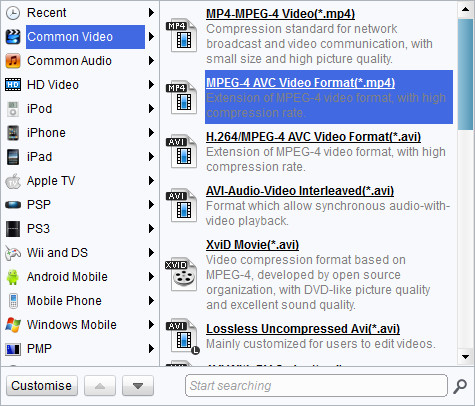
Pick a preconfigured profile
Leawo MKV to MPEG Converter has an advanced codec setting panel where you can deal with detailed parameters and save to your own profiles.

Add video editing features.
You can utilize the customization features in Leawo MKV to MPEG Converter to get the better result in audiovisual effects. The features are in 4 parts: Effect, Trim, Crop, and Watermark.
- The Trim customization focuses on assigning new video length.
- The Effect customization focuses on changing and improving audiovisual effect of the video.
- The Crop customization focuses on defining new video screen size.
- The Watermark customization focuses on applying image or text as watermark.

Start the conversion now in an easy and fast way.
Leawo MKV to MPEG Converter takes advantage of multiprocessing, which can boost conversion speed while working on a multi-core system. Efficiency can rise by batch conversion as well as the after-done actions.
Normally, Leawo MKV to MPEG Converter sports a fast and smooth conversion among similar softwares. Now if you want to know the conversion better or to practice, feel free to visit Leawo's knowledge base and download Leawo Free MKV to MPEG Converter for unlimited time evaluation!
Extended Knowledge
MKV is the filename extension for Matroska Multimedia Container, an open-standard free container format. A Matroska file can hold a number of audio, video and subtitle streams, besides attachments like graphics and decoder filters all at the same time, thus allowing a complete movie to be stored in a single file.
MPEG stands for the Motion Picture Experts Group, part of the International Organization for Standardization (ISO) and International Electrotechnical Commission (IEC), charged with creating and publishing standards for various areas of technology, respectively. MPEG standards address audio and video formats used online, in television broadcasts, and in DVD media.
