DPG is a dedicated video container format which enables you to play videos on Nintendo DSL player. All kinds of videos can be converted to DPG, including MKV. First of all, you need a powerful tool to ensure the video converted can be smoothly played on NDSL player. This guide will tell you how to convert MKV to DPG format with Leawo Video Converter — the best MKV to DPG Converter in only 4 steps.
Be sure to install it on Windows NT/2000/XP/Vista/Win7. At the end of the installation, there will be an option to install an additional K-lite codec pack. Because the codec pack is for a better and stabler performance of the program, we recommend you install it as well.
Full Guide

Load MKV files for conversion
Drag and drop import manner is supported. After import, the files on the list can be previewed in the combined player window or rearranged to a new order.
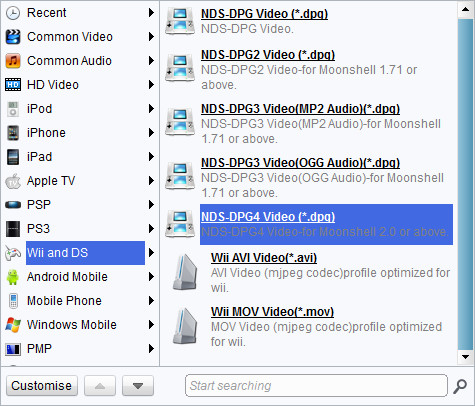
Choose output format for DPG conversion
Select the one that matches your player best. If you feel the default profile is not good enough, you can open the codec setting panel via "Settings" button to suit your demands. You can save the changes for your own use as well.

Edit video with customized features
Apart from the essential functions, Leawo MKV to DPG Converter also offer solutions for the users who would like to have their video customized before downloaded to their NDSL. The customization provided is in 4 parts: Effect, Trim, Crop, Logo and Text watermark.
- The Trim customization focuses on assigning new video length.
- The Effect customization focuses on changing and improving audiovisual effect of the video.
- The Crop customization focuses on defining new video screen size.
- The Watermark customization focuses on applying image or text as watermark.

Start the conversion process
After you have got everything ready and go for the start of conversion. Leawo MKV to 3GP Converter is fast in processing speed, yet it offers estimate time, file size and after-done actions in case there is a long dull task pulling you from things around. Once the conversion is done, you can check the 3GP files in the specific output folder either opened automatically through after-done command or manually via the button next to the folder path.
Leawo MKV to DPG Converter sports a high efficiency in multiple tasks by supporting multiprocessing. Good video quality and fast conversion speed are secured. Want to do it yourself? Come on and download Leawo MKV to DPG Converter to have a try!
Extended Knowledge
MKV is the filename extension for Matroska Multimedia Container, an open-standard free container format. A Matroska file can hold a number of audio, video and subtitle streams, besides attachments like graphics and decoder filters all at the same time, thus allowing a complete movie to be stored in a single file.
DPG is a video container format used for playing movie files on the Nintendo DS portable gaming device; may be converted from other video formats to DPG using MoonShell or another converter program. It can be played on the Nintendo DS by transferring the DPG file to a DS-compatible GameBoy Advance card and also be played back on a PC using supporting player.
