How to download the web video-FLV offline to my computer?
Many video web sites offer such software programs for users to download videos from their sites. And, these download tools are free for use. You may download the tool directly with the URL they provide you. But they are exclusively used for the specific web site. You can't use them to download videos on other sites.
YouTube, unfortunately, doesn't offer the tool to download videos on its site. But there do be a lot of tools to download YouTube videos, and all of them are free! Leawo YouTube Downloader is one of these free tools for downloading web videos from YouTube easily. It also can be used to download videos from any other web site. Users may download it and have a try, as it can play the downloaded video immediately after the downloading!
Is it possible to play the FLV on my home TV set via Apple TV?
Apple TV can play a lot of videos but they must be in the format of MP4! Therefore, if you want to watch the amazing Flash video FLV with your family via Apple TV, you have to convert the Flash video to Apple TV to make the video compatible with the device, that’s so called FLV to Apple TV MP4 conversion. Now you can enjoy the FLV video on your Apple TV.
How to convert FLV to Apple TV?
There are 2 ways to convert FLV to Apple TV. You may convert the video with online web sites offering the service to convert FLV to Apple TV, such as ConvertDirect.com, you can use the conversion tool to convert FLV to Apple TV, too. Compared with online conversion, it's always better to convert FLV to Apple TV with this conversion tool, especially when you have multiple conversion tasks and want to bring them home for fun. Because there is no limit of internet speed that will cause constant conversion abortion, etc.
How to convert FLV to Apple TV with Leawo FLV Converter?
Leawo Video Converter—the best FLV Converter is an powerful FLV converter that can convert FLV to videos for various devices, like converting FLV to Apple TV. This tool is easy to use, there is no complex manipulation, but easy mouse clicks will successfully convert FLV to Apple TV for your home TV set.
Full Guide

Import videos
Launch Leawo FLV Converter and click "Add Video" icon to input FLV files.
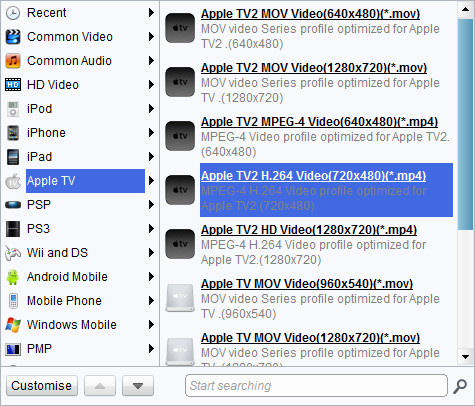
Choose output video format
Double click FLV file name to have a preview, select Apple TV MP4 as the target output format from "Profile" menu.

Add features to the output video
Click "Edit" icon to enter more settings, you can add various features to the output video through Trim, Crop, Effect and Watermark.
- Under "Trim", set the "Start Time" and "End Time" points for a video length.
- In the droplist of "Letter Box", select a "Crop" style, or adjust the offset values for a precise cropping.
- Under "Effect", drag the slides of "Brightness", "Contrast" and "Saturation" for a better visual effect. Drag "Volume" slide to adjust the volume.
- The "Watermark" part offers functions to give image watermark or text watermark on the video.

Start conversion
Click the big green button to start to convert FLV to Apple TV MP4. When the conversion completes, copy the MP4 to your Apple TV and enjoy the video with your home TV set.
Extended Knowledge
FLV, short for Flash video, is a video format played in Adobe Flash Player. If you download a video from YouTube, Google Video, Yahoo Video, DailyMotion etc, it is most likely a Flash video with the file extension .flv. With the wide availability of Adobe Flash Player in most common web browsers, Flash video has become the most popular format for online video delivery!
Apple TV is a digital media receiver made and sold by Apple, and it was first announced at a special press event in San Francisco, California on September 12, 2006, by Apple CEO Steve Jobs. It is a small form factor network appliance designed to play digital content originating from the iTunes Store, YouTube, Flickr, MobileMe or any Mac OS X or Windows computer running iTunes onto an enhanced-definition or high-definition widescreen television. Apple TV can function as either a home theater-connected iPod device or a digital media receiver, depending on the needs of the user.
