"I got my favorite video from the website, however, its format is ASF. Oh, my god! I am not familiar with this foramt. Frankly, my portable player doesn't support this format, MOV is possible, so what should I do to convert ASF to MOV in order to enjoy the video." Leawo Video Converter should be your good helper, which can convert almost all video formats from one to another, ASF to MOV included.
Undoubtedly, Leawo Video Converter is a powerful ASF to MOV video converter to convert ASF to MOV with super fast speed. Its practical functions such as cropping, trimming, editing, etc. can also keep the original quality of ASF life. I do think this software is your dream tool.
Want to enjoy your digital life now? Please download and install Leawo Video Converter first.
Okay, in this guide we will explain how to convert ASF to MOV with Leawo Video Converter which can convert video between any formats easy and fast.
Full Guide

Add video
Click add icon to add ASF video file to the program.
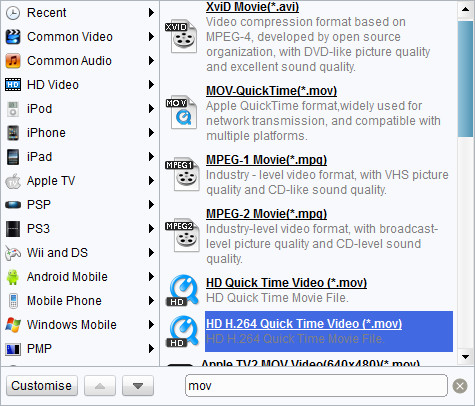
Choose output video format
Choose "Movie-Quick Time(*.mov)" in "Profile". And also, select your destination folder in “Output”.

Customize effects
Click "Edit" to open the video editing window. Then you can customize the output audio and video.

Start conversion
Click "Convert" on the bottom right to start the conversion, you'll find the conversion at super fast speed.
Extended Knowledge

ASF stands for Advanced Streaming Format. ASF is a proprietary streaming format developed by Micro soft that provides streaming media services for the Windows Media framework.
MOV video file is common multimedia format often used for saving movies and other video files, uses a proprietary compression algorithm developed by Apple Computer, compatible with both Macintosh and Windows platforms. The format specifies a multimedia container file that contains one or more tracks, each of which stores a particular type of data: audio, video, effects, or text (e.g. for subtitles).
