This guide will show you how to convert 3GP to WMV with Leawo 3GP to WMV Video Converter. It is easy to get 3GP videos from your cell phones, but when it comes to video editing in Windows Movie Maker or Windows Mobile phones, it is WMV videos that can fit in the place. Leawo 3GP to WMV Converter is a universal video converter that provides excellent support for 3GP to WMV conversion. It can also satisfy you with more extensive features.
To begin with, you can free download Leawo Video Converter. It is a clean and safe program, easy to install and remove, which runs flawlessly on NT/2000/XP/Vista/Win7.
After you open the program, you can comfortably familiarize yourself with the user interface. A quick startup guide is remarkably shown. It tells how easy it is to use this program and it will now be elaborated in this guide.
Full Guide

Load the 3GP videos into the program
If you have experienced Photoshop and Media Player and such programs, it should appeal to you that file drag-drop is very convenient, especially when you have many files distributed in different folders. Now Leawo 3GP to WMV Video Converter invites you to make use of that convenience again. Directly drawing in the files is just where the efficiency lies.
You can line up the files in a new order by moving them up and down until they are in reasonable positions. As it is important not to mistake the files either by name or by order during a merge operation, you should have a check by double clicking them to play on preview.
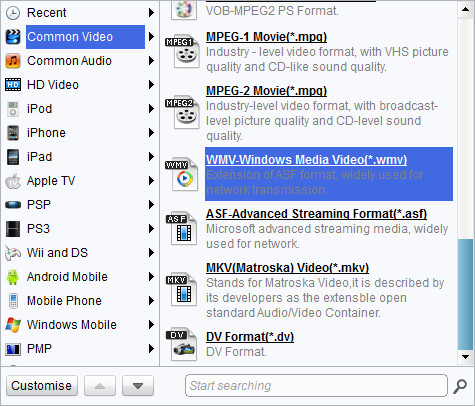
Choose Output Format
Leawo 3GP to WMV Video Converter has a full set of ready settings packed in profiles for you to choose from. You can find profiles for WMV in the catalogue of Common Videos, Windows Mobile. Along with the profile, or you can just input WMV into the profile search bar then you can see all optional WMV file formats. There are further controls on the profile performance.
- You can simply determine the quality level of output by switching the options under the profile box, or access to advanced codec settings through Settings button. If you favor your own settings more than the default ones, you may save them as a new profile.
- The settings can only effect on the very file you have selected. Therefore you can apply different settings to different files on the list. If you would like all the files share the same settings, you can make sure of that by clicking the "Apply to all" button.

Edit Video Features
If you have additional desires to give the video a fresh look, you may want to edit them before conversion. Leawo 3GP to WMV Video Converter happens to offer the handiest features for you to do that without difficulties. Access the customization control panel by clicking on the Edit icon. Remember the effect will only be given to the file you select.

Convert 3GP to MPEG
There are some things you can do to make a smooth and reliable conversion for you.
The CUP multi-core control ensures your holy control of your computer while CUDA accelerating ability increases converting speed and shortens conversion time so as to save your time. What you need is to do some settings in "Tools-Options" panel.
Having gone through this step by step guide, you may have already known how to fully utilize this program to do video conversion by now. To add to its practical value, Leawo 3GP to WMV Video Converter is a powerful video converter which can interchange video formats between almost every video format as well as audio format, while the investment is at a well-acceptable level. Additional value-added services include first priority service. If you are Mac user, Mac Video Video Converter is an equivalent choice.
Extended Knowledge

3GP is the mpeg4 based video format used in mobile terminals, like cell phones.3GP is a multimedia container format defined by the Third Generation Partnership Project (3GPP) for use on 3G mobile phones but can also be played on some 2G and 4G phones.
WMV (short for Windows Media Video) is a video compression format for several proprietary codecs developed by Microsoft. The original video format, known as WMV, was originally designed for Internet streaming applications, as a competitor to RealVideo. The other formats, such as WMV Screen and WMV Image, cater for specialized content. Through standardization from the Society of Motion Picture and Television Engineers (SMPTE), WMV 9 has gained adoption for physical-delivery formats such as HD DVD and Blu-ray Disc.
