The video captured by your cell phone will most often be in 3GP format. Unfortunately, many PC softwares don't provide support for 3GP videos, so that you need to convert 3GP to MPEG format before the software can use them properly. Leawo 3GP to MPEG Video Converter is just what you need to deal with the 3GP to MPEG process and present you with satisfactory results. It is a successful 3GP to MPEG converter that is fast in producing quality MPEG videos. Moreover, it is capable of editing videos before conversion.
Leawo Video Converter is a friendly program, clear to install and easy to use. Feel free to have an evaluation.
Full Guide

Add Video Files
You can simply drag the video files in the program, and Leawo 3GP to MPEG Video Converter will smartly detect the file information. Afterwards, you can change the file order and the output names of each file. If coincidence occurs on output names, Leawo 3GP to MPEG Video Converter will automatically rename the files so that they won't overlay each other. If you would like a video preview, just double click on the file title.
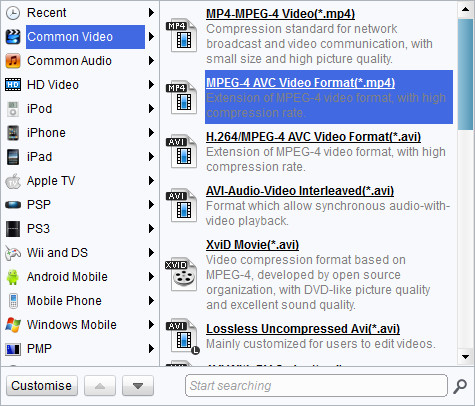
Choose Output Format
Leawo 3GP to MPEG Video Converter has more than enough profiles to make the video conversion just a piece of cake. Select MPEG-1 or MPEG-2 profile according to your situation.

Edit Video Features
There is still one thing you can do before the conversion. Why don’t you go for an interesting video editing within Leawo 3GP to MPEG Video Converter? Open the video edit panel via "Edit" icon.

Convert 3GP to MPEG
Finally, let the conversion begins smoothly after so many joyful preparations. Also, Leawo 3GP to MPEG Video Converter offers you some conveniences upon the conversion process.
- It is never too late when you want to regret on the video conversion after it begins. You can make a pause to the current process, skip any of the ongoing threads or even cancel the appointment by deselect it before it starts.
- If you want to have an eye break during the process, you can instruct Leawo 3GP to MPEG Video Converter to automatically "Open the output folder" or "Shut down computer" after conversion.
Extended Knowledge
3GP is the mpeg4 based video format used in mobile terminals, like cell phones.3GP is a multimedia container format defined by the Third Generation Partnership Project (3GPP) for use on 3G mobile phones but can also be played on some 2G and 4G phones.
MPEG stands for the Motion Picture Experts Group, part of the International Organization for Standardization (ISO) and International Electrotechnical Commission (IEC), charged with creating and publishing standards for various areas of technology, respectively. MPEG standards address audio and video formats used online, in television broadcasts, and in DVD media.
