It is a good chance that if you want to convert 3GP to MP4 videos and wish to play the 3GP videos on your other portable terminals, for example, iPod and PSP, or edit in popular video software. Whether you are going to convert or edit, Leawo Video Converter - the best 3GP to MP4 Video Converter, can do the job up to your expectations. This professional 3GP to MP4 converter can easily secure your wish to finish the task and increase your productivity.
Leawo Video Converter holds an advantage for its user-oriented style and extra powerful features.
Full Guide

Fetch files in preparation for conversion
Generally, the home interface is divided into three sections in terms of function. They are the standby list on the left, the preview window on the right and the setting control at the bottom.
You are greeted with a getting started instruction upon the start of Leawo 3GP to MP4 Video Converter.
Videos can be imported in two ways. If you feel it is kind of inconvenience to browse the files via add icon, you can find dragging them in Leawo 3GP to MP4 Video Converter directly a very good alternative.
The list will appear and grow as more files added in. It is necessary to organize the files in a new order, if the order is compulsive in converting or merging. Double click on the video title will play the video on the Leawo 3GP to MP4 Video Converter's preview window.
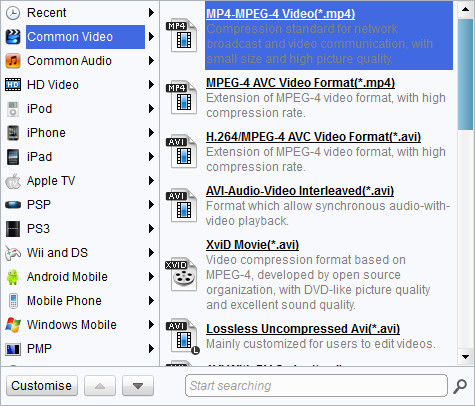
Select a MP4 profile for output
Leawo 3GP to MP4 Video Converter has a good provision of profiles regarding MP4 video output. Moreover, there are other container formats which are based on MPEG-4, such as Xvid Movie and Mov-QuickTime, and specific profiles in terms of portable devices.
The advanced settings panel extends to more settings related to video codec and audio codec. Usually the default setting can cover most common needs. In a particular case, you are safe to adjust these settings upon your knowledge or given information.

Edit video features
The Customization control panel is where you can have the videos modified to your content.
- The Trim feature can cut a segment within the original video by milliseconds.
- The Crop feature can help you get rid of the black margins.
- The Effect feature gives control on the visual and sound effect of the video.
- The Watermark feature allows for applying an image and text above the video layer.

Click the Start button to begin the conversion
During the conversion process, the current process can be paused or skipped or even cancelled. Anticipated information about the size and time of the output is displayed. You can also set Leawo 3GP to MP4 Video Converter either to open the output folder or to shut down computer after the conversion completes.
Extended Knowledge
3GP is the mpeg4 based video format used in mobile terminals, like cell phones.3GP is a multimedia container format defined by the Third Generation Partnership Project (3GPP) for use on 3G mobile phones but can also be played on some 2G and 4G phones.
MP4 is short for Moving Picture Expert Group-4. MP4 is also known as MPEG-4 AVC, or advanced video coding. This new technology is going to make video files decrease in size so that they are easier to work with and support. What used to be massive video files of motion and audio are now compressed versions of the same material, called MP4s.
