Convert MP4 to FLV is for putting videos online played in Adobe Flash Player. A lot of sharing websites will automatically convert the uploaded MP4 to FLV, like YouTube, Google Video, DailyMotion, etc. Flash video, known as FLV, is exactly a native format for Adobe Flash Player. So in order to embed MP4 video into Adobe Flash, it is a must to convert MP4 to FLV. It's not necessary to use a MP4 to FLV converter, you can just use Leawo Video to FLV Converter to get it done. Leawo Video Converter can perfectly convert videos of any kinds to FLV, including converting MP4 to FLV. Besides, you can have your video trimmed, cropped and logoed during the MP4 to FLV conversion.
Full Guide

Add MP4 video files
Launch Leawo Video to FLV Converter, click "Add Video" icon to input MP4 files.
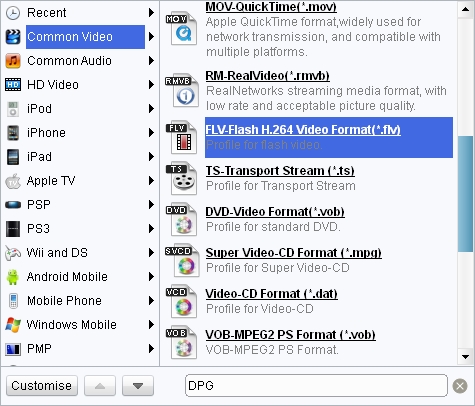
Choose output video format
Double click MP4 file name to have a preview, select FLV as the target output format from "Profile" menu, and click "Edit" icon to enter more settings.
- Trim video by changing the time points or dragging the triangles on the slide to get duration.
- Crop video by dragging the video frame or selecting from "Letter Box" for the proper dimension.
- Drag the slides to adjust video effect.
- Add an image or text as watermark.

Start MP4 to FLV conversion
Click the big green button to start the MP4 to FLV conversion.
Extended Knowledge

MP4 is short for Moving Picture Expert Group-4. First published in 1998, MPEG-4 or MP4 was designed to encompass all the features of earlier released of MPEG files, and add a few more. As a standardized group of video and perceptual coding formats, MP4 in general became a hit for average Internet users and more than 98% media players support this format! The introduction of MP4 made it possible for the audience to continue growing by providing quicker, faster, and higher quality broadcast media.
FLV is short for Flash video, is a video format played in Adobe Flash Player. If you download a video from YouTube, Google Video, Yahoo Video, DailyMotion etc, it is most likely a Flash video with the file extension .flv. With the wide availability of Adobe Flash Player in most common web browsers, Flash video has become the most popular format for online video delivery!
Related Articles
