Convert MOV to FLV is for putting videos online played in Adobe Flash Player used by most video sharing websites like YouTube, Google Video, DailyMotion, etc. Flash video, known as FLV, is exactly a native format for Adobe Flash Player. So in order to embed MOV video into Adobe Flash, it is a must to convert MOV to FLV. Leawo Video Converter - the best Video to FLV Converter can perfectly convert videos of any kinds to FLV, including converting MOV to FLV. Besides, you can have your video trimmed, cropped and logoed during the MOV to FLV conversion.
Full Guide

Add MOV video files
Launch Leawo Video Converter, click "Add Video" icon to input MOV files.
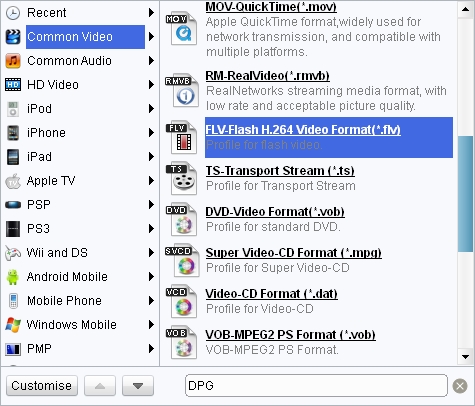
Choose output video format
Double click MOV file name to have a preview. To convert MOV to FLV, just select FLV as the target output format from "Profile" menu.

Edit output video effect.
Click "Edit" icon to enter more settings.

Click "Convert" to start the FLV to AVI conversion.
Before you start to convert MOV to FLV, you can also click on the "Edit" icon to enter more settings: trimming, cropping, effecting and watermarking.
Extended Knowledge
MOV is a container format and can contain video, animation, graphics, 3D and virtual reality (VR) content or text (for subtitles, for example). It is a file extension used by the QuickTime-wrapped files. The format was created by Apple Computer to work with multimedia files. Though MOV files are often found on the web, to play them on Windows computer one has to install an extra component or convert to other formats.
FLV, short for Flash video, is a video format played in Adobe Flash Player. If you download a video from YouTube, Google Video, Yahoo Video, DailyMotion etc, it is most likely a Flash video with the file extension .flv. With the wide availability of Adobe Flash Player in most common web browsers, flash video has become the most popular format for online video delivery!
Related Articles
