AVI to FLV conversion is convenient for putting videos on the internet, because FLV is the most popular, right-size and internet-friendly format for online video delivery with Adobe Flash Player, and 99% of Internet users have Adobe Flash Player installed in their web browsers. Convert AVI to FLV, you can put AVI content in website, blog, forum, etc; convert AVI to FLV with Leawo Video Converter—which is the best Video to FLV Converter, you may get your video improved by the function to adjust the video effect; convert AVI to FLV with this video to FLV converter, you can get the video edited by using the function to adjust video effect, trim video and crop video; convert AVI to FLV with this video to FLV converter, you may save more time than using other programs for its batch conversion.
Full Guide

Add AVI video files
Launch Leawo Video to FLV Converter, click "Add Video" icon to input AVI files.
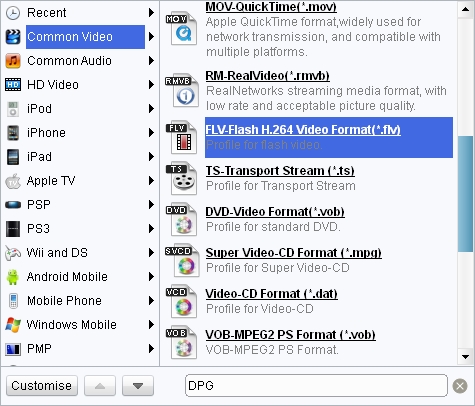
Choose output video format
Double click AVI file name to have a preview, select FLV as the target output format from "Profile" menu.

Make some edit
Click "Edit" icon to enter more settings.
- Trim video by changing the time points or dragging the triangles on the slide to get a duration.
- Crop video by dragging the video frame or selecting from "Letter Box" for the proper dimension.
- Drag the slides to adjust video effect.
- Add an image or text over the video as watermark.

Start AVI to FLV Conversion
Click the big green button to start the AVI to FLV conversion.
Extended Knowledge

AVI, short for Audio Video Interleaved, is a multimedia container format introduced by Microsoft in November 1992. As a container, AVI can contain both video and audio data in a file that allows synchronous video-with-audio playback. AVI is being widely supported on a vast range of operating systems and devices. With codecs of DivX and Xvid, the picture quality of AVI may be even better than DVD videos.
FLV, short for Flash video, is a video format played in Adobe Flash Player. If you download a video from YouTube, Google Video, Yahoo Video, DailyMotion etc, it is most likely a Flash video with the file extension .flv. With the wide availability of Adobe Flash Player in most common web browsers, Flash video has become the most popular format for online video delivery!
Related Articles
