
Leawo iAm RingerIntel
iPhone ringtone maker for Mac creates iPhone ringtone for Mac users exclusively. Leawo iAm Ringer is an all-round Mac iPhone ringtone creator that can make iPhone ringtone on Mac agilely according to your preference. This iPhone ringtone software smartly supports various ringtone sources: almost all video and audio in popular formats stored in your Mac such as AVI, MPEG, WMV, MP3, WMA, WAV,etc., besides, media sources like videos, audios and movies in your iTunes can be taken full advantage of. With flexible and handy operating process, it offers you with individualized iPhone ringtone of sorts.
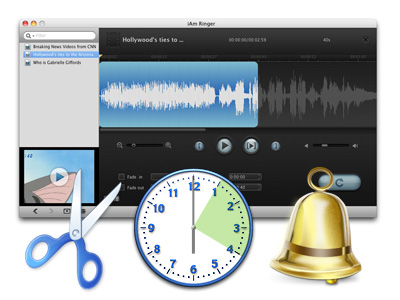
As a practical Mac ringtone maker for iPhone, Leawo iAm Ringer is equipped with many useful features like Timeline Zoom In & Timeline Zoom Out modulation, Fade in & Fade out effect adjustment and Start Time & End Time setting, etc. You can create any iPhone ringtone with high quality out of any resources including audio, video and movie by using this Mac iPhone ringtone maker.
- Key Features
- References
- System Requirements
- Screenshots
- New Features
Create iPhone Ringtone out of any media sources
This versatile ringtone creator for iPhone allows you to get iPhone ringtones out of any media sources: videos and audios in various formats such as AVI, MPEG, WMV, MP3, WMA, WAV, etc., splendid music, movies, TV shows and other on your iTunes.
Fade in & Fade out effect attached to enhance output ringtone harmony
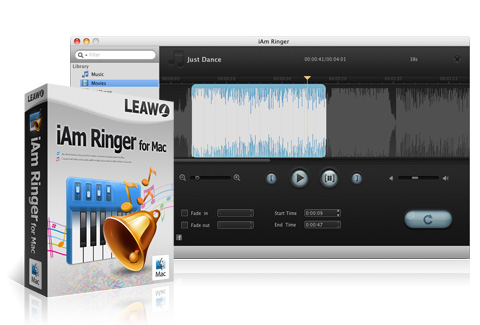
This iPhone ringtone creator Mac offers you with powerful editing effects. You can set Fade in & Fade out effect to make more harmonious iPhone ringtones and set the maximum volume of the output with this smart iPhone ringtone creating tool.
Powerful functions equipped to ensure exact iPhone ringtones trim
The Timeline Zoom In & Timeline Zoom Out function will either let you trim ringtone more precisely or let you have a full view of the target file. If it is a video, video preview is allowable in this iPhone ringtone maker.
Conveniently and smartly import ringtone sources to ringtone creator for Mac
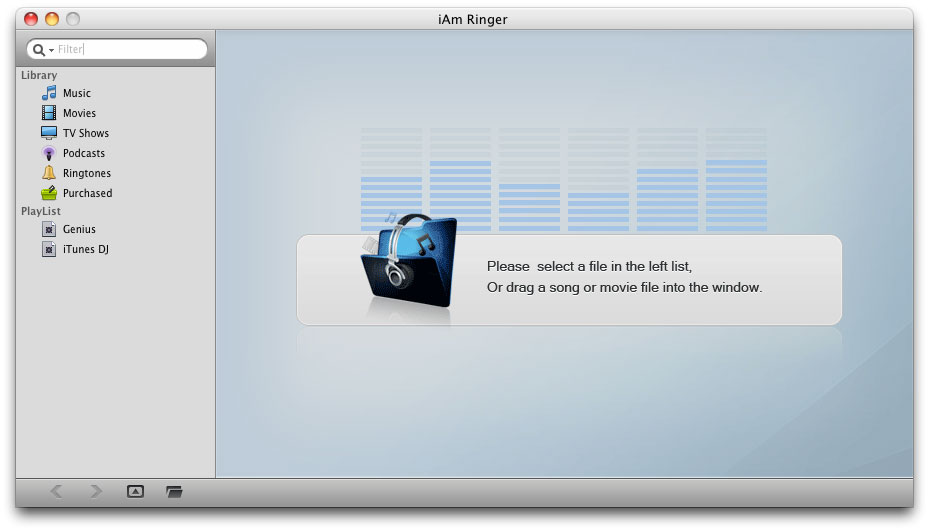
With this iPhone ringtone converter, you are capable of importing media resources through iTunes Library, dragging videos, audios and movies from your Mac or searching other ringtone sources in your folders.
iPhone ringtone maker precisely sets ringtone start time and end time
This iPhone ringtone maker really can be remarked as the best iPhone ringtone creator for Mac that can make ringtone with multifarious shinning features. In order to get exactly what you required, you can set ringtone start time and end time to an inch.
User-oriented Mac Ringtone Creator creates ringtones for different uses
By using Leawo iAm Ringer, you can create iPhone ringtone in any way you choose without restriction. It can create different types of ringtone for you and with which you are able to set specific ringtones for different people.
Output iPhone ringtone is synchronized to iTunes
iTunes will be opened automatically after creation since the output iPhone ringtone is synchronized to iTunes Library. You can find the output ringtone immediately without exertion.
Easy-to-use Leawo iAm Ringer makes iPhone ringtone with fast speed and excellent quality
The whole iPhone ringtone creation can be completed within only a few clicks without any technical hassles and the output enjoys excellent quality which enables you to make your own ringtone for iPhone flawlessly.
Output Device Support |
|
iPhone, iPhone 3G, iPhone 3GS, iPhone 4. |
|
Input File Format |
|
Video |
WMV, ASF, AVI, RMVB, FLV, RM, MOV, QT, MP4, M4V, DV, 3GP, 3G2, DAT, MPG, MPEG, VOB, FLV, MKV, MTS, M2TS, F4V |
Audio |
AAC, AC3, AIFF, AMR, M4A, MP2, MP3, OGG, RA, AU, WAV, WMA, MKA, FLAC |
Output Audio Format Support |
|
M4R |
|
Basic requirements for conversion:
◆ Intel-based Mac, Mac OS X 10.5 Leopard or 10.6 Snow Leopard or later
Other requirements for the better playing of the output files:
◆ 128MB Memory (512MB recommended)
◆ 512MB hard disc space or above
◆ Mac compatible Monitor (800*600 or above resolution)
◆ Mac compatible mouse and keyboard
What's New in Version 1.3.0:
1. Added multilingual setting, include German, Japanese, Spanish, Portuguese, Dutch and French.
2. Added list sorting function.
3. Added bug report function.
4. Modified interface style details.
Leawo AVCHD Converter is developed to meet the specific demands of people who want to convert MTS, M2TS, MOD, M2T, TS, TP, TRP, etc. to video in any formats with perfectly effects.
Learn More Download
Do not convert std and hd video among all formats, this Blu ray Ripper is designed to rip std DVD and blu-ray to video/audio in all pop formats with the high speed and quality.
Learn More Download
Products
- MorePackage Solutions
- Total Media Converter Ultimate
- Video Converter Ultimate/Pro
- Blu-ray Video Converter
- Easy iPad Converter Suite
- Easy iPhone Converter Suite
- Easy iPod Converter Suite
- MoreVideo/HD Video Tools
- All-in-One Video Converter
- HD Video Converter
- Free AVI Converter
- Free MP4 Converter
- Free FLV Converter
- Free YouTube Downloader
- Video to DVD Creator
- Blu-ray Creator
- iTransfer
- Video Editor
- More DVD/Blu-ray Tools
- Blu-ray Ripper
- Blu-ray Copy
- Blu-ray to MKV Converter
- DVD Ripper
- DVD Copy
- DVD to AVI Converter
- DVD to MP4 Converter
- Utilities
-
WinMac
- SWF Encrypt
- Data Recovery for Mac
- Photo Recovery for Mac
- SWF Compressor for Mac
- MoreMac Converters
- Video Converter Pro for Mac
- Mac HD Video Converter
- Video Converter for Mac
- Blu-ray Ripper for Mac
- DVD Ripper for Mac
- DVD Creator for Mac
- YouTube Downloader for Mac
- iAm Ringer for Mac
- Mac Video to MP4 Converter
- Mac DVD to MP4 Converter
- MorePortable Device Tools
-
WinMac
- iPad Video Converter for Win
- DVD to iPad Converter for Win
- Free iPod Video Converter for Win
- DVD to iPod Converter for Win
- Free iPhone Video Converter for Win
- DVD to iPhone Converter for Win
- Mac Video to iPad Converter
- Mac DVD to iPad Converter
- Mac Video to iPod Converter
- Mac DVD to iPod Converter
- Mac Video to iPhone Converter
- Mac DVD to iPhone Converterc
- MorePowerPoint Converters
- PowerPoint to DVD Pro
- PowerPoint to DVD Std
- PowerPoint to Video (Free/Pro)
- PowerPoint to FLV
- PowerPoint to iPad
- PowerPoint to YouTube