


Summary:
HD DVD vs Blu-ray, and what’s the best choice? This article makes a detailed comparison of these two formats to show the key difference between HD DVD and Blu-ray, and helps you make an informed decision.
Outline
We often see the logos HD DVD and Blu-ray on discs, but do you really understand them? They are two different high-definition optical disc formats, and they were once fought over for the place in the share of family theatre. So, which one to choose? I will discuss the key differences to help you know which one is better.
HD DVD vs Blu-ray: Key Technical Differences
Although the two formats promise massive progress than DVD, they are different in terms of internal structure and offer varying storage capacity, bringing different performance. Here are some of their key differences.
1. Storage Capacity
Technically, HD DVD is the better version of DVD, with a similar structure but has higher data density. But if you compare HD DVD with Blu-ray, Blu-ray completely departs from traditional DVD technology. It applies a narrower blue laser beam and can store more data in the same physical space.
HD DVD: Offers 15 GB on a single layer and 30 GB on a dual-layer disc.
Blu-ray: Offers a massive 25 GB on a single layer, 50 GB on a dual-layer disc.
So, there is a significant capacity gap that impacts the major movie studios’ choice. This means, with Blu-ray, the movie company can make the movie with a higher bitrate, multiple lossless audio tracks, and extensive " special features" without even sacrificing the quality.
2. Video and Audio Quality
Both formats use the same required video encoding standards: MPEG-4 AVC (H.264), VC-1, and MPEG-2, but the two formats differ greatly in their maximum throughput (transfer rate).
Max Bitrate (Raw Data): Blu-ray reaches 53.95 Mbit/s, while HD DVD reaches 36.55 Mbit/s.
Max Bitrate (Audio + Video): Blu-ray supports 48 Mbit/s, while HD DVD is limited to 30.24 Mbit/s.
Max Bitrate (Video only): Blu-ray peaks at 40 Mbit/s, while HD DVD tops out at 29.4 Mbit/s.
Blu-ray has a much greater maximum bitrate than HD DVD means that Blu-ray has greater quality with respect to both audio and video. Blu-ray supports up to 4K resolution, which is 4 times that of 1080p, which HD DVD supports. Blu-ray can stream more detailed movie images, such as producing richer colors, having greater dynamic range, and the ability to shoot smoother motion images. The greater maximum bitrate of Blu-ray also allows lossless audio formats such as Dolby TrueHD and DTS-HD Master Audio, providing an enhanced audio experience without any loss of quality.
3. Disc Structure and Durability
These two formats have very different designs. HD DVD has the same type of protective layer as regular DVDs, which is 0.6 mm thick, and therefore less costly to manufacture, but far less sophisticated than Blu-ray. Conversely, Blu-ray created a data layer only 0.1 mm from the actual surface. This makes Blu-ray a higher-quality medium, but easily scratched. Hence, there is a necessity to implement the "Hard Coat" technology to help protect the disc from damage.
However, even with various protective coatings, all types of physical discs eventually encounter disc rot or damage after continuous usage. If you don’t want to lose all of your collections, the most effective way is to convert the discs to digital formats, which requires using third-party disc rippers.
Leawo Blu-ray Ripper is one of the best Blu-ray rippers that allows you to convert Blu-ray/DVD to over 180 video and audio formats. It also keeps the high-quality of the original disc with 6x converting speed. If you prefer every original bit of the disc with audio and video, convert Blu-ray to MKV format, and if you want to play on your phone, tablet, or any other device, convert Blu-ray to MP4 for more device compatibility. Anyway, if you get Blu-ray/DVD disc collections, digitizing your collection ensures that even if the physical disc is damaged, your content remains safe.

-
Comprehensive Blu-ray ripping and converting software to decrypt, rip and convert Blu-ray/DVD disc, folder and ISO image file.
- Remove multiple Blu-ray/DVD disc protections and region restrictions.
- Convert Blu-ray/DVD to video/audio in 180+ different formats.

HD DVD vs Blu-ray: Hardware and Compatibility
In terms of performance stats above, enthusiasts may find these are informative, but most of the average consumer is more focused on the costs, the ease of use, and also whether or not it would be possible for them to run and play their most desired blockbusters on the machines.
1. Player Availability and Pricing
In the early years, the price of HD DVD players was much lower than Blu-ray players. Because of this pricing discrepancy, Blu-ray was a high-end product for most consumers. On February 19, 2008, HD DVD’s manufacturer, Toshiba Corporation, announced that it would stop producing the HD DVD format, and the only remaining format would be Blu-ray. Following Toshiba’s decision, Blu-ray players became much more affordable.
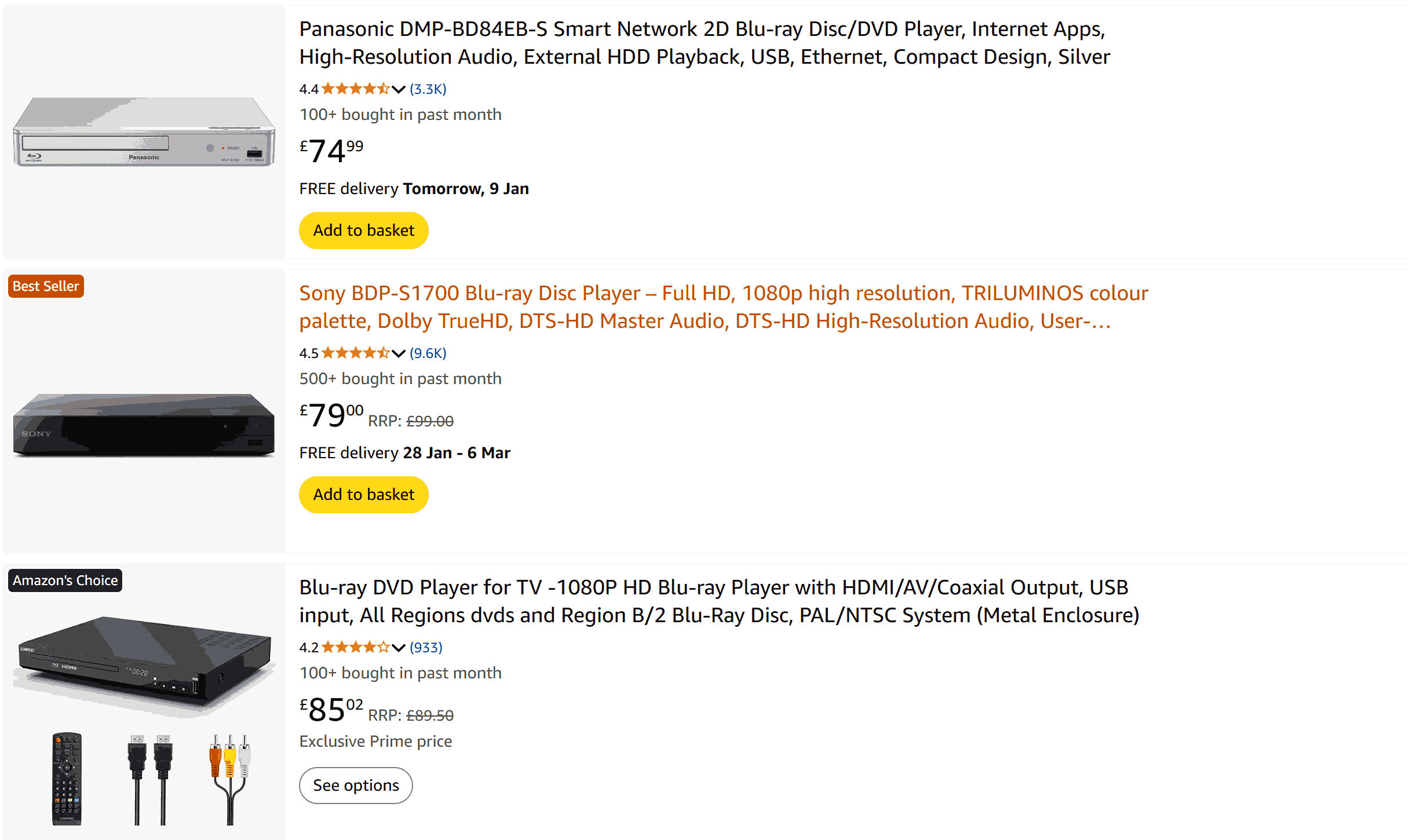
Today, the emergence of streaming services such as Netflix and Disney+ has reshaped the business landscape, causing a decreased demand for physical discs. The major manufacturers like Samsung, OPPO, and LG have slowly left the standalone players market. Now, the standard 1080p Blu-ray players are around $70-$90 and $500-$1000+ for higher-end brand 4K UHD players, which is a niche market.
2. Gaming Consoles and Market Reach
Blu-ray’s success and continued existence aren’t driven by just its technology. It has also been hugely influenced by the fact that Sony built a Blu-ray player into PS3 systems as part of the console’s hardware. With the launch of the PS3 console, millions of gamers were turned into Blu-ray owners instantly when they bought their first PS3. HD DVD, on the other hand, became an expensive, cumbersome add-on to the Xbox 360 and was never really taken seriously by many buyers.
That same strategy continues to work in Blu-rays today, even though nearly every household has access to online content through services like Netflix. Many consumers will probably never purchase a standalone 4K UHD Blu-ray player. But with their next-generation gaming consoles like PlayStation 5 already equipped with 4K capability, they will have no excuse not to try a UHD Blu-ray disc to experience what true 4K+Ultra is all about.
Content Support and Studio Backing
At first, studios like Universal preferred HD DVD because it is cheaper to produce, while Disney and Sony chose to stand with Blu-ray because of the storage capacity. This causes the problem. If you want to watch Transformers, you need a player, but if you want to watch Spider-Man, you need another one.
Things changed in 2008 when Warner Bros decided to back Blu-ray, which became a turning point. After that, other studios followed, and Blu-ray truly became a success, especially since there are a lot of people who own a PS3.
As for now, HD DVD is dead. No more movies are made for it. If you still keep your old HD DVDs, you are out of luck, because they are hard to fix, and that’s why many people choose to digitize their discs before they stop working.
HD DVD vs Blu-ray: Quick Comparison Table
Here’s a brief overview to better understand Blu-ray vs HD DVD.
|
Feature |
Blu-ray (BD) |
HD DVD |
|
Storage Capacity |
25GB (SL), 50GB (DL), Up to 128GB (BDXL) |
15GB (SL), 30GB (DL) |
|
Max Video Resolution |
1080p, 4K Ultra HD (2160p) |
1080p (Standard), 1080i (Early) |
|
Max Bitrate (Raw Data) |
53.95 Mbit/s |
36.55 Mbit/s |
|
Max Bitrate (Video) |
40 Mbit/s |
29.4 Mbit/s |
|
Video Encoding |
MPEG-2, H.264, VC-1, HEVC (H.265) |
VC-1, H.264, MPEG-2 |
|
Audio Support |
Dolby TrueHD, Atmos, DTS-HD MA |
Dolby TrueHD, DD+, DTS |
|
Region Code |
3 Regions (Optional), 4K is Region-free |
Region-free |
|
Hardcoating |
Mandatory (Very Durable) |
Optional (Easy to scratch) |
|
Interactive Tech |
Blu-ray Disc Java (BD-J) |
HDi Interactive Format |
|
Block Size |
64 KB ECC |
4096 bytes |
|
Primary Usage |
Movies, PS3/PS4/PS5 & Xbox Games |
High Definition Video (Obsolete) |
|
Market Status |
Active / Industry Standard |
Discontinued (Dead) |
Conclusion: Which Format Should You Choose?
The winner is clear: Blu-ray is the only choice. Although HD-DVD was the cheaper option when it first came out, it is now a dead format with no new titles or player releases. Blu-ray defeated HD-DVD by providing superior storage capacity, better picture quality, and being available on popular gaming consoles.
-
Windows Media Player Review: Is It Working on Windows 11?
-
6 Best Tools to Download YouTube Playlist Fast
-
Detailed Review: Is KeepStreams Safe? Is it Worth Trying?
-
How to Record a YouTube Live Stream on Any Device (Step-by-Step Guide)
-
Disney Plus HDCP Issue: Complete Troubleshooting & Fix Guide
-
How to Download Bilibili Videos? All Methods Explained
-
How to Fix OBS Not Capturing Game on Windows
-
Wondershare UniConverter Review: Answers to All Your Doubts
-
OBS Studio Review: How Good Is It for Recording Your Screen?
-
Is SameMovie Safe to Use? Honest Review











-
Best Twitter Porn Accounts You Shouldn’t Miss
-
How to Download Pornhub Videos? Ways to Download from Pornhub
-
Top 5 OnlyFans Viewer Tools to View OnlyFans Content for Free
-
Full Review of Savethevideo: Is Savethevideo Safe & How to Use it?
-
Netflix Download Limit: What it is & How to Avoid
-
How to Import Bookmarks from Safari to Chrome
-
Full Guide to YouTube Members Only Videos: Watch, Download
-
How to Download MissAV Porn Videos in HD for Offline Viewing?
-
How to Download Videos from Fansly with Fansly Downloader
-
4 Methods to Burn ISO Files to Blu-ray Discs Easily


















 العربية
 繁體中文
繁體中文 Dansk
Dansk Nederlands
 Suomi
Suomi Français
 Deutsch
 Italiano
 한국어
한국어 Norsk bokmål
 Português
 Русский
 Español
 Svenska