Can the Wii Play DVDs? Complete Explanation

Summary:
Nintendo Wii cannot play DVDs, but we can bypass this. Explore this article to find how you can watch DVDs on Will.
Outline
If you plan to give a second life to your old Wii game console to play your favorite DVD movies. You will find it doesn’t work. Although this game console has a built-in drive, it cannot play DVDs. But don’t worry, Wii not directly playing DVDs does not mean there are no other ways.
Can the Wii Play DVDs Directly?
No. Released in 2006, the Nintendo Wii revolutionized gaming with its motion-control techniques. However, unlike the competitors, PlayStation and Xbox 360, the Wii is designed for pure gaming. It is not for multimedia play. The main reason is that Nintendo is doing this for lower the game console’s retail price, to make it more affordable. The Wii console doesn’t include the necessary software decoders and skips the expensive DVD licensing fees. So, the device’s drive only recognizes proprietary game discs, not any random DVD videos, which means it has the equipment, but it does not support the function (Nintendo locks it).
How to Watch DVD Movies on Wii via Conversion
Although the Wii cannot directly play DVD discs, it can read digital media like an SD card or an external device, which means you can digitize your DVD to convert it into a format that the Wii supports. You can bypass the drive limitations and let the console’s Photo Channel play your videos. No hardware modification, you can play your DVDs on the Will, and you can store your DVD content longer without scratches and aging.
To achieve the best quality, you need the best Blu-ray rippers to handle the job. Leawo Blu-ray Ripper offers you a powerful solution. It lets you bypass the region codes and DRM protection, converts the DVD (and even Blu-ray) discs to video/audio to over 180 formats. You can convert DVD/Blu-ray to MP4 for any device, and you can convert DVD/Blu-ray to MKV formats for higher quality. But note, although Leawo supports up to 4K conversion, you can only convert your DVDs to 480p (640×480) because the Wii only supports this resolution. Plus, for videos, the Will only support Motion JPEG encoded AVI (.avi) and QuickTime (.mov) files. So, do not choose wrong when converting. Here is a simple guide below.

-
Comprehensive Blu-ray ripping and converting software to decrypt, rip and convert Blu-ray/DVD disc, folder and ISO image file.
- Remove multiple Blu-ray/DVD disc protections and region restrictions.
- Convert Blu-ray/DVD to video/audio in 180+ different formats.

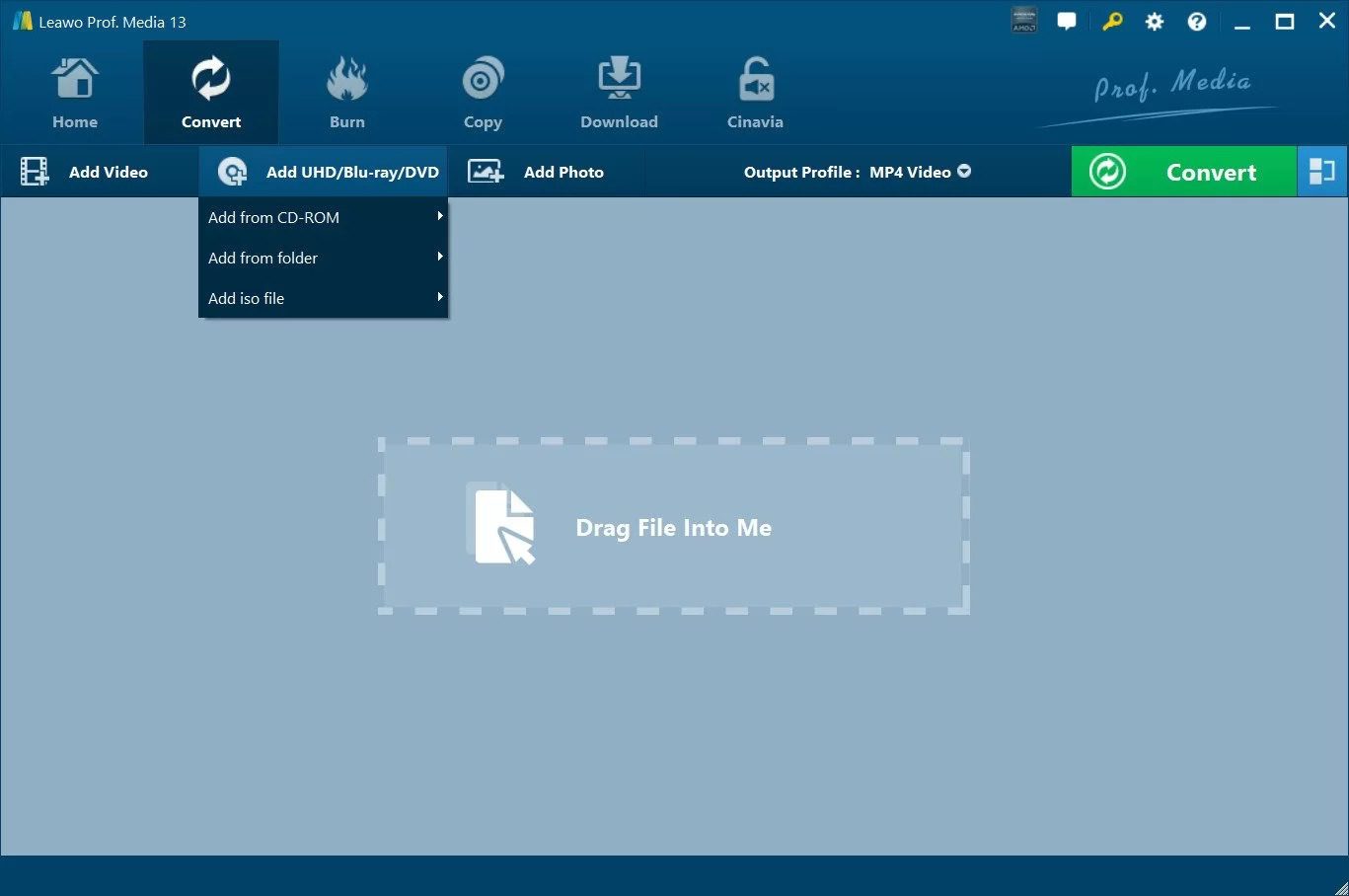
Step 1: Open the software. In the main screen, click on the Convert button. Then, choose Add UHD/Blu-ray/DVD > Add from CD-ROM, to let the software read your disc.
Step 2: Click on the drop-down box beside the Convert button. Then choose Change. There, you can see many formats. Choose the right format for Wii (AVI or MOV). Come back to the main screen of the software.

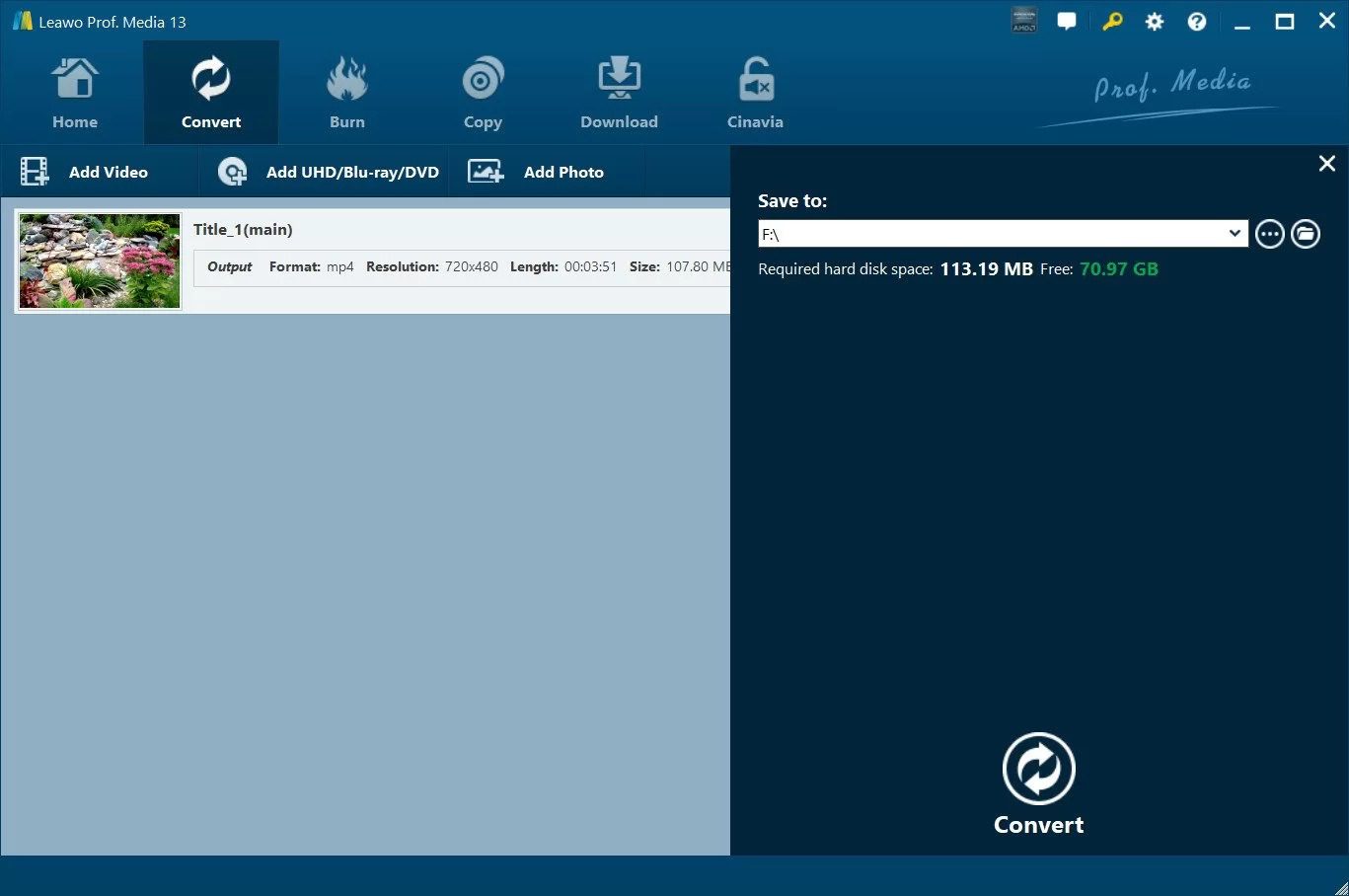
Step 3: Click on the green Convert button. From the right panel, choose the save location for your file, then click the Convert button below to start conversion.
Step 4: After finishing the conversion, insert your SD card into the computer and transfer the converted video to the SD card. Insert the SD card into the Wil. Open the Photo Channel on Wii, find the file, and play it.
How to Watch DVD Movies on Wii via Homebrew Channel
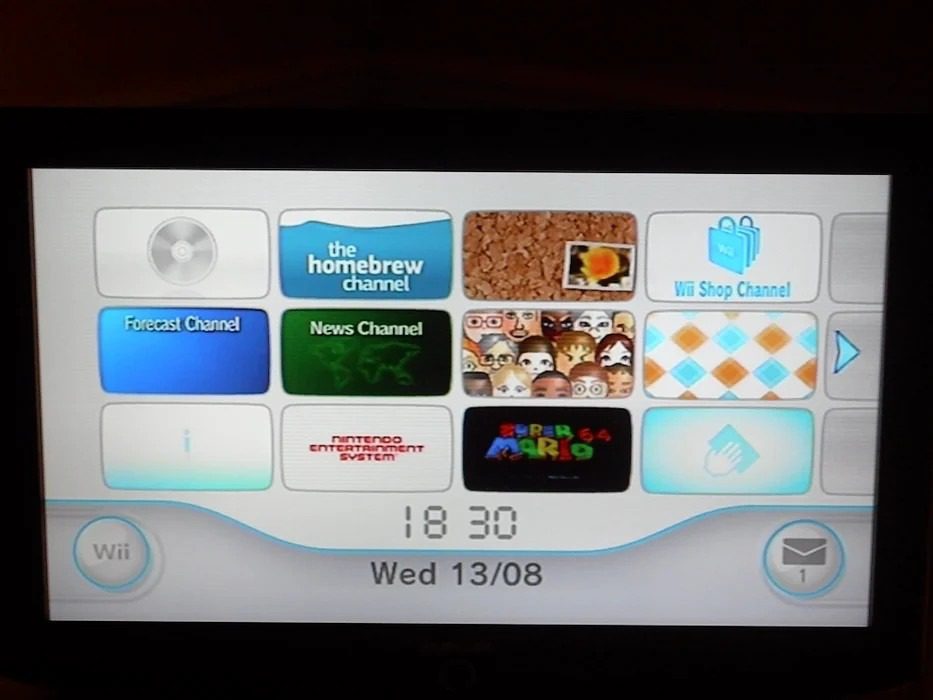
For users who still want to play DVDs on the Wii, installing the Homebrew Channel is another way out. You can think of this as adding a third-party store on your Wii and letting it run the restricted non-official players on Wii, like MPlayer and WiiMC, which play any content from your SD, USB, or DVD directly on Wii.
However, before doing this, you need to consider some significant risks. This method is like modifying your device, and once you fail, the device will become "bricked", leading the system data to be broken, and your device cannot be used. Another point is that the installation process is too complicated, so I personally suggest applying method 1 to convert your DVD to digital formats.
But, if you’ve thought it over and still insist on installing Homebrew Channel, here is a clear video tutorial that you can refer to: How to Mod your Wii in 2026 | Install Homebrew Channel, USB Loader GX & More! [Full Guide].

How to Watch DVD Movies on Wii via WiiMC
After you follow the tutorial and install Homebrew Channel, you can install WiiMC to play your DVDs. Please follow the steps below to install WiiMC.
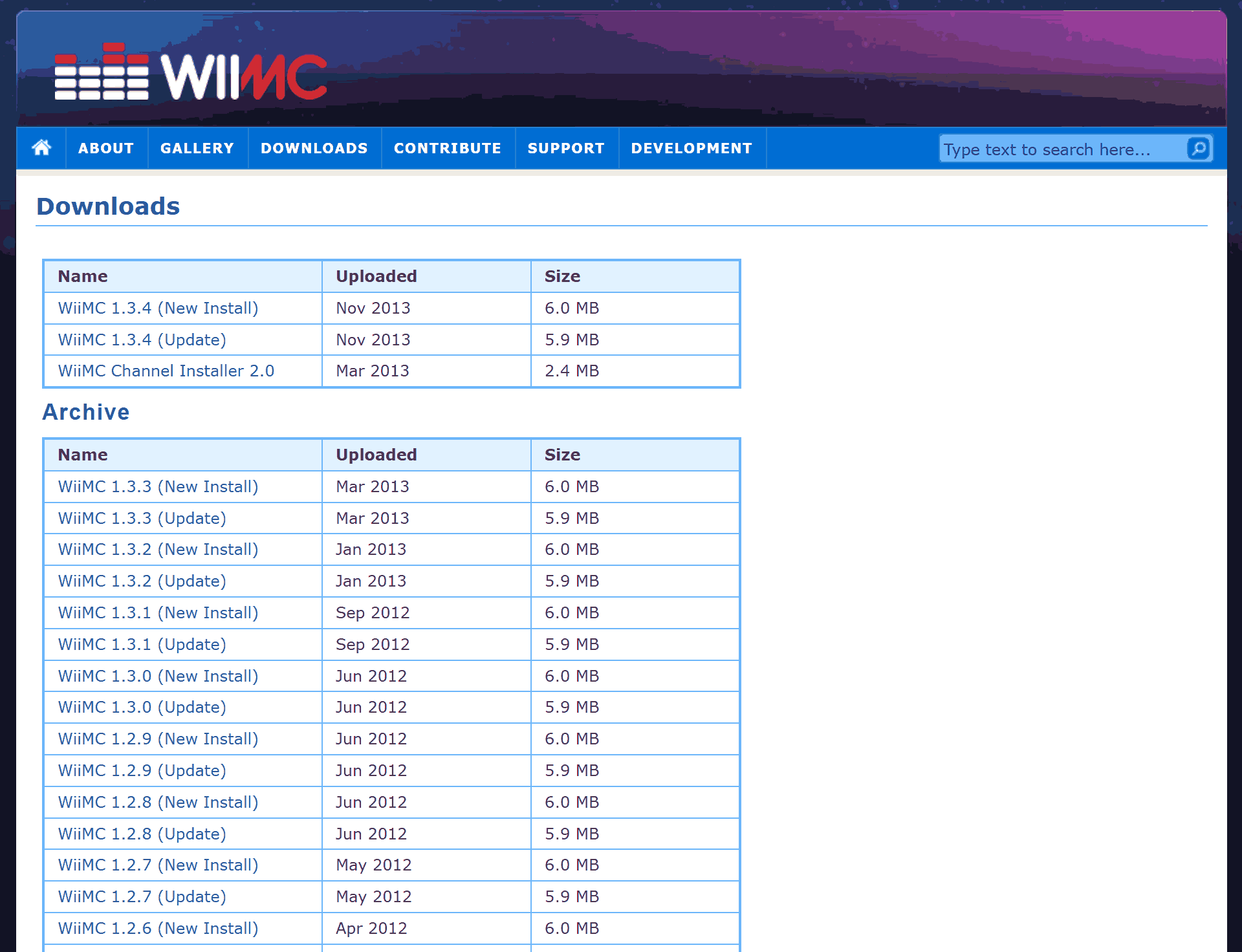
Step 1: Visit https://www.wiimc.org/downloads/ and download the newest version on your computer.
Step 2: Extract the files to the folder of the same name.
Step 3: Create a "apps" folder in your SD card, then drag the extracted files to the folder, then eject the SD card.
Step 4: Insert the SD card into the Wii and open Homebrew Channel. A new WiiMC entry will appear in the Homebrew Channel, and you can launch WiiMC through there.
- The channel loads apps/wiimc/boot.dol from SD or USB. So, you need to install WiiMC in this location, on the SD card.
FAQs
1. Why do I get the “DVD playback is not supported on this Wii” message?
This is mainly because your console is equipped with a newer disc drive. Around late 2008 and early 2009, Nintendo updated the internal device components, so it blocked the DVD video commands. If your device is manufactured after this time, including the horizontal "Family Edition" or the red "Wii Mini, your device cannot play DVDs, physically, and there is no other software or hack methods that can solve this.
2. Can WiiMac on Wii play high-resolution video?
No. Although WiiMC supports up to 720p files, it will degrade to 480p due to the console’s limited processing power, and it may lead to lagging or crashes. Hence, it is better to play video resolution capped at 480p for smoothness.
3. What consoles can play DVDs?
Many game consoles can play DVDs, such as PlayStation 2,3,4,5, Xbox, Xbox 360, Xbox One, and Xbox Series X.
Conclusion
Well, can the Will play DVDs? I think you get the answer. No, but that is not completely no. There are two ways to solve the problem. Use Leawo Blu-ray Ripper to convert your DVD to the Wii-supported formats and play it on Wii with an SD card. Or, install Homebrew Channel and WiiMC to play DVDs directly. Considering the second method is too complex, I think the first one is better for most users. Anyway, no matter what you choose, enjoy watching on the Wii.
Share this post










 العربية
 繁體中文
繁體中文 Dansk
Dansk Nederlands
 Suomi
Suomi Français
 Deutsch
 Italiano
 한국어
한국어 Norsk bokmål
 Português
 Русский
 Español
 Svenska