WinX DVD Ripper Platinum Review: Is It the Right Tool for You

Summary:
WinX DVD Ripper Platinum is a beginner-friendly solution to rip your DVD collection, but it does not support Blu-ray. For those who want a comprehensive tool, there is a better choice.
Outline
There are many online streaming services available in the market these days, but I always have a fear of losing my favorite movies on the internet. DVDs are the only way for me to “own” my media collections. I believe that some of you may have the same idea as me, and DVD backups are required. That’s why we need to use some DVD rippers, and WinX DVD Ripper is a popular one for this purpose. Is it a better choice to use? Therefore, I decided to test it out and make this review to discuss whether it is really a good option for us to protect our DVDs.
What is WinX DVD Ripper Platinum?
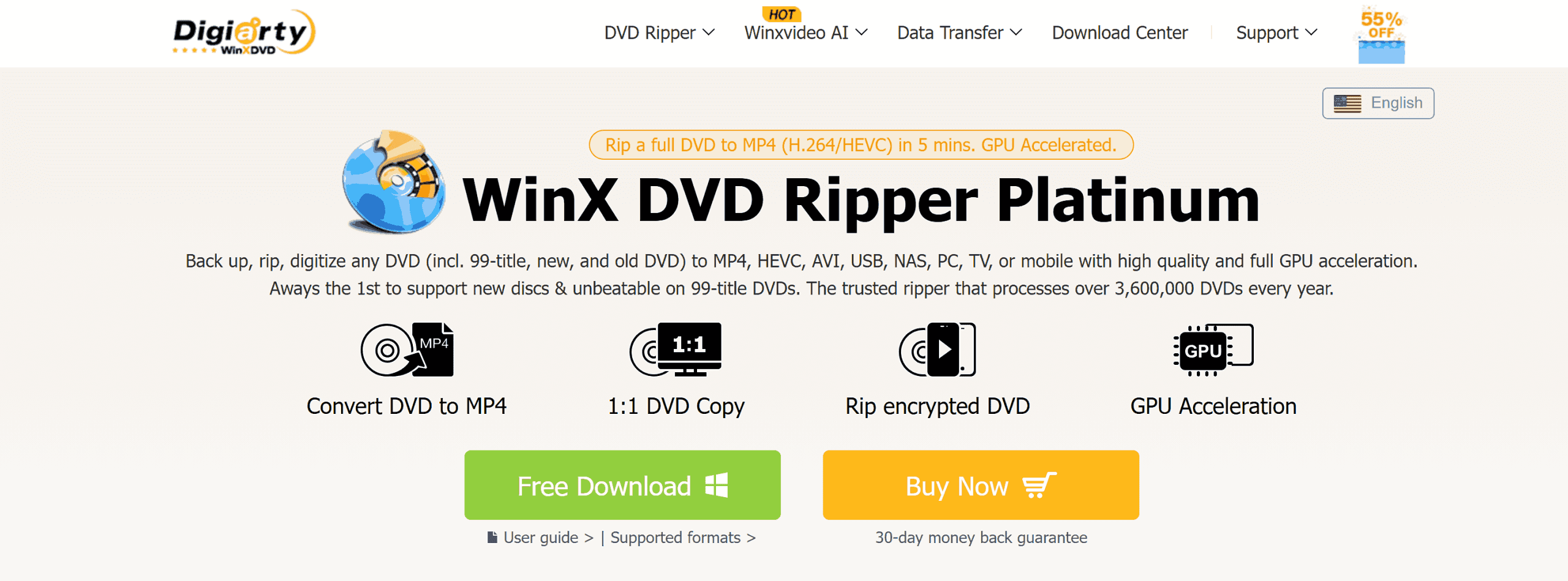
Before going into the details of this software, it should first be noted that there are essentially two versions of it. The plain WinX DVD Ripper is the free, general-purpose ripping software that is sufficient for common ripping, but lacks the features required for the latest protection schemes and high-speed drives. The WinX DVD Ripper Platinum, on the other hand, is a high-end software that is really useful for power users. It is a professional-grade software for ripping physical media, ISO, or folders to digital formats like MP4, HEVC, and AVI.
What DVD Ripper Platinum Can Do?
Disc Decryption: The decryption process works for virtually any type of DVD, from 99-title discs and region-locked media to even older or non-standard DVDs.
Level-3 Hardware Acceleration: By leveraging Intel, NVIDIA, and AMD GPUs, it is able to rip a full-length DVD at a fast speed.
350+ Preset Profiles: It comes with a wide array of preset conversion settings for devices, from iPhones and Androids to tablets and gaming consoles, while reducing file sizes by up to 80%.
1:1 Lossless Backup: There are four modes to clone a DVD into an ISO image or MPEG2 file with all the original video, audio, and subtitle tracks preserved.
Basic Editor: It provides choices to trim unwanted scenes, crop black bars, merge multiple titles, and add external subtitle files.
WinX DVD Ripper vs Platinum: What’s the Difference?
To save you time, I have compared both versions. The most important thing I noticed is that although the free edition is great, it has a huge drawback: it can only rip 5 minutes of your DVD. In essence, WinX DVD Ripper (Free) is merely a limited version of the Platinum, acting as a trial to determine whether the software is fit for your needs.
If you plan on ripping an entire movie collection, you need the WinX DVD Ripper Platinum. This is the only version that gets frequent updates to crack the latest protection and leverages your computer’s GPU for ripping at lightning-fast speeds. Here is a comparison of both versions:
| Feature |
WinX DVD Ripper (Free) |
WinX DVD Ripper Platinum |
|
Conversion Limit |
First 5 minutes only |
Unlimited Full Movie |
|
DRM & Protection |
Basic (CSS, Region Codes) |
Complete (99-Title, Disney, Sony, etc.) |
|
Ripping Speed |
Basic / Software-based |
47X Faster (Level-3 GPU Acceleration) |
|
Device Presets |
Limited |
450+ Profiles (iPhone, PS5, Android, etc.) |
|
1:1 ISO / Folder Copy |
Not Supported |
Fully Supported |
|
Advanced Features |
No ISO Creation |
ISO/MPEG-2 Copy & AI Compatibility |
Pros and Cons of WinX DVD Ripper Platinum
After testing WinX DVD with various discs, I have found that although WinX DVD is great, it has limitations that may make modern movie collectors look somewhere else. Here are some goods and bad that may help your decision.
Pros: What I Like
Ripping Speed: The ripping of WinX DVD is fast. A 2-hour DVD movie took only around 20 minutes to rip.
Easily Encrypted: It successfully ripped most DRM protections like CSS、RCE、UOPs.
Small, High-Quality Files: An 8GB movie can be compressed into a 2GB file, which is useful on a mobile device.
Low System Impact: Even at full speed, it barely uses CPU power (around 3%), so I could still browse the web or work without my computer slowing down.
Cons: What Could Be Better
No Blu-ray Support: This is the biggest point that I don’t like since Blu-ray features are supported on most similar products. And if you have any Blu-ray discs, this software seems useless to you.
Outdated Interface: The interface of WinX DVD is a bit old school, like from 10 years ago.
Limited Editing and Customization: Although it is featured with a edtior, the editing is limited to a few functions, so you cannot have more advanced adjustments, like doing multi-track editing.
Real User Feedback on WinX DVD Ripper
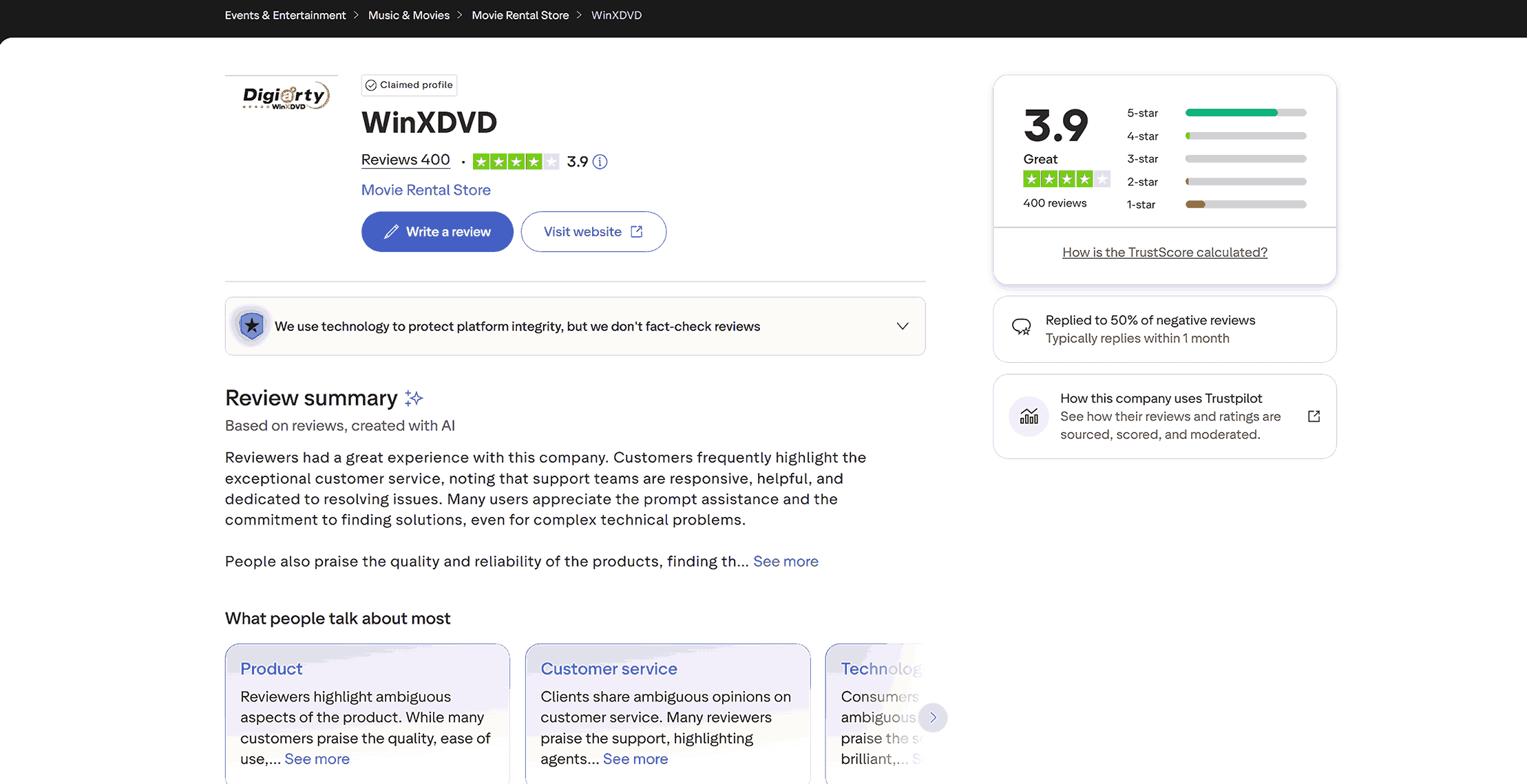
To let you know more about the performance of this software, I checked the new ratings and comments on Trustpilot. Right now, the software gets 3.9 stars based on 400 reviews.
What Users Like
Strong Disc Support: Many users are satisfied that the software can rip 99-title DVDs that some other tools cannot.
Good Customer Service: The support team is helpful and responds quickly.
Easy for Beginners: Most users think this software is simple and easy to use.
Saves Space: Users like how it can shrink large DVD files into smaller versions while keeping the video clear.
What Users Dislike
System Crashes: Some users are complaining that the software is unstable and crashes when ripping DVDs.
Billing Complaints: Frequent complaints about being charged automatically for renewal and having trouble getting full refund.
Speed Issues: A few users pointed out that the software so called acceleration didn’t work in certain computer parts as promised.
No Modern Disc Support: Users who have both DVDs and Blu-rays are not satisfied with no support for Blu-ray ripping.
Best Alternative to WinX DVD Ripper
If you found that WinX DVD Ripper Platinum cannot handle your various disc ripping needs for both DVDs and Blu-ray discs, Leawo Blu-ray Ripper is a better choice. Leawo is a one-stop solution for all your discs and has all comparative features that WinX DVD Platinum does, even better. As one of the Best Blu-ray rippers available in the current market, it is designed to help you digitize your entire library, no matter how new or protected the discs are.

-
Comprehensive Blu-ray ripping and converting software to decrypt, rip and convert Blu-ray/DVD disc, folder and ISO image file.
- Remove multiple Blu-ray/DVD disc protections and region restrictions.
- Convert Blu-ray/DVD to video/audio in 180+ different formats.

Why Leawo is the Stronger Choice:
DRM Decryption: Leawo can bypass both DVD and Blu-ray protections, including higher ones like AACS, BD+, CSS-DVD, and the latest MKB
High Quality Output: Leawo can rip the disc into over 180 formats, meaning you can rip and convert DVD and Blu-ray into MKV and other formats like MP4, HEVC, MOV, and FLAC.
3D Movie Transformation: This is a unique feature that WinX doesn’t have. Leawo can turn your 2D Blu-ray into a 3D movie, with 6 3D effects available, which is suitable for users who have VR headsets or 3D TVs.
Full Video Editing: Leawo has a built-in editor that allows you to do editing before ripping, including trimming, cropping, adding watermarks, and more.
GPU Acceleration: Just like WinX DVD Platinum, Leawo uses NVIDIA CUDA, Intel QucikSync and AMD APP to accelerate the ripping speed without device crashes.
Leawo Blu-ray Ripper vs. WinX DVD Ripper Platinum
|
Feature |
WinX DVD Ripper Platinum |
Leawo Blu-ray Ripper |
|
DVD Support |
Yes |
Yes |
|
Blu-ray Support |
No |
Yes |
|
Output Formats |
350+ Profiles |
180+ Formats (High Customization) |
|
2D to 3D Conversion |
No |
Yes |
|
Editing Tools |
Basic |
Advanced (Watermark, Effects, etc.) |
|
Encryption Support |
DVD Only |
Blu-ray (AACS/BD+) & DVD |
How to use Leawo Blu-ray Ripper:
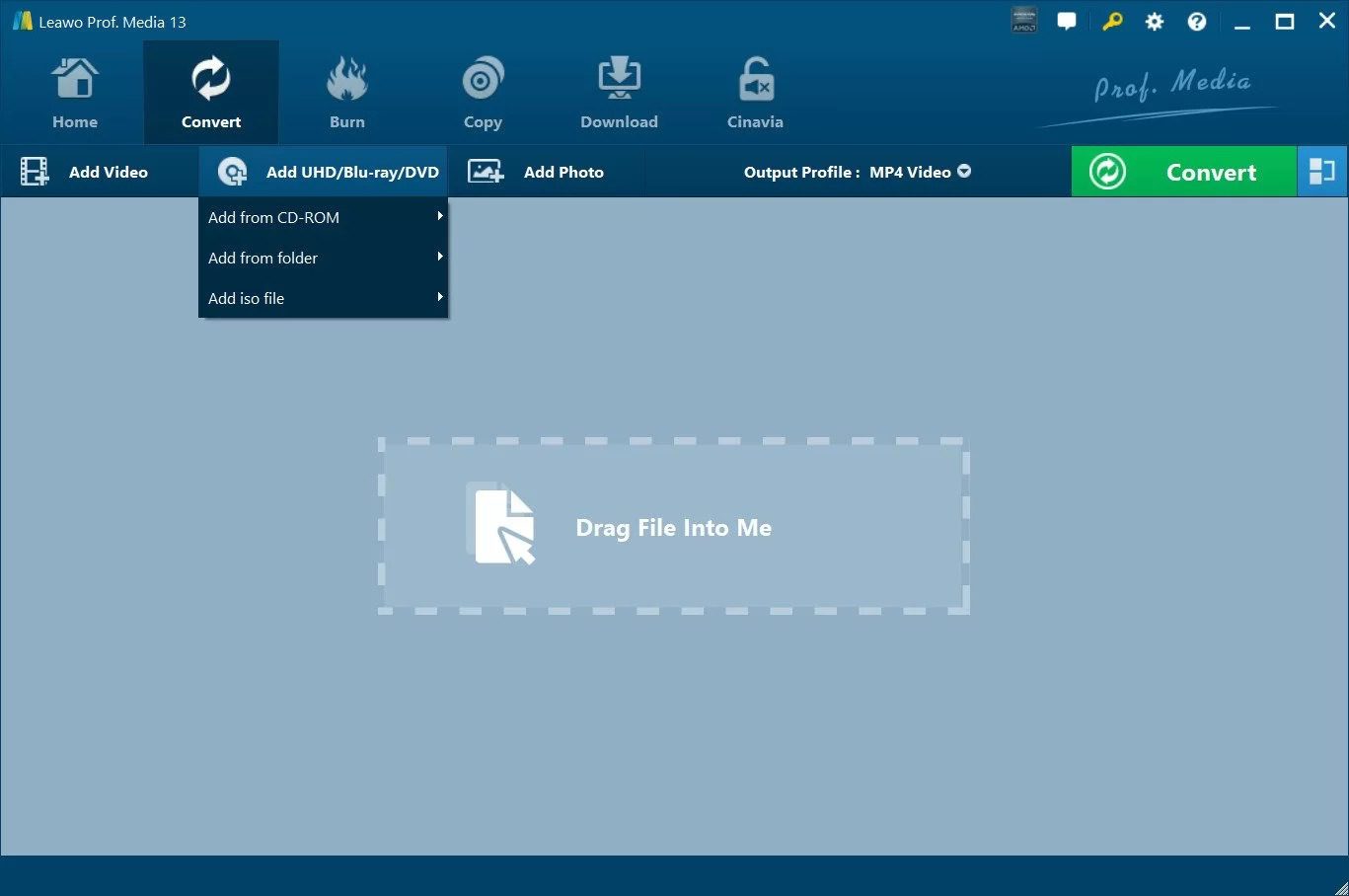
Step 1: On the main screen of Leawo Blu-ray Ripper, click on Convert > Add UHD/Blu-ray/DVD > Add from CD-ROM, so the software can read your disc.
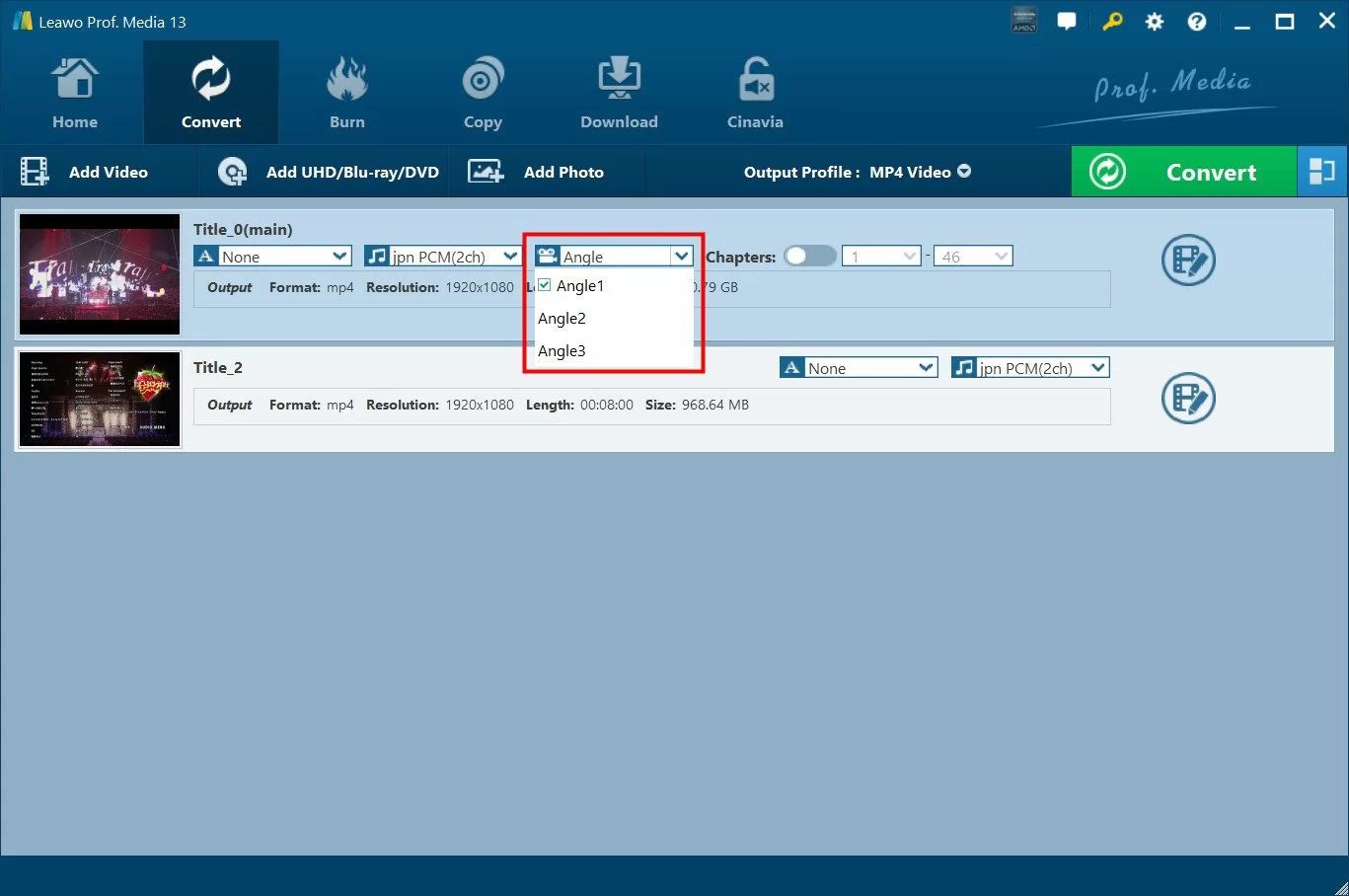
Step 2: Leawo will show you all the disc information on the screen. Just choose the subtitles, angles, chapters, etc.
Step 3: Click the “Output Profile” tab at the top, and from the drop-down boxes, select Change > Profile. If you want to rip DVD/Blu-ray to MP4, just choose MP4 in the profile, or other formats.
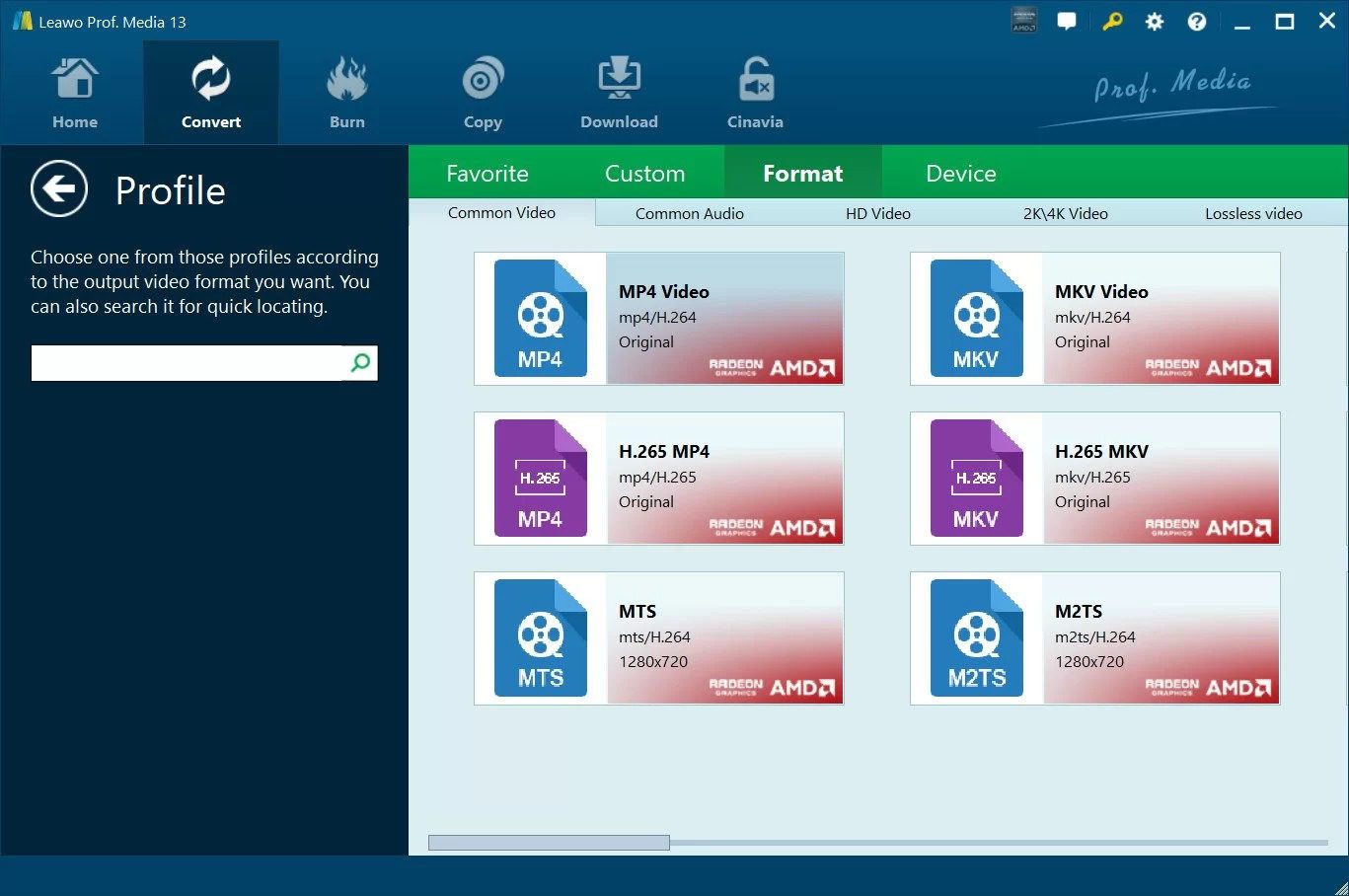
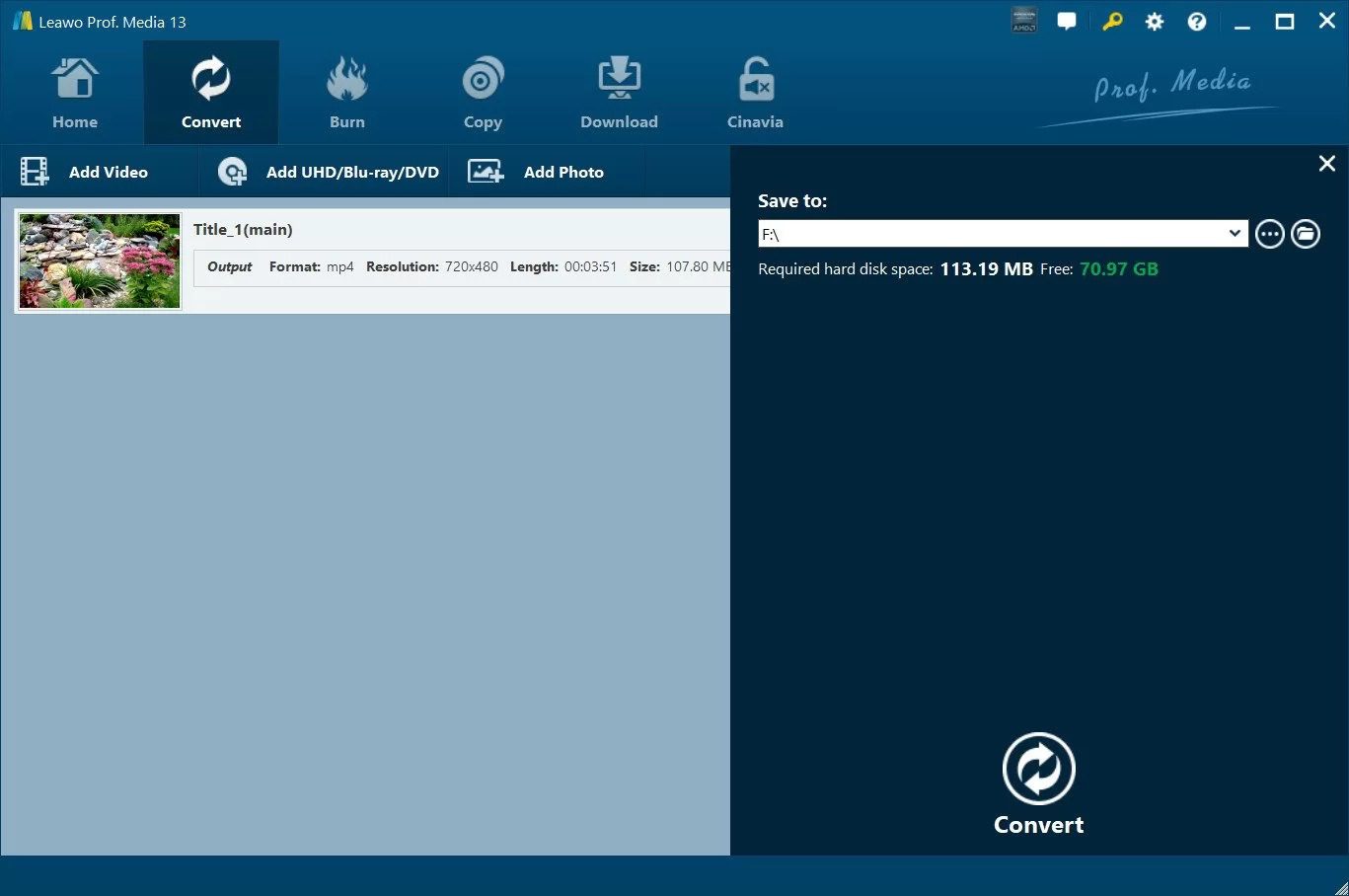
Step 4: Go back to the main screen after choosing the format. Click the green Convert button again to enter the page to choose the output directory. Click on the white Convert button to start ripping.
FAQs
1. Is WinX DVD Ripper Platinum safe?
Yes. WinX DVD Platinum is safe to use. It is developed by Digiarty Software, which has 19 years of industry experience. But, just remember one thing: install it from the official site to avoid malware, viruses, or bundled crapware.
2. Does WinX DVD Ripper Platinum rip Blu-ray?
No. WinX DVD Ripper Platinum is designed to rip DVDs. It lacks the hardware and software drivers to decrypt Blu-ray discs. If you need to rip Blu-rays, you can try tools like Leawo Blu-ray Ripper for both DVDs and Blu-rays.
3. Is Winx DVD Ripper Free?
There is a free version of WinX DVD, but it is a limited edition to rip only 5 minutes of your DVD disc, for software testing and trial. If you want to get the full version, you need to upgrade to the WinX DVD Ripper Platinum edition.
4. How much is WinX DVD Ripper Platinum?
WinX DVD Ripper Platinum offers three main plans:
Premium License: $39.95 per year (works on 3 PCs).
Ultimate License: $65.95 for a Lifetime license (works on 1 PC).
4-in-1 Bundle: $89.95 for a Lifetime bundle that includes their AI video tool, DVD copier, and iPhone transfer tool.
Conclusion
Anyway, WinX DVD Ripper Platinum is a quick solution for those who want easily digitize a traditional DVD collection. However, if you have multiple tasks besides DVDs, like 4K content, or advanced editing needs before ripping, Leawo Blu-ray Ripper may be better, an all-in-one alternative to build your media library.
Share this post










 العربية
 繁體中文
繁體中文 Dansk
Dansk Nederlands
 Suomi
Suomi Français
 Deutsch
 Italiano
 한국어
한국어 Norsk bokmål
 Português
 Русский
 Español
 Svenska