VOB format can be perfect on DVD disc, but not necessary on your hard disk. When your PC softwares and portable terminals refuse to accept VOB videos, they are actually asking you to firstly convert VOB to MPEG format or other kinds. Leawo VOB to MPEG Video Converter is exactly a well-designed VOB to MPEG converter which can help you go though the VOB to MPEG conversion easy and fast. Moreover, it also provides value-added features such as video editing.
Leawo Video Converter is an elegant program with user-oriented interface and good compatibility with the system. Feel free to download Leawo VOB to MPEG Video Converter to experience excellent video converting.
At the startup, Leawo VOB to MPEG Video Converter will greet you with a quick manual on how to use it in several steps. Most of the functions are clearly seen on the home interface. Anyone who is new to this program can easily get hang of it very soon.
Full Guide

Import videos
Leawo VOB to MPEG Video Converter allows you to directly drag in the video files without efforts to bring them in via traditional "File" button or "Add Video" icon. Next you can rearrange and rename the files on the list. If there are files with the same name, Leawo VOB to MPEG Video Converter will automatically number them to prevent unexpected results. Meanwhile, you can double click on the file title for a video preview.
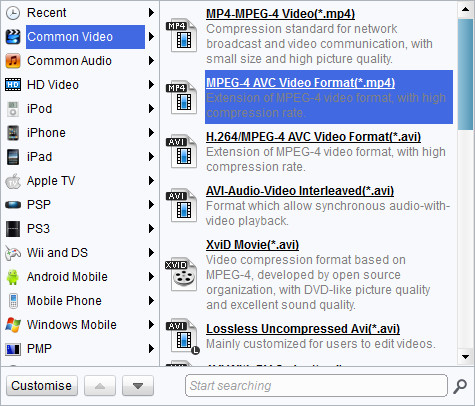
Choose output video format
Leawo VOB to MPEG Video Converter has a sufficient supply of profiles to make the video conversion much simpler. Select MPEG-1 or MPEG-2 profile for your situation.

Add features to the output videos
Is it too soon to start conversion by now since you can have your video edited in Leawo VOB to MPEG Video Converter? You certainly don't want to miss this intriguing feature. It is very easy and enjoyable. Open the video edit panel via "Edit" button, you can add features to the output video via Trim, Crop, Effect and Watermark.

Start conversion
Finally, it is time to start a smooth VOB to MPEG conversion. Also, Leawo VOB to MPEG Video Converter offers you some conveniences upon the conversion process.
- After the process begins, you still have a chance to change your plan. You can pause the process, skip any of the running threads or even cancel the task before it starts.
- If you want to take a break during the process, just let Leawo VOB to MPEG Video Converter to automatically "Open the output folder" or "Shut down computer" after conversion.
Leawo VOB to MPEG Video Converter is a good handy tool to convert your VOB to MPEG videos in a smooth and efficient way. The unit price is now at only $29.95. Bunch purchase will save even more money. Upon purchase, you are entitled to more value-added services such as lifetime free updates and preferential customer service. Here is more information about Leawo VOB to MPEG Video Converter.
Extended Knowledge

VOB (Video Object) is a container format in DVD-Video media. VOB can contain video, audio, subtitle, menu and navigation contents multiplexed together into a stream form. VOB is based on the MPEG program stream format, but with additional limitations and specifications in the private streams. The MPEG program stream has provisions for non-standard data (as used in VOB files) in the form of so-called private streams. VOB files are a very strict subset of the MPEG program stream standard. While all VOB files are MPEG program streams, not all MPEG program streams comply with the definition for a VOB file.
