


It has been an accelerating trend that MKV is used to carry HD movies. MKV’s innate advanced structure in concealing video and audio allows it to adapt multiple environments easily, such as portable and internet. This guide is going to inform you that Video Converter which is the best MKV to AVI Converter is able to convert MKV videos to AVI formats which still own dominating market share at the moment. Following this guide, you will be learning the skill to convert MKV to AVI easy and fast.
Freely and safely download Leawo Video Converter from this and install it on any of Windows NT/2000/XP/Vista/Win7 systems. It incorporates with famous K-lite codec pack to enhance the decoding capability, and it is optional if you have installed otherwise.
Full Guide

Add Videos to the Program
Open Leawo MKV to AVI Converter. The home interface is streamlined other than obtrusive like some expert software. Several tips are neatly shown above the empty standby list to give you key information which starts you up in a few seconds. Then add the very first MKV file in preparation for conversion. The MKV files imported can be previewed by double click on their titles.
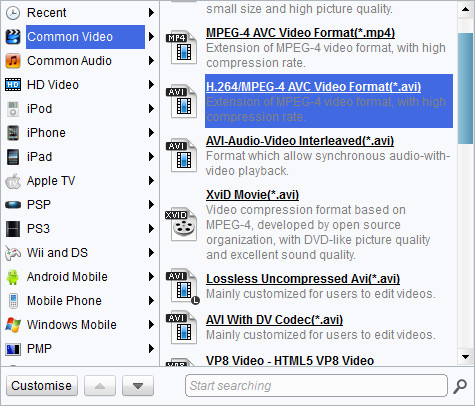
Choose Output Format
Second Step, select a desired profile for MKV to AVI output and further refine the profile settings via advanced codec setting panel; it is enabled via Settings button. Any changes made to the profile settings can be saved to new profiles and listed under User Defined category.

Edit Video Effects
Edit the video before the conversion if you wish to. The edit functions are located behind the edit icon, coming in five subs as Effect, Trim, Crop, Watermark.
- The Trim customization focuses on assigning new video length.
- The Effect customization focuses on changing and improving audiovisual effect of the video.
- The Crop customization focuses on defining new video screen size.
- The Watermark customization focuses on applying image or text as watermark.

Convert MKV to AVI
The conversion process is started by the big round button on the bottom right. Note that Leawo MKV to AVI Converter supports batch conversion and multithreading (altered via Options -> Preferences -> General -> Max Process), walking the conversion process smooth and fast.
Extended Knowledge

MKV is the filename extension for Matroska Multimedia Container, an open-standard free container format. A Matroska file can hold a number of audio, video and subtitle streams, besides attachments like graphics and decoder filters all at the same time, thus allowing a complete movie to be stored in a single file.
AVI (Audio Video Interleaved) file is a sound and motion picture file that conforms to the Microsoft Windows Resource Interchange File Format (RIFF) specification. AVI files (which end with an .avi extension) require a special player that may be included with your Web browser or may require downloading.
-

One Week with 4K Video Downloader: Honest Review
-

Tubi vs Pluto: Which is the Top Free Streamer?
-

Everything You Need to Know About External Blu-ray Drive
-

How to Stream Disney Plus on Discord
-

Free or Paid: The Best Anime Streaming Services for Now
-

11 Ways to Fix Disney Plus Error Code 83
-

How to Screen Record Crunchyroll for Free?
-
Know About Different Types of Blu-ray Discs
-

Latest Update: Is Philo Free with Amazon Prime?
-

Does PS4/PS4 Pro Play 4K Blu-ray

-

Best Twitter Porn Accounts You Shouldn’t Miss
-

Full Review of Savethevideo: Is Savethevideo Safe & How to Use it?
-

How to Download Pornhub Videos? Ways to Download from Pornhub
-

How to Import Bookmarks from Safari to Chrome
-

Netflix Download Limit: What it is & How to Avoid
-

4 Methods to Burn ISO Files to Blu-ray Discs Easily
-

Is Hulu Not Working on Your Smart TV? How to Fix?
-

How to Get Rid of Ads on HBO Max
-

How to Play 4K Blu-ray Disc on Computer
-

How to Download Videos from Fansly with Fansly Downloader






 العربية
 繁體中文
繁體中文 Dansk
Dansk Nederlands
 Suomi
Suomi Français
 Deutsch
 Italiano
 한국어
한국어 Norsk bokmål
 Português
 Русский
 Español
 Svenska