How to Download YouTube Video to iPod?

How to download YouTube videos to my computer?
Many video web sites offer such software programs for users to download videos from their sites. And, these download tools are free for use. You may download the tools directly with the URL they provided. But they often ask users to register for the tool and it is exclusively used for the specific web site. You can’t use it to download videos on other sites.
YouTube, unfortunately, doesn’t offer the tool to download videos on its site. But there do be a lot of tools to download YouTube videos, and all of them are free! Leawo YouTube Downloader is one of these free tools for downloading web videos from YouTube easily. It also can be used to download videos from any other web sites. Users may download it and have a try, as it can play the downloaded video immediately after the downloading!
How to download YouTube videos with Leawo Free YouTube Downloader?
Method 1:
- Open the program and type www.youtube.com in the address bar.
- Drag the video thumbnail to the hover window of the program.
Method 2:
- Open the program and type www.youtube.com in the address bar.
- Choose a video to play and click "Video" tab to watch and check the downloading progress at the same time.
- Click "Download" button to download video to your PC when the downloading progress completes.
How to download YouTube video to iPod with Leawo Video Converter?
Now you have downloaded YouTube to iPod, but there is a problem – the videos downloaded from YouTube (FLV videos) can not be played in iPod yet as iPod supports to play videos in MP4, not FLV. Or you may need to do video editing to have a better visual effect. So you have to convert those downloaded YouTube videos to iPod, that’s to convert YouTube FLV to MP4 for iPod with Leawo FLV Converter.
Leawo Video Converter, the best FLV Converter is the most powerful and efficient FLV converter that can convert FLV to video in variety of formats. YouTube video to iPod conversion is one of them. In addition to the primary function to convert the downloaded YouTube video to iPod, it can also help you to edit videos by trimming, cropping, and adding image or text over the video.
The tutorial below shows the exceptionally easy way to convert the downloaded YouTube video to iPod with Leawo FLV Converter.
Full Guide

Load MKV file
Launch Leawo FLV Converter and click "Add Video" icon to input YouTube videos.
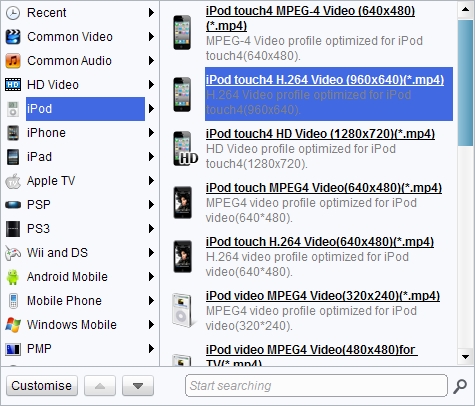
Choose output video format
Double click YouTube video file name to have a preview, to convert YouTube FLV to iPod MP4, just select iPod MP4 as the target output format from "Profile" menu.

Edit the video to get a better output result
Click "Edit" icon to enter more settings.
- Trim video by changing the time points or dragging the triangles on the slide to get a duration.
- Crop video by dragging the video frame or selecting from "Letter Box" for the proper dimension.
- Drag the slides to adjust video effect.
- Add an image or a text as watermark and adjust its position, transparency and size.

Start Conversion
Click the big Convert button to start to convert YouTube to MP4 for iPod.
Extended Knowledge

iPod is a portable device for storing and playing audio files encoded by MP3 or AAC compression algorithms. Designed by Apple Computer, iPods have distinctive styling and can hold anywhere from a few hundred to ten thousand songs. Popular iPod features include a calendar, address book, to-do list, alarm clock with sleep timer, games and text reader. Currently, iPod support MP4 video file in many different resolutions and sizes.
Share this post











 العربية
 繁體中文
繁體中文 Dansk
Dansk Nederlands
 Suomi
Suomi Français
 Deutsch
 Italiano
 한국어
한국어 Norsk bokmål
 Português
 Русский
 Español
 Svenska