How to Set Up Hulu Parental Controls for Kids?

Summary
- This article will share how to set up Hulu parental controls for kids, manage content ratings, and keep offline downloads safe. Also, parents can use tools like CleverGet to ensure age-appropriate viewing anytime, anywhere.
Hulu is one of the best Streaming services with a good catalogue of shows and movies. But parents often worry that their kids might accidentally watch age-restricted content. Hulu does not ignore this worry of parents. For this reason, there are many features in Hulu that try to provide a safer experience of watching for kids. For instance, you can create kid-friendly profiles. Or you can set content restrictions, and there is so much more. In this article, we’ll show you how to set up Hulu parental controls. Also, how you can manage content ratings, and how you can set up PINs for your kids.
Quick AccessCLOSE
How to Set Up a Kid Profile on Hulu?
The first thing that you can do is set up separate profiles for your kids on Hulu. A separate profile will make the whole streaming thing safe for your children. Let me show you quickly how you can set up a kid’s profile on Hulu.
Step 1. First, log in to your Hulu account, then go to the profile management section.
Step 2. Next, click on “Add Profile” and then select the “Kid” option. Just enter the name for your kid’s profile and choose an avatar. A separate profile will be very simple for your child to identify their profile.
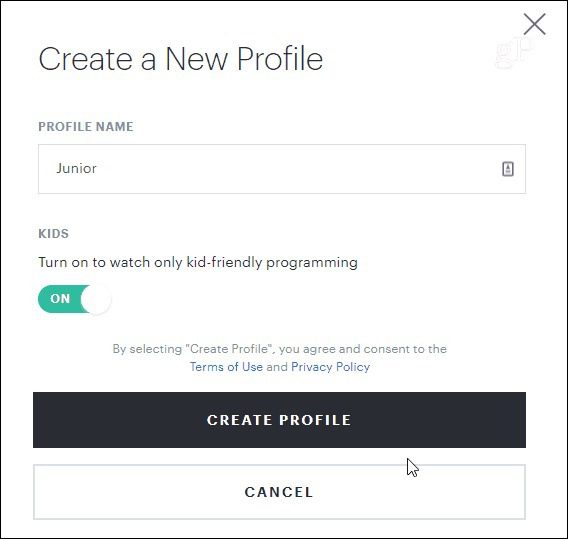
After the creation of a child profile, Hulu will filter the shows according to TV-Y, TV-G, and PG categories. We will discuss these categories next.
Content Ratings on Hulu: How Restrictions Are Decided
Hulu uses a content rated system that helps it filter content based on maturity rating. Below, we will discuss this in detail.
1. Hulu’s Maturity Ratings
On Hulu, shows and films have ratings such as TV Y, TV G, TV PG, TV 14, and TV MA for television content. On the other hand, movies also have ratings of G, PG, PG-13, R, and NC-17 tags. Here is what this naming stands for.
Hulu’s Maturity Ratings
- TV-Y: This category is for preschoolers. There will be no inappropriate language, violence, etc.
- TV-G: This category is also kid-friendly but slightly more advanced than TV-Y.
- TV-PG: This rating shows may need parental guidance. There could be some mild language, some cartoonish or small amounts of violence, or thematic elements.
- TV-14: This category is for viewers 14 and above. It could feature strong language, violence, or sexually suggestive themes.
- TV-MA: Only for mature audiences.
Hulu’s movies also come with ratings. Movies typically use the standard movie rating designations of G, PG, PG-13, R, and NC-17. You will see these content rating signs on children’s specialized account on the Hulu platform. To sign up for an account for a child, Hulu will automatically filter out all program content rated TV-14 and TV-MA, along with any content rated PG.
2. Block and Monitor Content on Hulu
Other than content rating, Hulu also gives parents extra features to manage the content for their kids. One example is that you can disable autoplay functions. Once disabled, the next episode will not be played automatically. This way, your child will not come across unexpected content exposure.
You can also look at history and see what your child has been watching. So, if you find any shows that are not suitable, it will be easier for you to act. Moreover, you can also delete inappropriate content from a child’s profile and can also turn off personalized recommendations. In this way, your kids will not get any suggestions outside the allowed rating.
Enable a PIN to Prevent Profile Switching
If you are worried that even after all this setup your kid might simply switch to an adult profile. This problem also has a solution. Parents can set a PIN on Hulu. When the PIN is set, your child can not enter the adult profile. So, the child’s profile is basically locked in a safe environment for watching. This option is available on all types of devices, like smart TVs, tablets, or phones. Your PIN will ensure that mature content is still inaccessible to him/her. Although it is just a small move, it definitely has a lot of power in ensuring an additional safety layer.
Step 1. First, open Hulu and log in to your account.
Step 2. Next, click your profile icon in the top-right corner and choose Manage Profiles.
Step 3. Next, choose the profile you want to lock (usually the adult one).
Step 4. Next, turn on Profile Lock by toggling the switch.
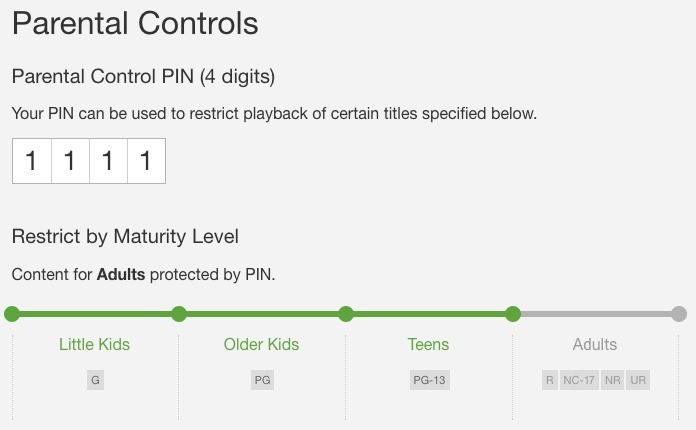
Step 5. Next, you need to create a 4-digit PIN and save it.
Step 6. Confirm your PIN again.
Once done, your kids can’t switch between profiles without the pin.
Offline Viewing Safety: Keeping Downloads Kid-Friendly
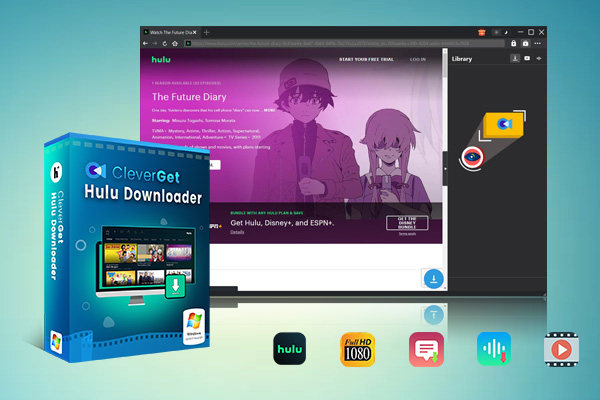
And if you are still concerned, then the best possible way is simply to download your kids’ favorite content and let them watch offline away from the streaming platform. This method is the most recommended for not only a safer watching experience, but also to watch without buffering and streaming limitations. One tool you can use to download videos from Hulu is CleverGet Hulu Downloader. As for after the download, there is no restriction on how you can move the files to any of your gadgets.

-
Professional Hulu downloader to download Hulu movies and series at original 720P or 1080P quality with selected subtitles and audio tracks for ad-free viewing.
- Download Hulu video to MP4/MKV files.
- Batch download Hulu episodes of all/certain seasons.
- Save metadata info for easier management.
FAQs
1. Can I use parental controls on Hulu Live TV?
Yes, Hulu Live TV allows the use of parental controls, but the controls are a bit different from those for on-demand content. It is possible to set up profiles for children and limit access to content based on maturity level. However, it is impossible to filter live channels by age.
Can I download Hulu shows for offline viewing safely?
Yes. You can download shows and movies with Hulu downloaders. You can download full seasons in high quality, with subtitles and audio tracks. This is especially useful for travel or offline play without internet and streaming limits.
Do kid profiles automatically restrict mature content?
Yes, Hulu has content ratings for its shows. Hulu, as a rule, limits the content to TV Y, TV G, and PG ratings only. These ratings will ensure that children will not be exposed to inappropriate shows or movies.
Conclusion
If you are reading till here, you must be sure now it’s easy to watch and configure Hulu securely for your kids. You can make a kid’s profile, add content rating, and add a PIN to prevent switching of profiles. In addition, a safe and comfortable way to provide offline access is using CleverGet Hulu Downloader, which keeps the video quality, subtitles, and audio tracks intact. With all the parental control options for Hulu, parents can ensure that their children view only appropriate content for their respective ages.
Share this post













 العربية
 繁體中文
繁體中文 Dansk
Dansk Nederlands
 Suomi
Suomi Français
 Deutsch
 Italiano
 한국어
한국어 Norsk bokmål
 Português
 Русский
 Español
 Svenska