


Summary:
RedFox AnyStream used to be a solid way to download shows from Netflix and other platforms, but it went offline in 2024 and never came back. This article explains what it was, how it worked, and some good alternative solutions.
It’s very easy and convenient to watch content on streaming platforms such as Netflix, Amazon Prime Video, and Disney+ online. How about offline viewing? That is where downloading software such as RedFox AnyStream comes in. In this article, we will explain what AnyStream is, its features, and compare it with AnyStream Plus. Besides, we will show you how to use it and introduce a reliable RedFox AnyStream alternative if it doesn’t work for you. Let’s begin.
OutlineCLOSE
1. What Is AnyStream?
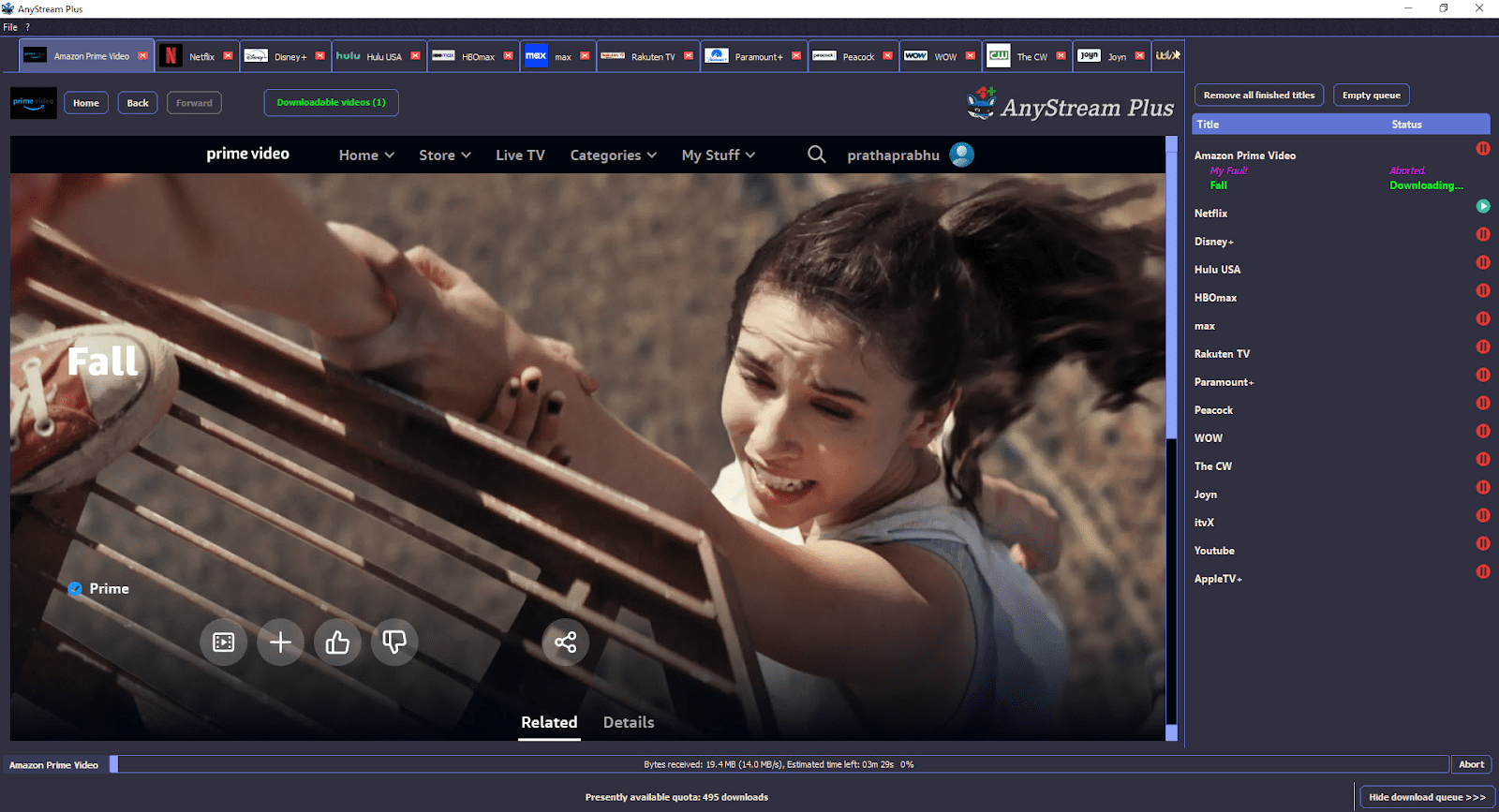
AnyStream is a software created by RedFox that gives its users the ability to download videos from subscription-based streaming platforms like Amazon Prime Video, Netflix, and Disney+. It is capable of downloading high-quality MP4 videos and 5.1 Dolby Digital Surround audio. Before you start downloading, you can adjust your downloads by selecting the video resolution, audio tracks, and subtitle languages. Your content will appear and sound great even when you are offline. To get tips and advice, the AnyStream forum is a very helpful community where users give each other tips and solutions. Even though AnyStream is advertised as providing a hassle-free, unlimited downloading process, it is still good to check the company’s performance in reality.
What Happened to AnyStream?
AnyStream and its parent company, RedFox, were suddenly taken down in June 2024. Their website went offline, and the servers for tools like AnyStream were also shut down. RedFox did not issue a formal explanation, and the real reason is therefore quite unclear. Some users think that it could be a legal issue, a financial problem, or a change in streaming technology. Thousands of users turned to the forums and communities like Reddit that became loaded with questions and discussions following the shutdown. At the moment, RedFox is still out, and a big majority of the population thinks the service is gone forever, but some still hold on to the hope that the service will reappear under another name.
AnyStream vs AnyStream Plus: What Are the Differences?
RedFox has two versions of AnyStream: the basic version of AnyStream and the AnyStream Plus. Even though they both allow you to save a video for offline viewing, the Plus version has more features and an extended platform support. Below is the comparison table, which lists the differences in the features of these two versions.
|
Features |
AnyStream Basic |
AnyStream Plus |
|
Supported Platforms |
Netflix, Amazon Prime Video, Disney+ |
All Basic platforms plus HBO Max, Hulu, Paramount+, Peacock, Rakuten TV, WOWTV, and more |
|
Batch Downloading |
Not available |
Yes – download multiple movies or series at once for convenience |
|
Download Movies & Series |
Yes – download individual movies or episodes |
Yes – same as Basic, with added batch support |
|
Download Whole Seasons |
Not available |
Yes – download an entire season or multiple seasons of a TV show |
|
Audio Quality |
Dolby Digital 5.1 surround sound |
Dolby Digital 5.1 surround sound |
|
Subtitle Support |
Embedded, TTML, SRT subtitles |
Embedded, TTML, SRT subtitles with smart pre-selection |
|
Smart Audio/Subtitle Selection |
Yes – remembers your preferred languages |
Yes – remembers your preferred languages and adapts automatically |
|
Amazon Ads Removal |
Yes – remove ads from Amazon content, including “Free with Ads” titles |
Yes – same as Basic |
|
Download Quality |
Up to HD |
Up to HD (same as Basic) |
|
Supported Websites |
Limited number of streaming sites |
Much broader list, including additional popular streaming platforms |
|
Customer Support |
Standard support |
Priority support for faster assistance |
|
Price (Lifetime License) |
$115 |
$170 |
This table provides a direct picture of what each version offers. Overall, AnyStream Basic would suit users who are interested in casual offline watching, whereas AnyStream Plus is best for people who require greater supported platforms, batch download, and advanced features.
2. How to Use AnyStream?
AnyStream installation and usage are straightforward. You can download movies, TV shows, or documentaries from any streaming service. For instance if you want to download from Netflix,simply follow the steps below:
Step 1: Set Your Output Preferences
Download AnyStream and install it on your computer. Before downloading, you can configure the settings to suit your preferences. Besides the output folder, other things like file name and download speed can be selected.
Step 2: Find the Video You Want
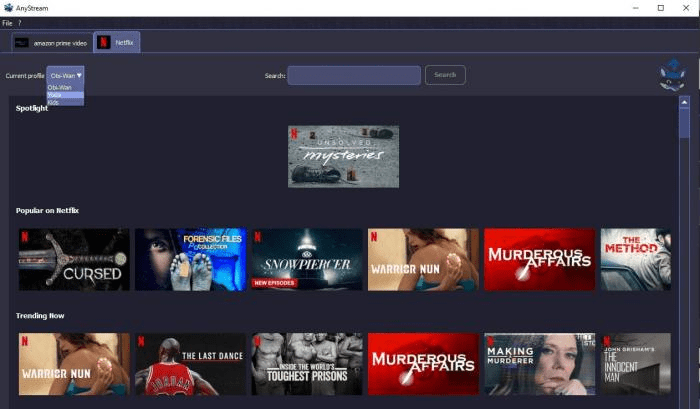
Launch the Netflix tab and enter your login credentials. Locate your desired content by using the search bar. Then click the video you want to download.
Step 3: Customize and Start Downloading
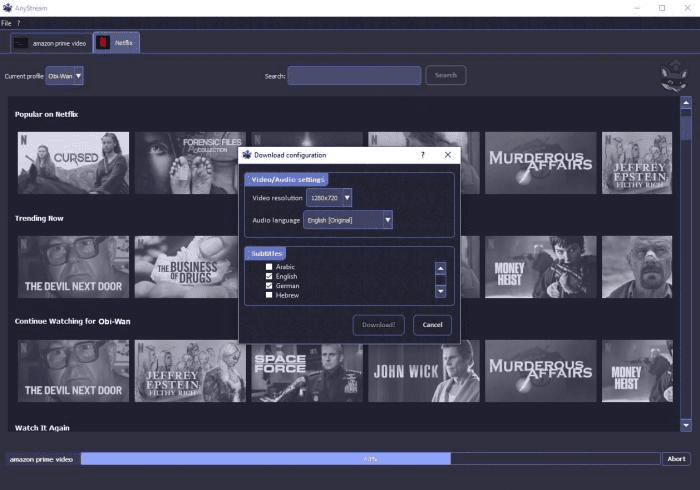
Here you will see a pop-up window. In that pop-up window, you can select the video resolution, subtitle language, and audio language. Once you are set, click on the Download button.
Step 4: Check your Downloads
You can see the download status in the progress bar at the bottom. Once the download is done, a window will display that gives you access to the folder of your video.
These are just some of the simplest steps to save your favorite movies and TV shows so you can watch them later without an Internet connection.
Part 3: AnyStream Down? Time for a Powerful Alternative
If AnyStream is down and you want a more reliable alternative, CleverGet All-In-One Video Downloader is a solid choice. It is a one-stop online video downloader that supports more than 1,000 websites, such as YouTube, Netflix, Amazon, Disney+, Hulu, HBO Max, Apple TV+, and Twitch etc. You can batch download videos, download episodes of entire series, and even download live streams. This way, you can watch it without an internet connection on nearly all devices. CleverGet All-In-One Video Downloader can save videos in MP4, MKV, WEBM, and audio formats.

-
An all-in-one video downloader toolkit that can save online videos including live streams and premium OTT content from over 1,000 sites at up to 8K resolution with an ad filter.
- Batch download movies, TV episodes of certain or all seasons, playlists, etc.
- Support multiple subtitle and audio tracks download selection.
- Record videos in the background at up to 5× speed and 4K resolution.
- Convert videos to MP4, MKV, MP3 or other formats.
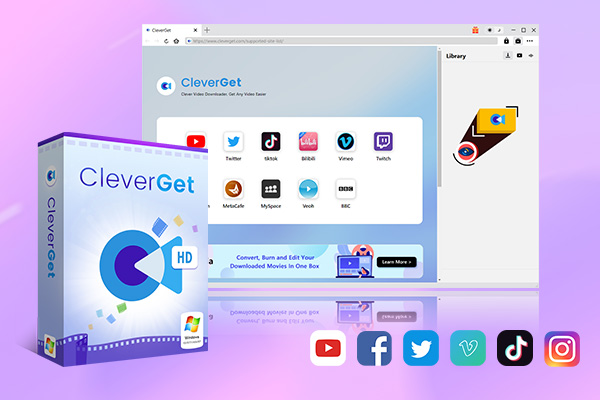
It is capable of capturing streaming video with a max resolution of 4K and 5X speed, including DRM-protected content. The best thing is that it automatically removes the ads. It has several modules, such as Netflix Downloader, Amazon Downloader, Disney+ Downloader, Twitch Downloader, and a generic Video Recorder, so that it can be used with almost any streaming source. Videos that are not downloadable can also be recorded as long as they play in CleverGet. For Windows and Mac users, it’s a one-place solution for all their downloading needs.
Conclusion
RedFox AnyStream was once a good option to download movies from streaming sites, but due to the recent closure that happened recently, its users are trying to find alternatives. CleverGet All-In-One Video Downloader is a good option when it comes to a reliable and all-in-one solution. It works with hundreds of platforms, allows downloading entire seasons, records live, and stores videos in high quality without any hassle. In short, if you want a simple offline solution, CleverGet All-In-One Video Downloader is the ideal option due to its consistent performance across the various services. With one tool you can download from your favorite streaming sites at one place.
-
ScreenRec Review: Real Performance Test
-
Best Ways to Watch YouTube Videos Offline Without Internet
-
How Many People Can Share a Netflix Account?
-
5 Proven Methods to Watch YouTube Without Ads
-
How Long Do Recordings Stay on YouTube TV? Full Breakdown
-
AnyBurn Review: Is This Free Burner Enough
-
3 Best Ways to Download All Videos from YouTube Channel
-
DVDFab DVD Creator Review: Read Before Buying
-
Windows Media Player Review: Is It Working on Windows 11?
-
6 Best Tools to Download YouTube Playlist Fast







-
Best Twitter Porn Accounts You Shouldn’t Miss
-
How to Download Pornhub Videos? Ways to Download from Pornhub
-
Top 5 OnlyFans Viewer Tools to View OnlyFans Content for Free
-
Full Review of Savethevideo: Is Savethevideo Safe & How to Use it?
-
How to Download MissAV Porn Videos in HD for Offline Viewing?
-
Netflix Download Limit: What it is & How to Avoid
-
Full Guide to YouTube Members Only Videos: Watch, Download
-
How to Import Bookmarks from Safari to Chrome
-
How to Download Videos from Fansly with Fansly Downloader
-
4 Methods to Burn ISO Files to Blu-ray Discs Easily















 العربية
 繁體中文
繁體中文 Dansk
Dansk Nederlands
 Suomi
Suomi Français
 Deutsch
 Italiano
 한국어
한국어 Norsk bokmål
 Português
 Русский
 Español
 Svenska