6 Best DVD Rippers in 2026: Free & Paid Options Tested

Summary: This hands-on guide tests six leading DVD rippers, comparing real rip speed, decryption success, and output quality to help readers pick the right tool for their own collection. If you’re short on time, here’s our quick verdict first.
- Best Overall: Leawo DVD Ripper
- Best Free Option: Handbrake
- Best for Beginners: WinX DVD Ripper Platinum
“hey so my grandpa came to me with an interesting request. He’s big into movies and has a few shelves full of old(er) dvds. He regularly travels long distances by train and wants to watch his movies during that time…”
From Reddit
A recent Reddit post captured a problem more common than it seems: Somewhere in a closet or on a shelf, most of us still have a stack of discs that never made it to streaming, and physical media doesn’t get more durable with time. Discs scratch, drives fail, and the people who most need convenient playback are often the least adept at using ripping software. For this reason, DVD ripping software will remain relevant in 2026.
To find the tool that makes this painless, we tested 6 leading DVD rippers.
1. How We Tested These 5 DVD Rippers
We personally install and test each tool under identical conditions. Below, we detail how we evaluate speed, quality, and reliability so that you can compare our test results with your own requirements.
1.1 Testing Criteria
- Ripping Speed
- Output Quality
- Format & Device Support
- Copy Protection Handling
- Ease of Use
1.2 Test Environment
| DVD sample | 1:38:21 (7.59G) |
| OS | Windows 11, Version 10.0.22624.819 |
| CPU | Intel(R) Core(TM) i7-10700KF @3.80GHz |
| RAM | 16GB DDR4 3200MHz |
| GPU | NVIDIA GeForce RTX 3070 8GB |
| Hard Drive | 500GB KINGSTON SA2000M8500G M.2 NVME SSD |
2. Quick Comparison Table: Best DVD Rippers at a Glance
Before diving into the detailed reviews, we first provide a quick comparison overview for readers who want a concise answer right away. You can use the table below to quickly compare prices and compatible formats before reading the detailed reviews.
| Tool | Price | Platform | Output Formats | Rating |
|---|---|---|---|---|
| Leawo DVD Ripper | Free trial / $39.95 lifetime | Windows, macOS | 180+ | Trustpilot: 4.1 |
| WinX DVD Ripper Platinum | Free giveaway / ~$59.95 lifetime | Windows, macOS | 350+ | Trustpilot: 4.0 |
| DVDFab DVD Ripper | Free trial / $59.49 lifetime | Windows, macOS | 1000+ | Trustpilot: 4.5 |
| HandBrake | Free, open source | Windows, macOS, Linux | MP4, MKV, WebM | TechRadar: 4.5 |
| MediaCoder | Free (donationware) | Windows | Wide codec support via FFmpeg | SourceForge: 4.0 |
| MakeMKV | Free (donationware)/ paid | Windows, macOS, Linux | MKV | TechRadar: 4.5 |
3. 3 Best Paid DVD Rippers Reviewed
Paid DVD ripping software typically offers faster processing speeds, more reliable handling of copy-protected discs, and ongoing technical support. Therefore, if you wish to digitize a large DVD collection or edit commercial DVDs, paid software is a great choice. Below is a comparison of the three best paid tools we have tested.
3.1 Leawo DVD Ripper
Compatibility: Windows 7/8/8.1/10/11 and macOS 10.13/10.14…/15/26
Latest version: 13.0.8 (updated early 2026)
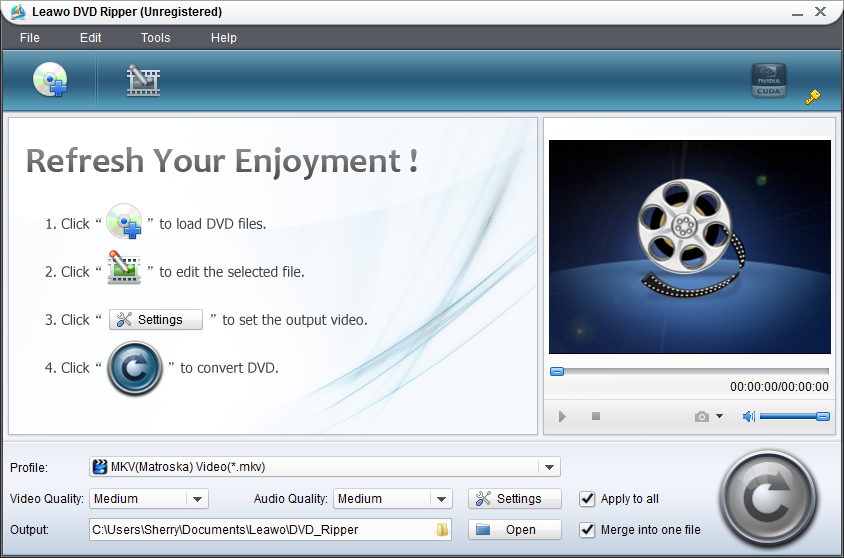
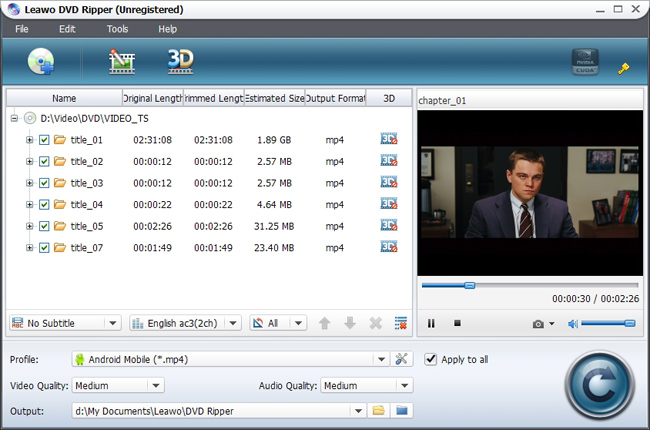
Leawo DVD Ripper can handle standard commercial DVDs, homemade recordings, multi-angle titles, CSS encryption, and region restrictions. It rips DVD discs, folders, or ISO/IFO files to over 180 output formats, with full HEVC/H.265 and H.264 decoding.

The interface follows a simple three-step process: load the disc, select the output profile, and click convert. This shortens the learning curve without overlooking the advanced editing tools sought by experienced users, such as trim, crop, watermark, subtitle selection. For a full walkthrough of converting a DVD to MP4 on both platforms, see our guide on how to convert DVD to MP4 on Mac and Windows.
Test Results
| Rip Time | 17min23s |
| Output File Size | 819MB |
| CPU Usage During Rip | 4% ~ 8% |
| Copy Protection | PASS |
- Wide device-profile library
- Handles protected commercial DVDs
- Built-in basic editing
- Limited in free trial
Summary: Leawo DVD Ripper is an excellent solution for users who need to edit copyrighted commercial media and perform basic editing, while also desiring a user-friendly interface.
3.2 WinX DVD Ripper Platinum
Compatibility: Windows 11/10/8/8.1/7/Vista/XP/2003/2000 (32 & 64-bit); macOS Tahoe (26) ~ High Sierra (10.13)
Latest version: V8.22.4
WinX DVD Ripper Platinum employs algorithms specifically designed for DVDs with 99 tracks, fitness DVDs, TV series DVDs, and other multi-track formats. These types often pose challenges for standard software. The program leverages hardware acceleration technology, including GPU encoding via Intel, NVIDIA, and AMD graphics cards, and supports multi-core processors. According to the developer, the software can achieve ripping speeds of 250 to 500 frames per second, depending on the hardware configuration.

The process has been deliberately simplified: insert the DVD, click DVD Disc to load it, select an output format or device preset, and then click Run. Additionally, the program includes a Safe Mode specifically designed to read damaged or lightly scratched DVDs.
Test Results
| Rip Time | 23min40s |
| Output File Size | 929 MB |
| CPU Usage During Rip | 50% ~ 70% |
| Copy Protection | PASS |
- Simple workflow
- Strong hardware-acceleration support
- Handles modern protection schemes
- Free giveaway license is tied to a specific version with no free upgrade path
- Fewer built-in editing tools
Summary: WinX DVD Ripper Platinum is an ideal choice for readers seeking the fastest path from disk to file with minimal setup, particularly when using modern hardware with GPU acceleration.
3.3 DVDFab DVD Ripper
Compatibility: Windows 11/10/8.1/8/7 (64-bit); macOS 12+ (runs natively on Intel and Apple Silicon M1–M4, including macOS Sequoia)
Latest version: DVDFab 13.0.6.5 (updated Jul, 2026)
DVDFab DVD Ripper is a module within the DVDFab 13 suite, which also includes tools for copying, creating, and enhancing media. It supports physical DVD-5/DVD-9, DVD±R/RW, and DVD-RAM discs, as well as ISO images and VIDEO_TS folders, and handles various protection schemes such as CSS, APS, RC, RCE, Sony ARccOS, UOPs, and RipGuard.

The trade-off for that breadth is complexity. Its interface includes numerous modules and advanced settings, making it steeper to learn than single-function disc-ripping programs. New users can enjoy a 30-day free trial, during which they can perform three full disc conversions and unlock all advanced features.
Test Results
| Rip Time | 18min18s |
| Output File Size | 941MB |
| CPU Usage During Rip | 20% ~ 35% |
| Copy Protection | PASS |
- Wide protection-scheme coverage for older or unusual commercial discs
- Full features in 30-day free trial
- Complex interface
- Expensive price
Summary: DVDFab DVD Ripper is ideal for users of older, specialized, or heavily protected CDs and who do not mind a more complex interface.
4. 3 Best Free DVD Rippers Reviewed
After analyzing three premium paid tools, let’s take a look at three free tools that offer excellent value for money. “Free” does not mean “inferior”; some of the most well-known DVD ripping tools are completely free and open-source. Below, we compare the performance of these three free tools against their paid counterparts.
4.1 HandBrake
Compatibility: Windows 10 or later (needs .NET Desktop Runtime); macOS 10.13+ (Universal binary, Intel + Apple Silicon since v1.4.0); most current Linux distros (Fedora, Ubuntu LTS, FreeBSD)
Latest version: 1.11.2 (2026 stable release)
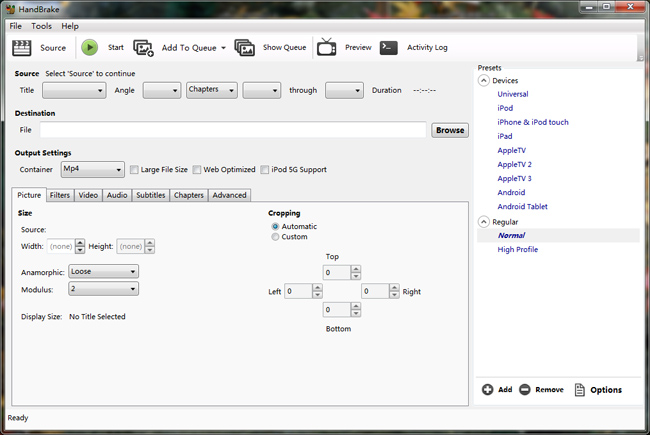
HandBrake is a free and open-source video transcoder released under the GPLv2 license. First released in 2003, it is currently actively maintained by a team of volunteers. It utilizes modern codecs such as H.264, H.265, AV1, VP8, and VP9 to convert videos into MP4, MKV, or WebM formats, supports batch processing and task queuing, and offers an extensive library of device presets.

The most significant limitation, particularly when ripping DVDs, is this: while HandBrake can handle any unprotected DVD or Blu-ray disc, commercial DVDs protected by CSS require an additional library (typically libdvdcss) to read the disc; HandBrake does not bypass this protection by default. For the exact steps to work around this limitation, see our guide on ripping a DVD with Handbrake.
Test Results
| Rip Time | 31min20s |
| Output File Size | 875MB |
| CPU Usage During Rip | 60% ~ 70% |
| Copy Protection | FAIL (require libdvdcss to read the protected disc) |
- Completely free and open-source
- Cross-platform
- Actively developed
- Excellent batch/queue support
- No built-in decryption for copy-protected commercial DVDs
- Overwhelming interface for beginners
Summary: For unprotected, home-made, or decrypted DVD sources, and for anyone who wants full control over encoding without paying for it, Handbrake is the best free option.
4.2 MediaCoder
Compatibility: Windows XP/Vista/7/8/10 only; Mac OS X (32-bit version supported by Darwine); Linux (32-bit version supported by WINE)
Latest version: 0.8.68 (July 2026)
MediaCoder is a free, FFmpeg-based transcoder built for users who want deep encoding control (codec, bitrate, deinterlacing, and GPU acceleration via QuickSync, NVENC, or CUDA), well beyond what most consumer-facing rippers expose.

The catch is that it doesn’t natively decrypt commercial DVD protection, so protected discs need a separate decryption step before MediaCoder can touch them. The interface is also dense and not particularly beginner-friendly, geared more toward technically confident users than casual ones, and the free build displays ads throughout, which is worth knowing going in.
Test Results
| Rip Time | 27min10s |
| Output File Size | 902 MB |
| CPU Usage During Rip | 35% ~ 50% |
| Copy Protection | FAIL |
- Extremely granular encoding control
- Actively updated
- Free to use
- No native decryption for commercial copy-protected DVDs
- Not beginner-friendly interface
- Free build displays ads
Summary: MediaCoder is best suited for technically proficient users who have already decrypted the source files (or unprotected/home-made DVDs) and desire precise control over the encoding process.
4.3 MakeMKV
Compatibility: Windows XP+ (x86/x64/ARM64 native); macOS 10.7+ (x64/ARM64, requires a Gatekeeper workaround); Linux (via forum-distributed build)
Latest version: v1.18.4 (June 2026, current beta build)
MakeMKV takes a different approach than other tools: instead of transcoding the disc into a compressed video file, it directly extracts and saves all audio tracks, subtitles, and chapter markers into an MKV container without re-encoding. If MKV is the format you’re after, our guide on the best ways to rip a DVD to MKV compares this approach against the alternatives.

The downside is the file size: the output file is closer in size to the original disc than to a target compressed bitrate, and the user interface offers very limited options for editing, compression, or device-specific settings.
DVD ripping remains free and unrestricted (requiring no license key), whereas ripping Blu-ray and 4K UHD discs remains shareware, unlockable via either a free beta key (renewable approximately every 60 days) or a one-time paid registration.
Test Results
| Rip Time | 16min45s – no re-encoding (lossless remux only) |
| Output File Size | 7.36 GB (lossless, close to source disc size) |
| CPU Usage During Rip | 12% ~ 22% |
| Copy Protection | PASS |
- Reliable native decryption for CSS-protected DVDs
- Fastest tool with no re-encoding
- Completely free with no license required
- Preserves all audio tracks, subtitles, and chapters losslessly
- Output is MKV only
- No compression or device-preset options
- Significantly larger file sizes
- No built-in editing tools
Summary: MakeMKV is suited for free, fast, and reliable lossless DVD archiving with one-click backups, but less ideal for creating small files for immediate device playback.
5. Head to Head: How the 6 DVD Rippers Compare
Now that we have analyzed each tool individually, let’s compare them based on the most important aspects: raw speed, handling of copy protection, and whether GPU acceleration shoulders the bulk of the workload.
5.1 Conversion Speed

MakeMKV is the fastest at 16m45s, followed by Leawo, DVDFab, and WinX, with MediaCoder and HandBrake trailing at 27m10s and 31m20s respectively. However, the speed differences stem from fundamentally different approaches: tools like MakeMKV mostly perform a near-lossless “remux” (repackaging the format) with minimal processing, making them inherently faster, while HandBrake is a full transcoder that re-encodes video to control file size and quality, which takes more time. In other words, most of the actual speed differences in this list stem from decryption support rather than encoding capabilities themselves – something worth noting before choosing a tool.
5.2 Copy Protection & Decryption
The table below summarizes common types of DVD copy protection used by software.
| Tool | Decryption |
| Leawo DVD Ripper | CSS, region lock |
| WinX DVD Ripper Platinum | CSS, region lock, ARccOS, X-project |
| DVDFab DVD Ripper | CSS, APS, RC, RCE, Sony ARccOS, UOPs, RipGuard |
| Handbrake | NO |
| MediaCoder | NO |
| MakeMKV | CSS |
This is where the purpose-built rippers separate from the general-purpose transcoders. When testing the same commercially protected DVDs under identical conditions using six different tools, the results varied unexpectedly: all tools specifically designed for DVD ripping successfully decrypted the disc, whereas two general-purpose transcoders which rely on their own conversion engines rather than dedicated disc-reading layers – failed to bypass the protection. This is not a software defect but rather a difference in functionality between the tools. Therefore, it is significant to choose a dedicated DVD ripping tool.
5.3 GPU Acceleration Support
The following is a comparison of the most popular DVD ripping tools, GPU acceleration technologies, and the vendors that support them.
| Tool | GPU Acceleration | GPU Vendors Supported |
| Leawo DVD Ripper | YES | Intel, NVIDIA, AMD |
| WinX DVD Ripper Platinum | YES | Intel, NVIDIA, AMD |
| DVDFab DVD Ripper | YES | Intel, NVIDIA, AMD |
| Handbrake | YES | Intel QuickSync, NVIDIA NVENC |
| MediaCoder | YES | Intel QuickSync, NVIDIA NVENC/CUDA |
| MakeMKV | NO | – |
No single tool is perfect in every respect. MakeMKV is unrivaled in reliability when handling protected discs, though it produces the largest files; Leawo, DVDFab, and WinX combine robust decryption capabilities with GPU-accelerated compression; while HandBrake and MediaCoder are better suited for handling unprotected discs. Your choice depends on Your choice depends on whether you prioritize speed, file size, or format flexibility. For most users looking to digitize a mixed collection containing both protected and unprotected media, Leawo offers the most balanced performance among the three solutions.
6. Troubleshooting Common DVD Ripping Problems
With all six tools reviewed, even the best software can occasionally run into problems – here’s how to troubleshoot the most common ones. The table below covers the most common problems, their likely causes, and how to fix them.
| Problem | Likely Cause | Fix |
| DVD Ripper Won’t Detect the Disc | Dirty disc or drive lens, outdated drive firmware | Clean the disc and lens; update your optical drive’s firmware. |
| Ripping Fails or Freezes Midway | Scratched disc, incompatible decryption method | Try a different decryption engine or Safe Mode; consider a disc-repair kit for scratches. |
| “Copy Protected” or Encryption Error Messages | Outdated software, unsupported CSS/region protection | Update to the latest version; verify the tool explicitly supports the disc’s protection type. |
| Output Video Has No Sound or Wrong Audio Track | Wrong audio stream selected during setup | Manually select the correct audio track before starting the rip. |
| Ripped Video Is Choppy, Pixelated, or Low Quality | Low bitrate setting, hardware-acceleration conflict | Increase the bitrate; toggle hardware acceleration on/off and compare results. |
7. Final Verdict
Digitizing a DVD collection doesn’t have to be complicated, but the right tool depends on what you’re starting with. There’s no single “best” DVD ripper for everyone. The right choice comes down to how protected your discs are, whether you need editing tools, and how much you’re willing to pay for convenience.
- Please ensure that disc ripping is carried out in compliance with all applicable laws and is used for personal purposes only.
- All logos, trademarks, and brand names remain the property of their respective owners and are protected by applicable trademark and intellectual property laws.
FAQ Section
Q1 What is the best free DVD ripper in 2026?
HandBrake is the best free DVD ripper for most people, thanks to its active development, wide codec support, and lack of watermarks or paywalls. Its main limitation is that it doesn’t natively decrypt copy-protected commercial DVDs, so it works best on home-burned or already-unprotected discs.
Is it legal to rip a DVD I own?
Laws vary by country, and this isn’t legal advice – but in general, making a personal backup of a DVD you legally own is treated differently from circumventing copy protection to redistribute or sell content. Check your local copyright law, particularly around DRM circumvention, before ripping protected discs.
Can any of these DVD rippers handle copy-protected commercial discs?
Leawo DVD Ripper, WinX DVD Ripper Platinum, and DVDFab DVD Ripper are built to handle CSS encryption and common commercial protection schemes out of the box. HandBrake and MediaCoder do not include native decryption and typically need to be paired with a separate decryption step for protected discs.
What’s the difference between ripping a DVD to MP4 vs. MKV?
MP4 is a highly compatible compression format that is ideal for playback on mobile phones, tablets, and streaming devices, and it typically produces smaller file sizes. MKV is a more flexible container capable of holding multiple audio tracks, subtitle streams, and higher-fidelity video (even lossless video), though this comes at the cost of larger file sizes and poorer compatibility with common devices.
Do I need a physical DVD drive to use these tools?
Yes, unless you’re working from a DVD folder or ISO image that’s already on your hard drive. All six tools in this guide can rip directly from a disc using an internal or external DVD drive, or convert an existing ISO/VIDEO_TS folder without a drive.
Are free DVD rippers safe to download?
Yes, with some caveats. HandBrake and MakeMKV are open-source or long-established tools widely regarded as safe when downloaded from their official sites. All tools in this guide were downloaded directly from the developers’ official websites and personally tested on our own computers. No malware or adware was detected during testing.
What should I do if a DVD ripper can’t read my disc?
Start by cleaning the disc and the drive lens, then check for a firmware update for your optical drive. If it still doesn’t work, try a second ripping tool. Different tools use different decryption engines and can succeed where another fails.
Share this post







 العربية
 繁體中文
繁體中文 Dansk
Dansk Nederlands
 Suomi
Suomi Français
 Deutsch
 Italiano
 한국어
한국어 Norsk bokmål
 Português
 Русский
 Español
 Svenska