

Is HandBrake Safe and Good? An In-Depth HandBrake Review

Summary:
If you want to know whether HandBrake remains the most effective solution for converting your video files, or become outdated? This comprehensive review of HandBrake will explore its performance, give you the pros and cons, and tell you whether it is worth upgrading to something considerably superior.
Outline
For years, HandBrake has been a solid application for converting video files. As a free and open-source program, it converts virtually any format. However, video coding has become so advanced that some people may question whether or not HandBrake is still a great way to convert videos. In this HandBrake review, I will review the performance, safety, and ease of use for the average user so that you can have an informed decision.
Key Features of HandBrake
HandBrake is more than simply a basic converter of video files. It is also a high-quality flexible encoder/transcoder with several advanced features. The core features of HandBrake are:
Universal Input: HandBrake supports converting almost all multimedia formats, as well as non-copy-protected DVDs/Blu-rays.
Options for Output Formats: HandBrake supports MP4, MKV, WebM, and has many options for audio output, including pass-through options for high-quality audio formats such as DTS-HD and TrueHD.
Great Video Filtering Options: For the editing of older and low-quality video footage, HandBrake allows users to apply a wide variety of filters to improve the overall quality from deinterlacing, denoising, sharpening, adjusting colour space/colour gradient levels, etc.
Efficient Batch Processing: Batch scanning and batch queueing features allow you to create and automate the process of encoding/transcoding multiple videos in a single session, and the feature called "Live Preview" allows you to review video settings such as audio and video codecs, as well as audio and video languages, before starting the long conversion.
HandBrake User Interface and Ease of Use
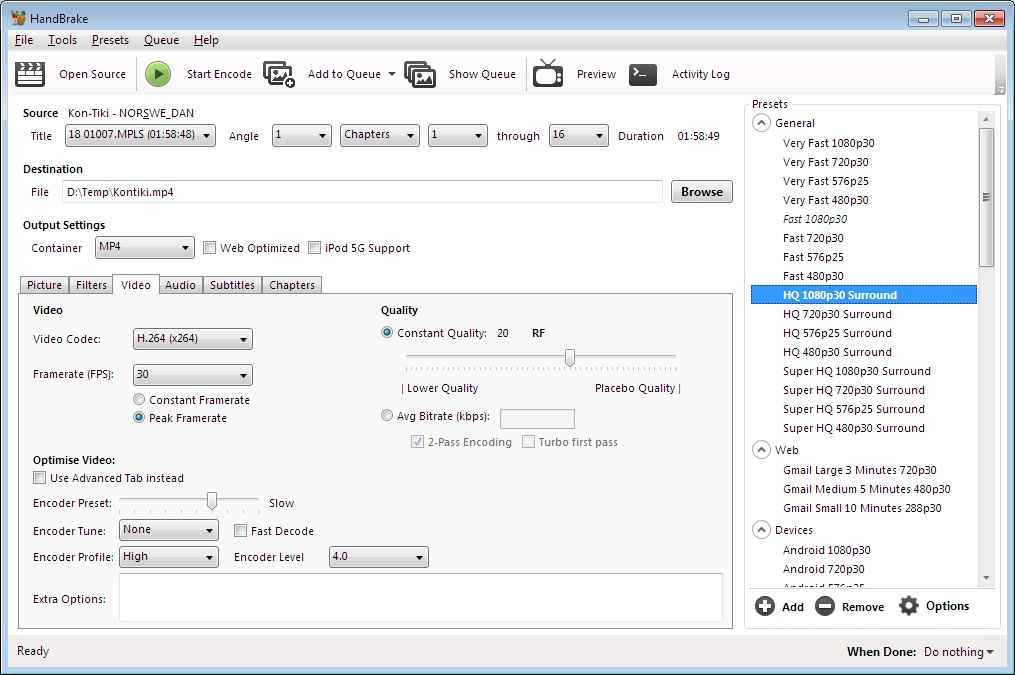
The primary focus of the HandBrake user interface is maximising productivity, but many people may find it difficult to work with. While the top toolbar provides clear buttons for "Open Source" and "Start Encode." The area in the centre is filled with a number of tabs, including Video, Audio, and Filters, and contains several sliders and dropdown boxes. When working with the user’s workstation, while providing you with a very high level of detail, it may appear cluttered and complex for the novice user.
To make up for the deficiency, the software has added a detailed preset sidebar on the right side, which improves usability. Those who are beginning to use it can skip over information regarding advanced settings just by selecting a pre-set profile (such as "Fast 1080p30"), which will yield good results immediately. However, for those wanting to advance beyond basic level use, there is still a steep learning curve because they need to understand how to work with bitrates, codecs, and frame rates to be able to use these features properly.
Is HandBrake Safe and Legal to Use?
HandBrake is known to be safe and free of malware, as long as you download from the official website HandBrake.fr. It is an open-source program, meaning it is thoroughly checked by public viewers. But it still might be advisable for you to check the files for any third-party scandal upon download.
The software remains 100% legitimate to use to convert video files. However, it cannot bypass the DRM-encrypted file, and many users add third-party libraries called libdvdccss to this software to rip DRM-protected DVD or Blu-ray discs. The legality, particularly regarding bypassing the encryption, remains in the grey area (companies legally don’t allow you to do that). But, if you use the converted file for personal use, not for commercial purposes, it is widely recognized as fine.
Pros and Cons of HandBrake
To assist you in making the decision whether this software is useful in your daily activities, let us make a comparison of the pros and cons of using HandBrake. Even though it is still one of the leading tools in the field, it has some challenges.
Pros:
Completely free to use.
It supported a lot of modern codecs like AV1, H.265, and H.264, MPEG-4 and MPEG-2, VP8 and VP9, which provide superior quality and great compression.
Whether you use Windows, macOS, or Linux, HandBrake gives a consistent user experience.
Power users can modify every setting from VFR (Variable Frame Rate) to audio pass-through tracks, which is professional.
Cons:
The interface is overwhelming for those users seeking only a “one click” solution, who may find the technical tabs and terminology confusing.
HandBrake has only three export options for video outputs: MP4, MKV, and WebM. Other formats, for instance, MOV, AVI, and WMV, require a different tool.
Converting process tends to be slow compared with other similar software.
It cannot decrypt protected DVDs or Blu-ray discs unless you install extra third-party files, and the processes are complicated for average users.
You cannot do clip trim edits, text overlays, or "cut and paste" edits before converting.
Best HandBrake Alternative
Despite the fact that HandBrake is a reputable open-source software, there are some drawbacks that simply cannot be ignored, especially when some users want to decrypt commercial Blu-ray discs. Also, this software has a limited output formats that include merely MP4, MKV, and WebM, with slow conversion speed for converting high-definition files.
Therefore, if you want an alternative to HandBrake that gives you much greater versatility and efficiency, you should consider other best Blu-ray rippers available for your needs. A great example is Leawo Blu-ray Ripper, which provides a better professional experience.

-
Comprehensive Blu-ray ripping and converting software to decrypt, rip and convert Blu-ray/DVD disc, folder and ISO image file.
- Remove multiple Blu-ray/DVD disc protections and region restrictions.
- Convert Blu-ray/DVD to video/audio in 180+ different formats.

Company Support and Software Update: Leawo is a company-made product, so it is able to be updated quickly to solve bugs. While HandBrake relies on volunteers’ developers, the update frequency is much lower than Leawo (the last update is in June, 2026).
Directly Bypass Protections: Unlike HandBrake, which needs to install a third-party plug to bypass protections, you can use Leawo to directly decrypt protections like AACS, BD+, MKB, and CSS-DVD. This means you can directly rip and convert Blu-ray files to MP4 and other formats without complicated steps.
Multiple Format Support: Leawo enables you to rip Blu-ray or DVD videos and convert them into more than 180 formats, like MOV, WMV, AVI, FLAC, MP3, etc.
Lossless Quality and Speed: Blockbuster fans will be able to rip Blu-ray to MKV with lossless original quality, including all the audio tracks and subtitles, and it supports faster video processing with NVIDIA CUDA、AMD APP, and Quick Sync Video technologies.
Creative Editing and 3D Conversion: Leawo also provides creative 2D to 3D conversion within the program, with 6 adjustable effects for your converted video file. HandBrake does not feature with this kind of functionality. Also, Leawo offers you a complete video editing suite, enabling you to cut, crop, and watermark your movies before conversion, offering you the creative possibilities that you will not find in HandBrake
Conclusion
There is no doubt that HandBrake is still a good tool for transcoding, especially in regard to the quality, and it is free. But if your requirement is not only transcoding but also involves ripping a commercial Blu-ray, or you want more in terms of the output formats, such as MOV and AVI, then Leawo Blu-ray Ripper is definitely the best pro-level solution. With its built-in ripping mechanism, more than 180 output formats, and quick processing speed, it makes this tedious job a one-stop solution.
Share this post













 العربية
 繁體中文
繁體中文 Dansk
Dansk Nederlands
 Suomi
Suomi Français
 Deutsch
 Italiano
 한국어
한국어 Norsk bokmål
 Português
 Русский
 Español
 Svenska