
How to Recover Deleted Photos from HTC One

The debut of flagship HTC One in London on February 20th, 2013 shines HTC fans’ eyes again with its unduplicated creation in Ultrapixel sensor camera. Different from ubiquitous megapixel camera, HTC One takes a different track in bringing in Ultrapixel sensor, which allows us to capture 200 percent more light on the sensor. With it, we can take better quality photos even in dim light.
However, when we are editting, sharing, or uploading photos from HTC One, accidents often happen. We may often encounter the occasion of deleting treasurable photos or other important files from our HTC One carelessly, or suffering destruction of virus so that we have to format our SD card. No matter due to what kinds of reasons, the fact we encounter is just simple — we lost our precious photos and memories forever. Really what you see? No, not really, the photos don’t vanish completely, they are just inaccessible.
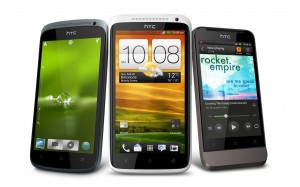
In that case, it is imperative to find ways to recover deleted photos from HTC One. Here I’ll share with you a good method to retrieve the deleted files from HTC One with use of powerful software — Leawo Data Recovery for Mac.
We can use the best data recovery tool to help us find back deleted files from HTC One, including photos, videos, movies, music, etc. One point to remember is to stop using your phone or micro SD card once you have lost your photos, which is beneficial to recover your photos.
Get the free trial version of Leawo Data Recovery for Mac, just a few clicks to help you easily retrieve deleted data from HTC One.
Step 1: Download Leawo Data Recovery for Mac on your Mac and run it.

Step 2: Choose one recovery mode from the provided three recovery modes: File Recovery, Photo Recovery, Lost Partition Recovery.
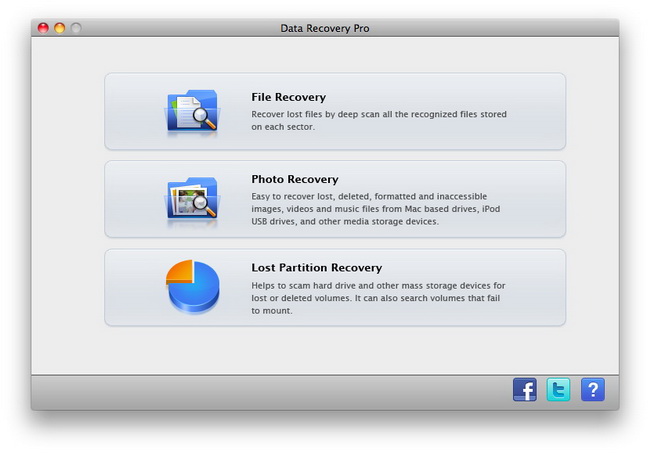
Suggestion: Choose “File Recovery” to conduct deep scan for all kinds of files recovery. If you only want to recover photos, music or videos, “Photo Recovery” mode will save you much time.
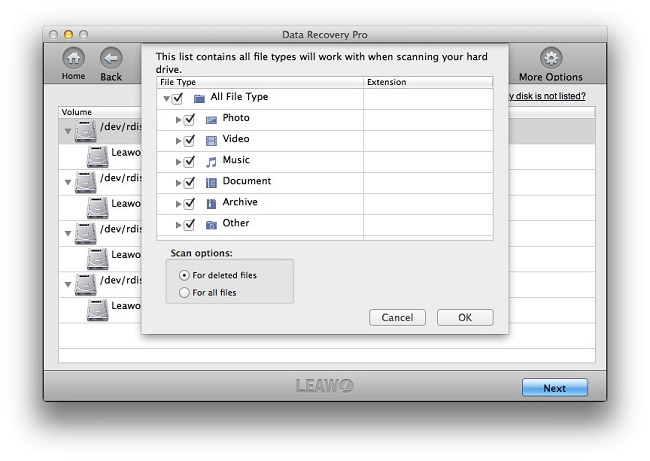
Step 3: Select Disk. Then the programme will begin to scan all the files on the computer. The software will automatically perform process of “Scanning — analyzing — reading sector”.
Step 4: Select files or single document to recover. You can search by file name in the search box on the top right corner, both “Reconstructed Files” and “Lost Files” are available to recover from. Double click or press space to preview the selected files.
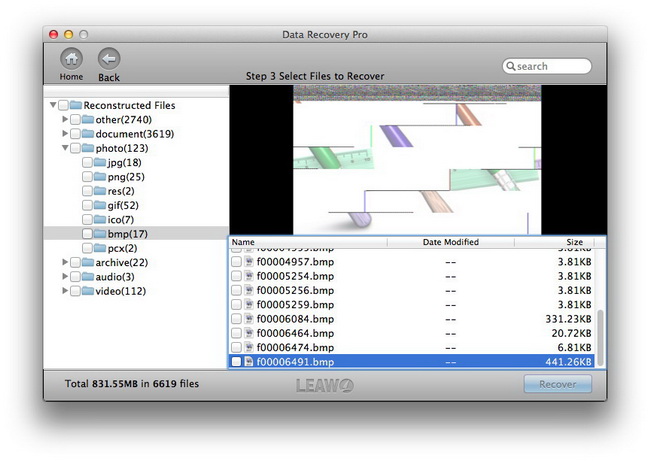
Click “Recover” to recover the selected files. The interface will prompt you to select a position to save.
Tips: It’s recommended to save the recovered files on another drive to avoid the lost/deleted data being overwritten.
Just five steps, you have successfully recovered the photos, files, music or videos you want to regain on your Mac. Then just immerse yourself in the wonderful regaining mood of sharing your photos with friends and families.
You can also use Leawo Photo Recovery for Mac to retrieve all your lost photos, music, videos from Mac hard drive.
Note: For Mac App Store version, please download free Data Recovery Helper to enable system hard drive recovery.
Share this post









 العربية
 繁體中文
繁體中文 Dansk
Dansk Nederlands
 Suomi
Suomi Français
 Deutsch
 Italiano
 한국어
한국어 Norsk bokmål
 Português
 Русский
 Español
 Svenska