Have you ever googled for WMV to MPEG converter to convert your WMV videos to MPEG videos for playback on your own portable devices? Is there an appropriate one to satisfy your needs? Why not try Leawo Video Converter, the best WMV to MPEG Video Converter this time? As a professional MPEG video converter, it enables you to convert all popular formats from one to another, including AVI to MP4, MP4 to WMV, FLV to RM, WMV to MPEG, MP4 to VOB, etc.
Leawo WMV to MPEG Video Converter also has several powerful functions, such as croping video, triming video, adjusting video effects, watermarking and video settings. Moreover, its user-friendly interface and easy-to-use design definitely make your WMV to MPEG video conversion easy and fast, without quality loss. Of course, you can enjoy your MPEG files made from WMV on your portable players like iPod, iPhone, PSP, etc.
Want to enjoy your digital life now? Please download and install Leawo WMV to MPEG Video Converter first.
Okay, in this guide we will explain how to convert WMV to MPEG video file with Leawo WMV to MPEG Video Converter, which can convert videosa among all video formats easy and fast.
Full Guide

Add videos
Click “File” button or add icon to add WMV files to the program.
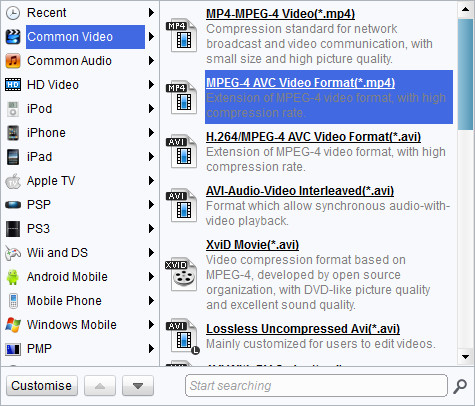
Choose output video format
Choose “MPEG-1 Movie(*.mpg)” in “Profile”. And also, select your destination folder in “Output”.

Add features to the output videos
Click "Edit" to open the editing window. Then you can customize the output audio and video.
- Under "Trim", set the "Start Time" and "End Time" points for a video length.
- In the droplist of "Letter Box", select a "Crop" style, or adjust the offset values for a precise cropping.
- Under "Effect", drag the slides of "Brightness", "Contrast" and "Saturation" for a better visual effect. Drag "Volume" slide to adjust the volume.
- Under "Watermark", add an image or text over the video as watermark.

Start conversion
Click "Convert" at the right of the bottom to start the conversion. You'll find the conversion time, progress bar and be able to set after-done operations for attention-free control.
Extended Knowledge
WMV (short for Windows Media Video) is a video compression format for several proprietary codecs developed by Microsoft. The original video format, known as WMV, was originally designed for Internet streaming applications, as a competitor to RealVideo. The other formats, such as WMV Screen and WMV Image, cater for specialized content. Through standardization from the Society of Motion Picture and Television Engineers (SMPTE), WMV 9 has gained adoption for physical-delivery formats such as HD DVD and Blu-ray Disc.
