Nintendo DSL player has a self-designed multimedia player called Moonshell, which makes it possible for any video playback on the player as long as the video is converted to DPG format. If you are going to convert WMV to DPG videos, this guide will tell you how in only 5 steps.
Download Leawo Video Converter. Make sure to setup on Windows NT/2000/XP/Vista/Win7. An additional K-lite codec pack is optioned for installation. For the enhancement the codec pack will provide, we recommend you install it as well.
Full Guide

Import videos
run Leawo WMV to DPG Converter and import WMV videos. The program supports a convenient way to drag and drop files from the file explorer. After import, the WMV videos can be previewed, rearranged in processing order and renamed for output.
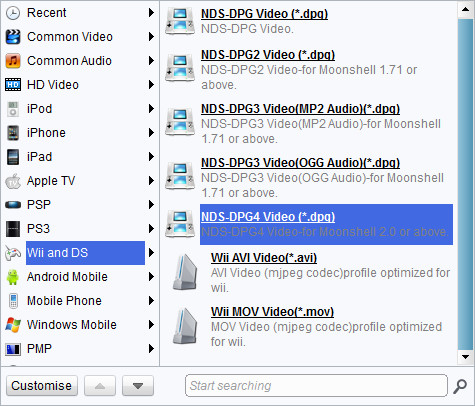
Choose output video format
Choose video format for output. In the Profile dropdown box choose DPG as the output format.

Add features to the output videos
Leawo WMV to DPG Converter also offers useful video edit functions for user customizations.
- The Trim function comes with video length modification control.
- The Crop function comes with video black margin remove control.
- The Effect function comes with brightness, contrast, audio volume and some other visual controls.
- The Watermark allows adding an image or text over the video as watermark.

Start conversion
start the conversion process. In the process panel, you are presented with the task progress, the estimated working time and file size. The process control is fully operational in Pause, Skip and Cancel. If you are stuck in a long conversion process, you will find the after-done actions very helpful.
Extended Knowledge
WMV (short for Windows Media Video) is a video compression format for several proprietary codecs developed by Microsoft. The original video format, known as WMV, was originally designed for Internet streaming applications, as a competitor to RealVideo. The other formats, such as WMV Screen and WMV Image, cater for specialized content. Through standardization from the Society of Motion Picture and Television Engineers (SMPTE), WMV 9 has gained adoption for physical-delivery formats such as HD DVD and Blu-ray Disc.
DPG is a video container format used for playing movie files on the Nintendo DS portable gaming device; may be converted from other video formats to DPG using MoonShell or another converter program. It can be played on the Nintendo DS by transferring the DPG file to a DS-compatible GameBoy Advance card and also be played back on a PC using supporting player.
