There are demands to convert MPEG to MOV, so as to have the videos work better on Apple's Mac OS and portable terminals. As a professional video converter, Leawo MPEG to MOV Video Converter offers a fast video conversion and high quality output. To add to the joyful experience, this MPEG to MOV Converter has extensive video editing features for video enhancement and entertainment.
Leawo MPEG to MOV Video Converter is a clean and safe program, easy to install and remove, you can free download Leawo Video Converter from its product page. It runs flawlessly on NT/2000/XP/Vista/Win7.
Leawo MPEG to MOV Video Converter features a friendly greeting interface upon startup. It is the first impression for the users to get in touch with Leawo’s user-oriented style and this guide will further reveal how convenient it is in video conversion.
Full Guide

Load the MPEG videos
By opening Leawo Free MPG to AVI Video Converter, you will be greeted with a fresh and light interface. All the functions are clearly visible. You can drag the video files directly in the standby list and the program will crunch the data. In a few seconds, the information about the video files is on display. You can rearrange the order of the list or delete some unwanted or completely clear all the entries. As to prevent any import mistakes, you may double click the file name to play on preview.
Choose output video format
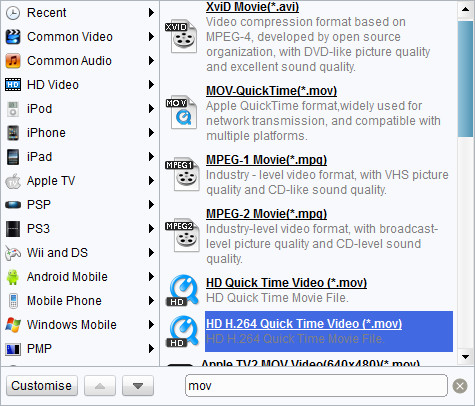
Leawo MPEG to MOV Video Converter has a great number of profiles for outputs. You may easily locate MOV output profile in Common Video catalogue. Access to the advanced settings via Settings button and make your own favorable settings. If you want to keep your own settings, you may save them as a new profile.

Add features to the output videos
Access the customization control panel by clicking on the Edit button.
- Under "Trim", set the "Start Time" and "End Time" points for a video length.
- In the droplist of "Letter Box", select a "Crop" style, or adjust the offset values for a precise cropping.
- Under "Effect", drag the slides of "Brightness", "Contrast" and "Saturation" for a better visual effect. Drag "Volume" slide to adjust the volume.
- The "Watermark" part offers functions to give image watermark or text watermark on the video.

Start conversion
To boost the video conversion speed, you can start a triple video conversion, which means Leawo MPEG to MOV Video Converter will convert at most three videos at the same time. What you need to do is set the number of Max Process to 3 in "Options-Preferences" panel.
As an easy-to-use MPEG to MOV converter, Leawo Video Converter is more than sufficient to your needs in relevant video conversions. To increase its value, it can also manage almost every video format as well as audio format, while the investment is only $29.95 now! Registration will ensure additional value-added services such as life-long free update and first priority service. If you are Mac user, Mac Video Converter is an equivalent choice.
Extended Knowledge
MPEG stands for the Motion Picture Experts Group, part of the International Organization for Standardization (ISO) and International Electrotechnical Commission (IEC), charged with creating and publishing standards for various areas of technology, respectively. MPEG standards address audio and video formats used online, in television broadcasts, and in DVD media.
MOV video file is common multimedia format often used for saving movies and other video files, uses a proprietary compression algorithm developed by Apple Computer, compatible with both Macintosh and Windows platforms. The format specifies a multimedia container file that contains one or more tracks, each of which stores a particular type of data: audio, video, effects, or text (e.g. for subtitles).
