Born in the HD video age, MKV is no doubt meant for HD video carrier. But there are still lacks of support for MKV videos in portable device area, where popular devices like iPod/iPhone, PSP, cell phones, PMP and so on are not ready to support MKV yet. An applicable approach to convert MKV to MP4 video, which is widely supported by portable devices, is to be addressed in this guide. Eye over this short guide and learn how to convert MKV to MP4 videos easy and fast.
Guide on using Leawo Video Converter — the best MKV to MP4 Converter to convert MKV to MP4 formats.
Full Guide

Load MKV files for conversion
Drag and drop for file import is supported. After import, the files on the list can be previewed in the combined player window or rearranged to a new order.
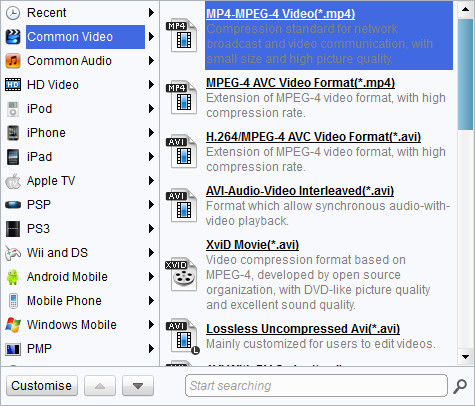
Pick a proper profile for MKV to MP4 output
Leawo MKV to MP4 Converter conveniently sets up multiple profiles for MP4 output to match some portable players, such as iPod/iPhone, PSP/PS3, cell phones, PMP, etc. As a professional user, you may also access to the codec setting panel via Settings button to tune the profile settings. It is convenient to make your own profile settings and access them later in User Defined category.

Useful video edit functions for user customizations
Edit the video before the conversion if you wish to. The edit functions are located behind the edit icon, coming in five subs as Effect, Trim, Crop, Watermark.
- The Trim customization focuses on assigning new video length.
- The Effect customization focuses on changing and improving audiovisual effect of the video.
- The Crop customization focuses on defining new video screen size.
- The Watermark customization focuses on applying image or text as watermark.

Start the MKV to MP4 conversion
Leawo MKV to MP4 Converter will smartly calculate the to-be-spent time and after-conversion file size. Capable of batch, multiprocessing and after-done actions, the MKV to MP4 converter is to present a smooth and fast conversion course.
In the end, Leawo MKV to MP4 Converter is among the best you can get!
Extended Knowledge

MKV is the filename extension for Matroska Multimedia Container, an open-standard free container format. A Matroska file can hold a number of audio, video and subtitle streams, besides attachments like graphics and decoder filters all at the same time, thus allowing a complete movie to be stored in a single file.
MP4 is short for Moving Picture Expert Group-4. MP4 is also known as MPEG-4 AVC, or advanced video coding. This new technology is going to make video files decrease in size so that they are easier to work with and support. What used to be massive video files of motion and audio are now compressed versions of the same material, called MP4s.
