How to download flash video from YouTube with Leawo Free YouTube Downloader?
Leawo Free YouTube Downloader is a free YouTube video Downloader, which can be used to download YouTube videos and download videos from other video sharing sites. Leawo YouTube Download is very easy to use. The tutorial below will show you exactly how to download YouTube videos in two methods.
Method 1:
- Open the program and type www.youtube.com in the address bar.
- Drag the video thumbnail to the hover window of the program.
Method 2:
- Open the program and type www.youtube.com in the address bar.
- Choose a video to play and click "Video" tab to watch and check the downloading progress at the same time.
- Click "Download" button to download video to your PC when the downloading progress completes.
How to convert FLV to Zune?
There are 2 ways to convert FLV to Zune. You may convert the video with online web sites offering the service to convert FLV to Zune, such as ConvertDirect.com, you can use the conversion tool to convert FLV to Zune, too. Compared with online conversion, it's always better to convert FLV to Zune using the conversion tool, especially when you have multiple conversion tasks and want to bring them home for fun. Because there is no limit of internet speed that will cause constant conversion abortion, etc.
Why to convert FLV to Zune with Leawo FLV Converter?
Convert FLV to WMV, the acceptable format of Zune player, is to play the amazing flash videos in your Zune player anytime you want. Leawo Video Converter is exactly a professional FLV converter that can convert FLV to videos in variety of formats, including converting FLV to Zune, for playback in different portable devices like Zune, PSP, cell phone, etc. Convert FLV to Zune format WMV with Leawo FLV Converter, you can get your flash videos cropped, trimmed and logoed during the FLV to Zune conversion; you can save a lot of time because this FLV converter supports to batch convert FLV to Zune WMV. Follow the guide on how to convert FLV to Zune with Leawo FLV Converter.
Full Guide

Import videos
Launch Leawo FLV Converter and click "Add" to input FLV videos.
Choose output video format
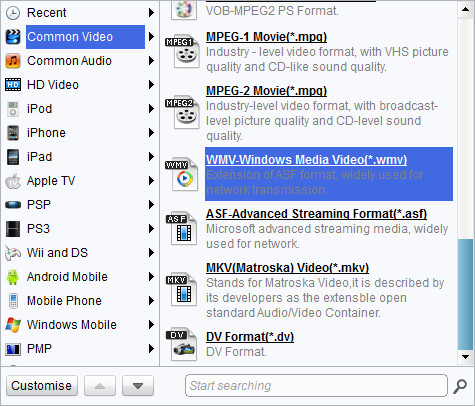
Double click FLV video file name to have a preview. To convert FLV to Zune WMV, just select Zune WMV as the target output format from "Profile" menu.

Add features to the output video
Click "Customize" to enter more settings.
- Trim video by changing the time points or dragging the triangles on the slide to get a duration.
- Crop video by dragging the video frame or selecting from "Letter Box" for the proper dimension.
- Drag the slides to adjust video effect.
- Add an image or a text as watermark and adjust its position, transparency and size.

Start conversion
Click the big green button to start the FLV to Zune conversion for your Zune player.
Extended Knowledge

Zune is a digital media brand owned by Microsoft which includes a line of portable media players, a digital media player software for Windows machines, a music subscription service known as a "Zune pass", music and video streaming for the Xbox 360 via the Zune Software, music, tv and movie sales, and the media software for Windows Phone.
