How to convert DVD to Xvid with DVD to Xvid Converter?
There are always needs to convert DVD to Xvid in order to share movies on internet. This guide will help you overcome all the difficulties and rip DVD to Xvid video all by yourself. Isn't it cool? The coolest is that the conversion from DVD to Xvid is much simpler than you thought. In Leawo DVD Ripper, you can turn out industrial Xvid movies in a flick of time.
This DVD to Xvid Converter is a green tool which is in peak compatibility with your computer. Feel free to try it without security risk to your personal data.
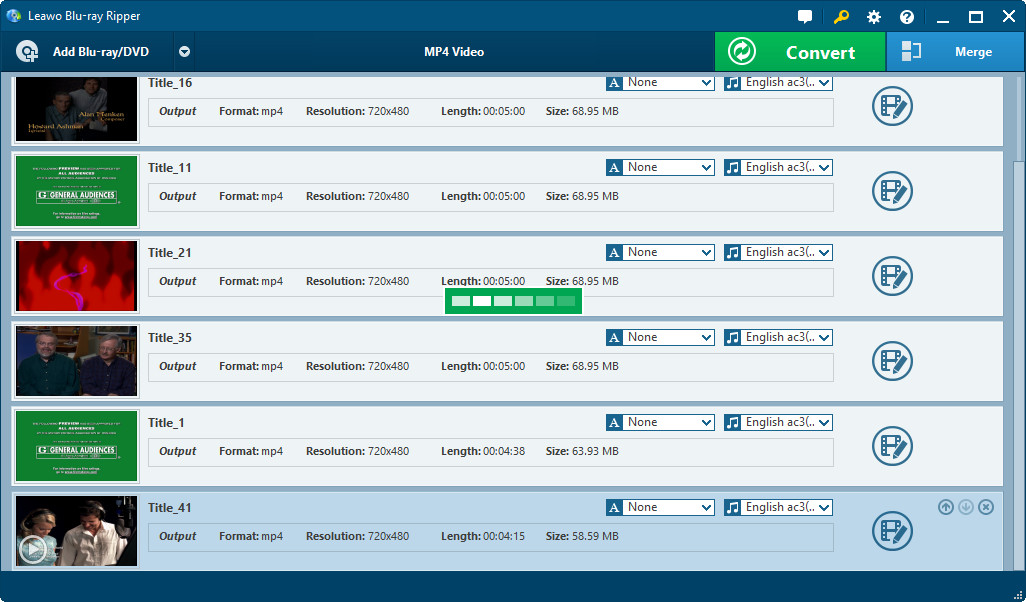
The very first step, as in many other similar softwares, is to load the resource you want to process. In this case, it is referred to the DVD which you want to convert to Xvid video. More than just one way to load from the DVD disc, you are also allow to copy the DVD folder to your harddisk in advance and load the resource from there. But it is suggested that the structure of the DVD folder be exactly the same with the original, or the loading command may fail.
Once you finish loading the DVD resource, a list of DVD content called chapters are in tree order. You can select one or more of them for conversion. Each of them will generate a corresponding Xvid video file in the output folder. If you choose to merge them, there will only be one Xvid video file after the conversion.

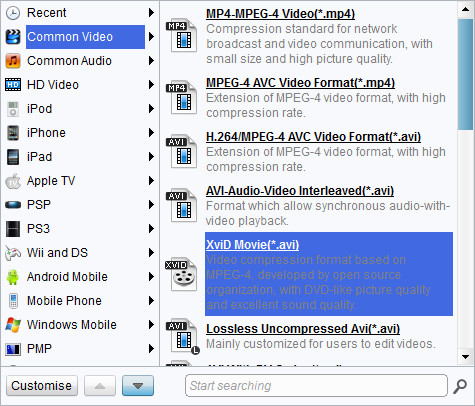
It is only 1/3 done in the course of conversion. Here comes the tough part for most of us, the settings. In the video converters of the old days, you have to look up for what all the settings mean and it takes a considerable time before you feel confident to start the conversion. Nowadays, the confusing settings are hidden behind a thing called profile. In consideration for the common needs of users, the video experts have come out with the most optimized settings that can be constantly used in many situations. Therefore, users don’t need to bother the settings anymore. Abundance of profiles is provided, as many as you count in this DVD to Xvid Converter. You may also easily find Xvid video profile right on top of many others in the Common Video column, because Xvid video is a very popular output format for DVD video.

Once again, the settings are simplified to mere three levels. They are levels of high, medium and low on video quality and audio quality separately. Choose the one that meet your need most immediately. One thing to remember is that, the quality is up, so is the file size.
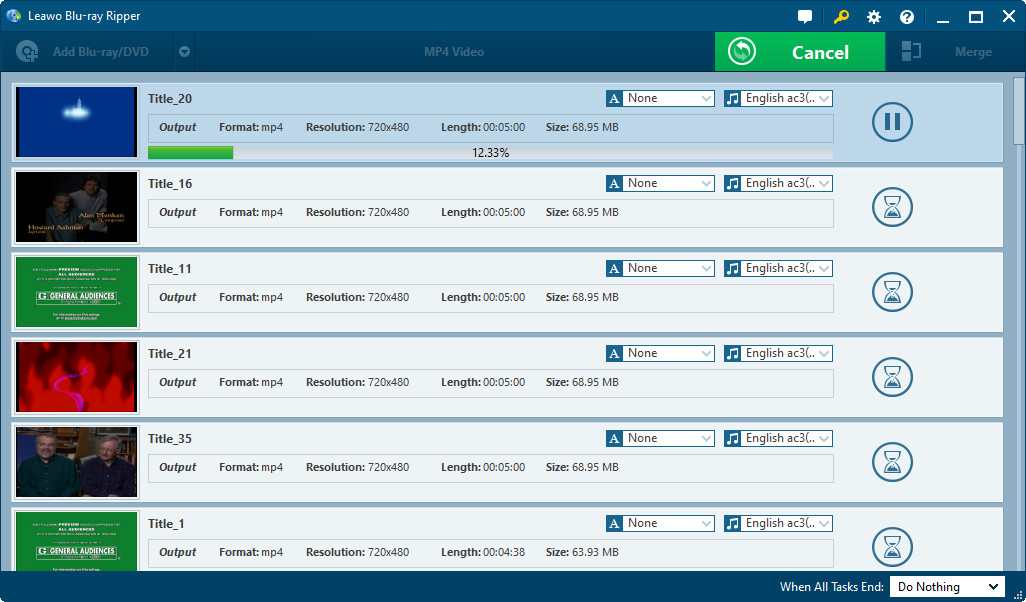
Some other options like Subtitle, Audio and Angle are already set to default after loading the DVD. With all necessary settings in position, you are all free to start the conversion now by pushing the Convert button. The DVD to Xvid conversion is done in such an easy and fast way.
If you feel this is far from ending, there are still places for you to tune out the best output. In Leawo DVD Ripper, you are free to access the advance setting panel where the hidden settings are found. Also, accessing to the customization control panel enable you a wonderful experience in editing video in a more extensive way.
For more information, visit Leawo DVD Ripper online.
Last but not least, some useful knowledge to feed.
What is DVD?
DVD (also known as "Digital Versatile Disc" or "Digital Video Disc") is a popular optical disc storage media format. Its main uses are video and data storage. Most DVDs are of the same dimensions as compact discs (CDs) but store more than six times as much data.
DVD-Video discs respectively refer to properly formatted and structured video content. It uses MPEG-2 for video compression, with AC-3, DTS or MPEG audio for multi-channel audio support.
To decode DVD, you will need both GPL MPEG-2 Decoder, and AC-3 Decoder.
What is Xvid?
Xvid (formerly "XviD") is a video codec library following the MPEG-4 standard, specifically MPEG-4 Part 2 Advanced Simple Profile (ASP). It uses ASP features such as b-frames, global and quarter pixel motion compensation, lumi masking, trellis quantization, and H.263, MPEG and custom quantization matrices. In a short word, it has a DVD-like video quality but usually half or smaller the size of DVD video.

Free Resources
Guide & Tips
- MoreVideo Related
- AVI to DVD | AVI to MP4| AVI to MPEG | MP4 to AVI | AVI to WMV | MPEG to AVI | WMV to AVI | MP4 to MP3 | MKV to AVI | MOV to AVI | MP4 to WMV | VOB to AVI | WMV to MP4 | WMV to MPEG | 3GP to AVI | RMVB to AVI | MKV to DVD | MPEG to MP4 | MP4 to YouTube | MOV to WMV |
- MoreDVD Related
- DVD to WMV | DVD to MPEG | DVD to YouTube | DVD to 3G2 | DVD to PowerPoint | DVD to MPG | DVD to VCD | DVD to Xvid | DVD to MP3 | DVD to MPEG4 | DVD to MOV | DVD to RMVB | DVD to VOB | Put DVD to Media Player | DVD to H.264 Coded MP4
- MorePortable Devices Related
- DVD to iPod | DVD to iPhone | DVD to PSP | DVD to Apple TV | DVD to Zune | AVI to iPod | AVI to iPhone | WMV to iPod | WMV to PSP | CD to iPod | MKV to PSP | AVI to PSP | MKV to iPhone | Video to Zune | MKV to iPod | WMV to iPhone | YouTube to iPod |
- MorePPT Converter Related
- Convert PowerPoint to AVI
- Put PowerPoint onto YouTube
- Make A Mobile Presentation
- Publish PowerPoint on Web
- PowerPoint Promotes Business


Join our Newsletter!


Freeware List