
“I would like to convert AVI to WMV to run on my Xbox360. Can you please recommend an AVI to WMV converter? I’m using media center on my laptop to stream all my audio and video to my xbox360 so I can watch all my films on the 32-inch screen rather than the laptop. Thanks for any help, it’s much appreciated.”
Actually, there are many AVI to WMV video converting programs available for helping you solve such kind of problems. Moreover, there are also some online video converters that can convert AVI to WMV online. Here you will find several solutions to convert AVI to WMV easily and effectively. And you can feel free to choose the one that better meets your need.
Part 1. How to Convert AVI to WMV with Leawo Video Converter
First of all, Leawo Video Converter would worth a shot if you prefer powerful and efficient computer programs. As one of the top-rated video converters, Leawo Video Converter can play an important role in converting AVI to WMV. Leawo Video Converter not only converts AVI to WMV videos, but also converts other video and audio formats, including MP4, AVI, MOV, MP3, AAC, etc. Besides, Leawo Video Converter also could convert 2D video to 3D and edit video. The below guide shows you how to convert AVI to WMV video files by using Leawo Video Converter.
Download and install Leawo Video Converter on your computer beforehand. Note that Leawo Video Converter has Windows version and Mac version, choose the proper version that is compatible with your computer OS.


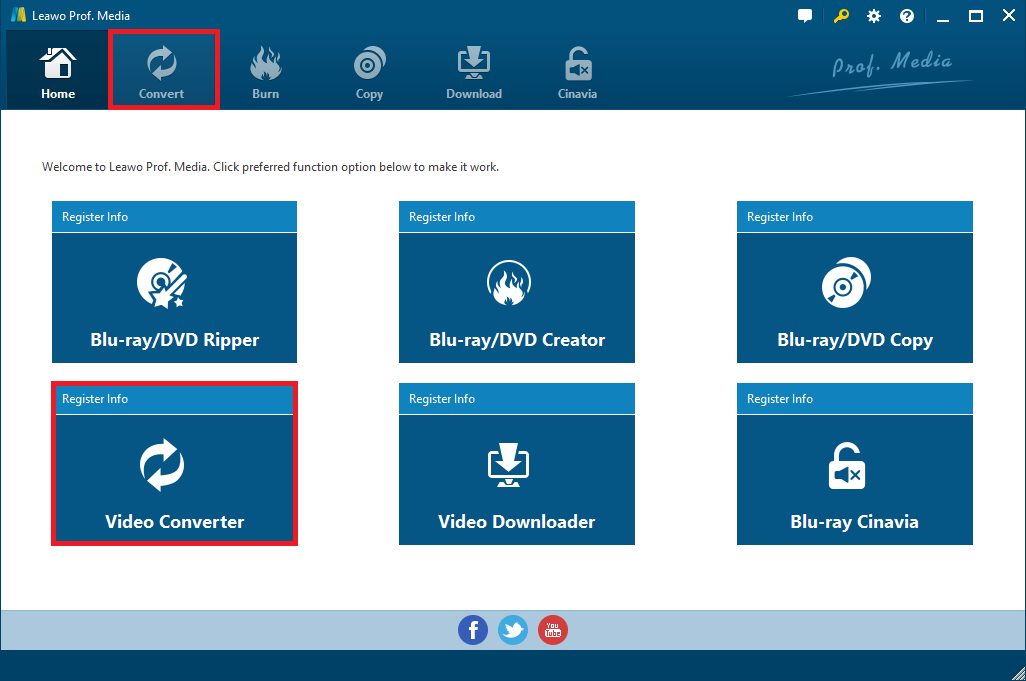
Step 1. Enter video converter module
Kick off Leawo Video Converter to enter the main program interface, now click on “Video Converter” tab or “Convert” button to enter the video converter module.
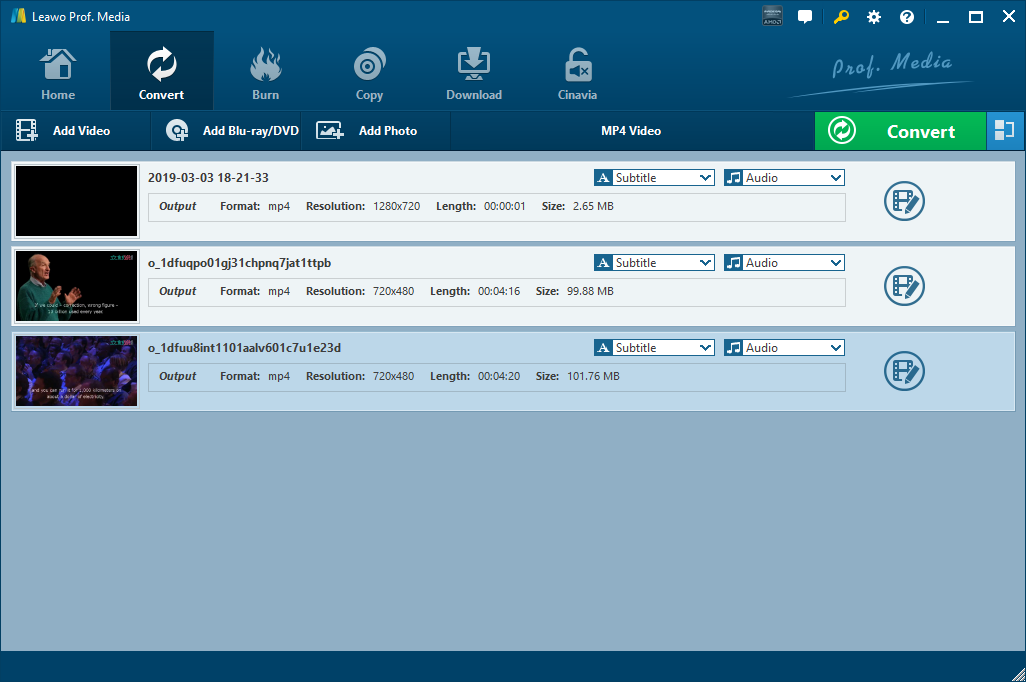
Step 2. Import source AVI video files
Click “Add Video” button on the sub-menu to load your source AVI video files. After loading, you could play the AVI video files, join the loaded files into one, select subtitles and audio tracks, add external subtitles to the loaded AVI video files, edit loaded AVI video files, etc.
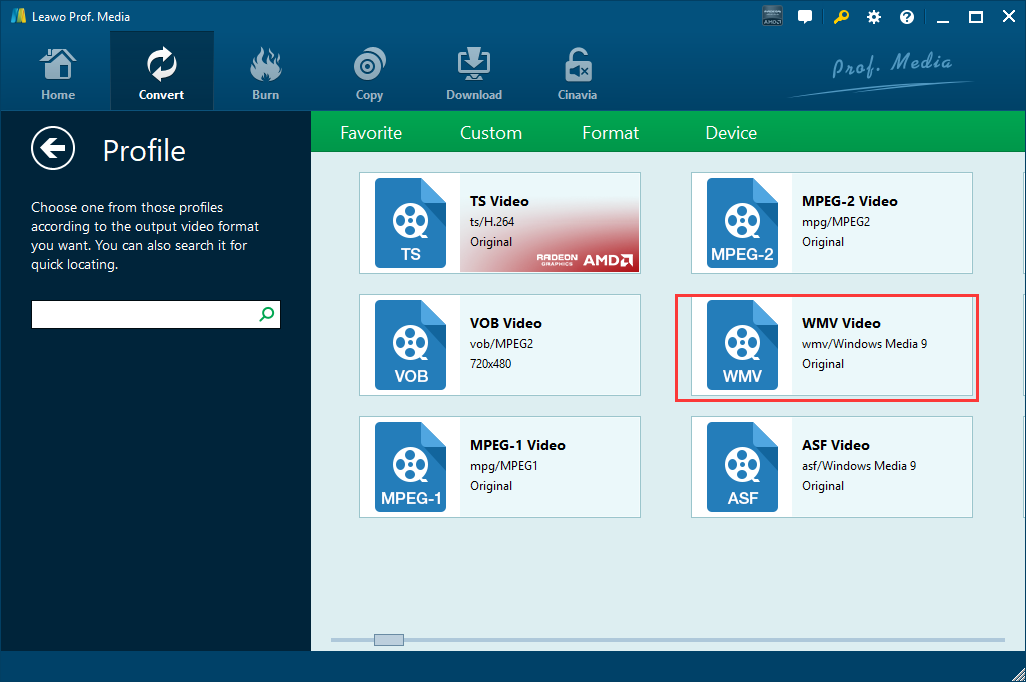
Step 3. Set WMV as output format
Click the drop-down box next to the “Add Photo” button to call out a drop-down list, and then select “Change” option. Then on the popup Profile window, select “WMV Video” from “Format” column as output format.
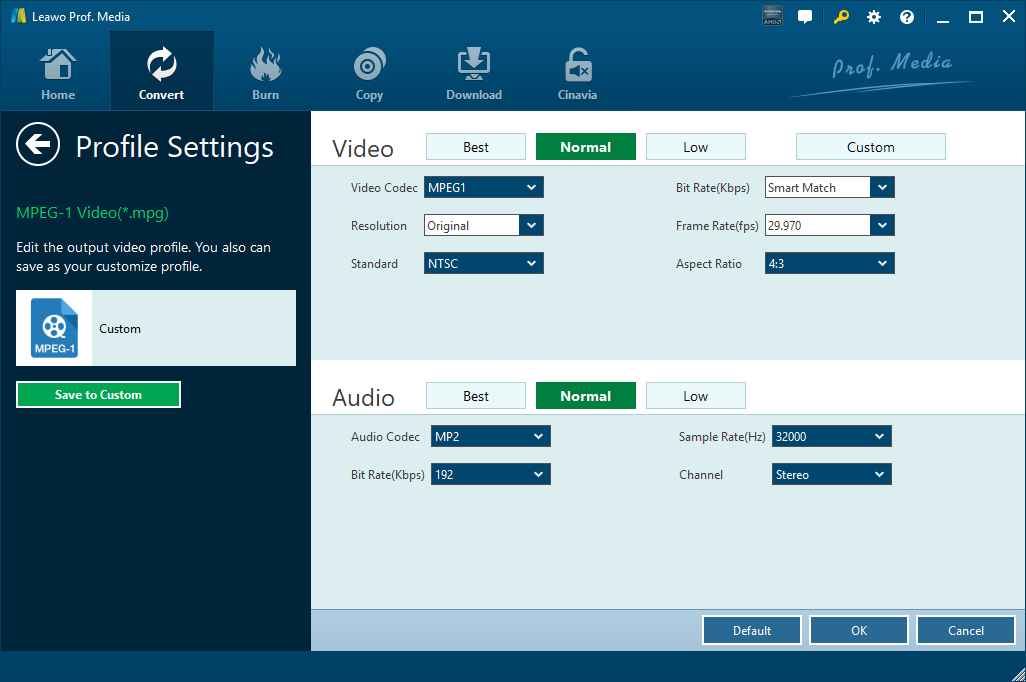
Note: If you need, you could click the “Edit” button instead of “Change” button on the drop-down list to enter the Profile Settings panel where you could adjust video and audio parameters like video codec, aspect ratio, frame rate, resolution, audio codec, bit rate, channel, sample rate, etc.
Step 4: Convert AVI to WMV
Click the big green “Convert” button on the sub-menu bar. And then, a sidebar will pop up. If necessary, you can set output directory for containing the converted video files. After that, click the “Convert” button right below and Leawo Video Converter would start to convert AVI to WMV immediately.
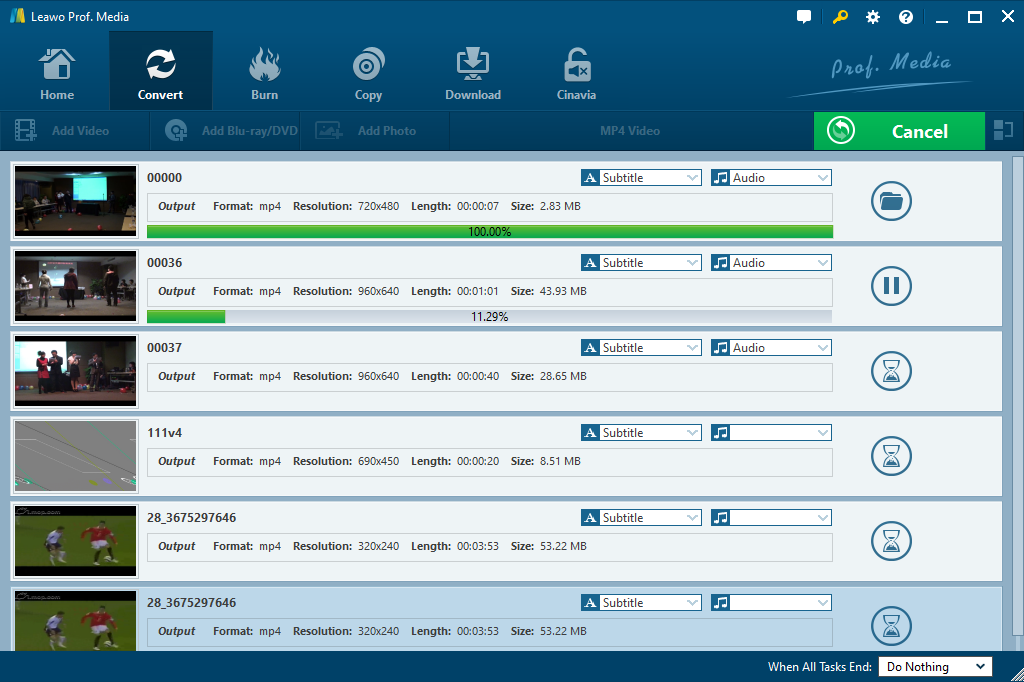
Note: As the main interface of Leawo Video Converter for Mac is almost the same as that of Leawo Video Converter, you can also easily convert AVI to WMV on Mac with the help of Leawo Video Converter for Mac.
Part 2. How to Convert AVI to WMV with iWisoft Free Video Converter
iWisoft video Converter is a free media converter that can convert many popular audio and video formats from one to another with ease. Besides, it is an all-round converter that can also be used to extract audio, convert image files and edit videos as per your requirement. It supports so many optimized media output profiles and output devices including Zune, iPhone, Xbox, Apple TV, and more. Additionally, it has some basic editing features such as adjusting bitrate, video codecs, audio codecs, video size, sample rate, volume, etc. Moreover, you are allowed to personalize the imported video files as well by using its editing options like merge videos, trim, crop and add subtitles.
It is not difficult for you to be a master in converting AVI to WMV with the help of iWisoft video converter. Please download and install the program on your PC, and then follow the step-by-step guide below.
Step 1. Add the source AVI files to iWisoft Free Video Converter.
Start iWisoft Free Video Converter, and then add the source AVI files for conversion. It allows you to import multiple AVI video files into this program for batch conversion. And you can also merge the imported video files.
Step 2. Set WMV as the output format.
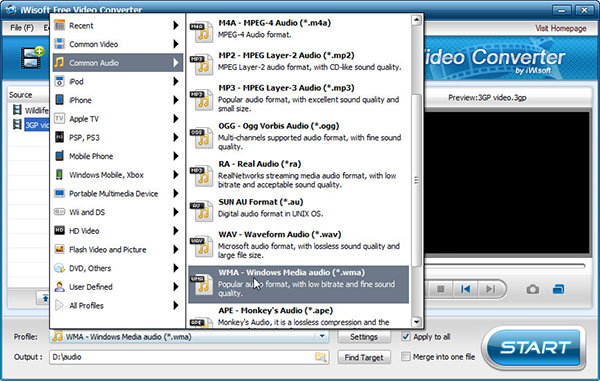
Click the Profile box to open the format list and then select WMV from the common video group as the output format. If needed, you can also click settings to change the output video parameters and select “OK” to save the settings.
Step 3: Start converting AVI to WMV.
Choose output destination for saving the converted WMV files, and then tap “Start” button to start converting AVI to WMV automatically.
Part 3. How to Convert AVI to WMV with Freemake
Except for the outstanding Leawo Video Converter and free iWisoft video converter, you could also use Freemake to convert AVI to WMV with no costs. As one of the easiest solutions for Windows PCs on Windows Vista, 7, 8, 8.1 and Windows 10, it converts any video format at high speed without any quality loss. Download Freemake on your PC, make sure that the Internet connection is stable while the installation is in progress, and then then follow the instruction to convert AVI to WMV.
Step 1. Start Freemake video converter.
Kick it off on your PC after the complete installation to enter the main interface.
Step 2. Import the source AVI video files into the program.
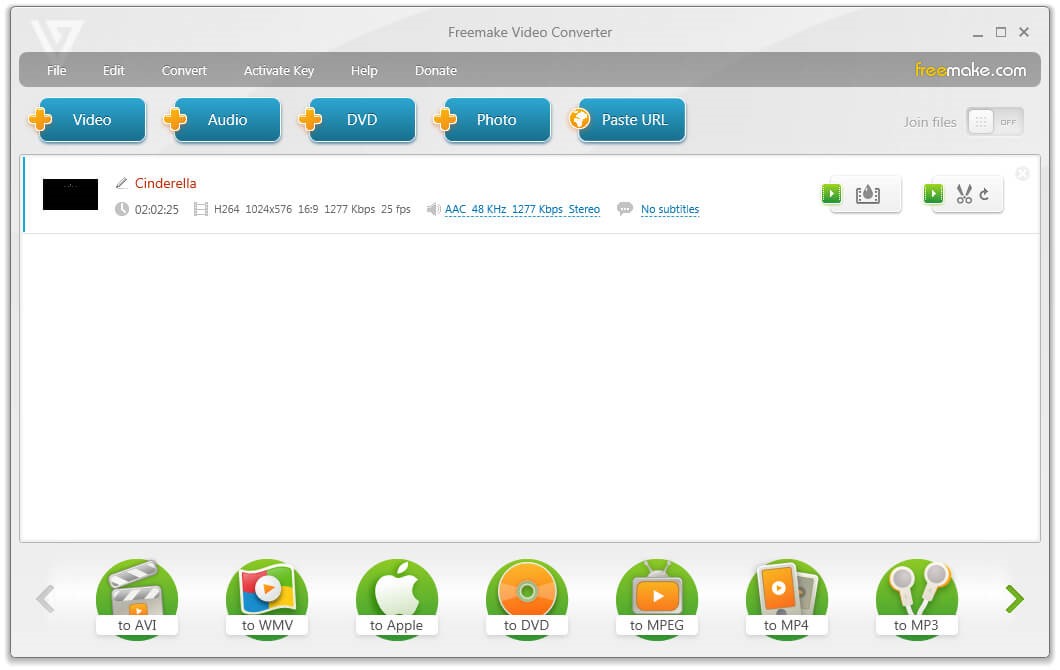
Click the “+Video” button to browse and choose the source video files, or drag and drop AVI video files into the program directly for importing. Alternatively, you can also go to the File menu and choose the “Add Video” option for the source video importing.
Step 3. Set output format
Choose the “to WMV” option at the bottom of the program to set the output format.
Step 4. Set video parameters
Click the cogwheel icon on the “to WMV” window to set the audio and video parameters of the target video files if needed.
Step 5. Start the video conversion
Set the destination path for saving the output video files, and then click the “Convert” button to start converting AVI to WMV right away. It will finish the conversion process in a while.
Part 4. How to Convert AVI to WMV with Online-Convert
There is no doubt that Online-Convert offers a useful solution to convert AVI to WMV with its comprehensive online conversion service. It supports over 50 source formats including AVI, MP4, MOV, MKV, etc. and converts any of video formats from one to another inefficiency without software installation and costs. Besides, it also offers some customization features, such as a preset option, video parameters settings, video cutting or rotating and more. It is easy to use for any users without technical background.
Step 1. Upload AVI video files
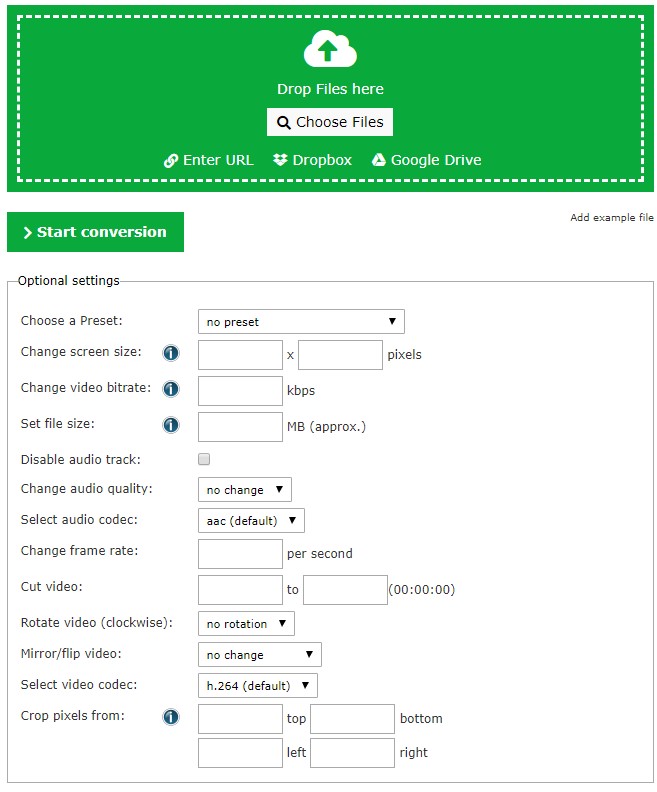
Click the “Choose Files” button or pasting the URL of the source video file to upload the AVI video files to the online converter. Or you can upload the video directly by drag-n-drops or import from Dropbox and Google Drive.
Step 2. Video customization
In the Optional settings, you can choose a preset, change the screen size or video bitrate, set file size, cut video and so on to customize the video if you need.
Step 3. Start conversion
After all settings are done, click the green “Start Conversion” button below, the video files will be uploaded and converted from AVI to WMV immediately. And the conversion process will be completed in a short while.
Step 4. Download the video
After finishing the converting process, you can download the converted WMV video files by clicking the green “Download” button.
Online-convert is quite convenient for users who don’t want to install any PC programs, but it only supports the video files in less than 100MB. If your AVI source file size is bigger than 100MB, you are required to be a paid subscribed member of the converter.
Part 5. How to Convert AVI to WMV with Windows Live Movie Maker
Except for the third-party video converting programs and free online converters, Windows Live Movie Maker is also a functional freeware designed by Microsoft for making, editing and publishing videos. By using this program, you can easily edit a video in any way you like by adding video effects, narration, background music and still images and remove unwanted parts of the video. Besides, it supports most popular media formats like MP4, WMV, MKV, AVI, MOV, etc. and you could save your AVI file in WMV customized as you like. Since it is bundled into the bulky Windows Live Essentials suite of apps, you need to uncheck the other boxes before installing them to separate it out. And then you can convert AVI to WMV easily and quickly by following the steps below.
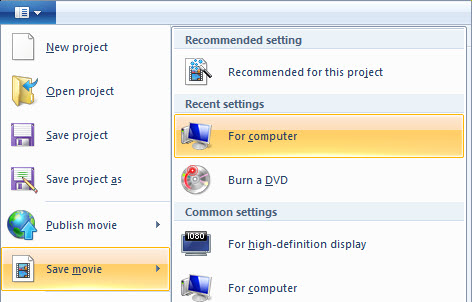
Step 1. Launch Windows (Live) Movie Maker from the Start Menu, and then click on “File” option on the menu bar to open a drop-down list.
Step 2. Choose “Open Project” to open your AVI video file. Then return to “File” > “Save Movie” to export the file as WMV video.
Conclusion
To sum up, either the professional video converter programs or the online converters are quite helpful for converting video files from AVI to WMV or any other formats. For convenience, functions and privacy protection, Leawo video converter would be the best option since it has clean and clear program, user-friendly interface and customized features. While using other free video converter programs, you may be warned that they may damage your computer. That’s a worry. Online video converters are easy to use and convenient to quite an extent. However, there are always some limitations in file size and video features. Anyway, every solution has its own pros and cons, you may choose a favorable one.
 Mar. 11, 2014 by


 Prof. Media
 Blu-ray Ripper
 Blu-ray Copy
 iOS Data Recovery
 [12/29/23] MAX Downloader V15.0.0
 10,000,000 people are using Leawo!
 All Transactions are protected!
 30-Day Money Back Guarantee!