Mac iPad Converter
Convert every aduio & video to iPad for playback. More...
Download Intel Version
Download PowerPC Version
How to Make Audios & Videos to be Played on iPad for Mac OS Users?
Apple iPad's video capability:
Apple iPad is a wonderful piece of handheld device for video enjoyment, equipped with a 9.7" LED-backlit IPS LCD screen that has 1024*768 resolution and 4:3 aspect ratio. The built-in memory ranging from 16 GB to 64 GB provides sufficient storage space for HD movies, and the battery can secure usage up to 10 hours. Meanwhile iPad is running on iPhone OS 3.2 which resembles iPhone and iPod Touch, including flawless support for MOV and MP4 video format. To play video successfully on Apple iPad, Leawo Mac iPad Converter will be an ideal solution.
How to convert video to play on Apple iPad with Leawo Mac iPad Converter?
Step 1: Download Leawo Mac iPad Converter from here, install and launch it. It will show the start-up interface with all the knowledge to operate.

Step 2: Click the "Add" button to import video files, or directly drag the files in from the file browser. The imported files will list under processing order. You can rename the output file, preview the video and get some screenshots.

Step 3: In the "Edit" panel, you can make some visual changes to the video to be converted.
Go to "Trim" tab, drag the triangle limiters on the player bar on the right side or enter the precise time value to split the video.

Go to "Crop" tab, move the handlers of the dashed frame on the player window to remove unwanted parts on screen.

Go to "Rotation" tab: Revolve the video to the needed angle. You can achieve horizontal flip & vertical flip, or realize to rotate 90° clockwise and rotate 90° counterclockwise. If the adjustment is beyond satisfaction you can reset it as well.

Go to "Effect" tab, move the sliders to change video brightness, contrast and audio volume.

Go to "Watermark" tab, select an image file and use the positioning sliders to locate it on screen. Besides, you also can input text, select font style and position it on screen with the sliders.

Step 4: 3D Settings
In this step you can 1). Select a 3D setting mode: Red/Cyan, Blue/Yellow, Interleaved, Side by Side, according to the 3D glasses you are using. 2). Set 3D Depth effect, choose a specific value from minus 50 to plus 50. 3). Have a real-time preview of the 3D video.

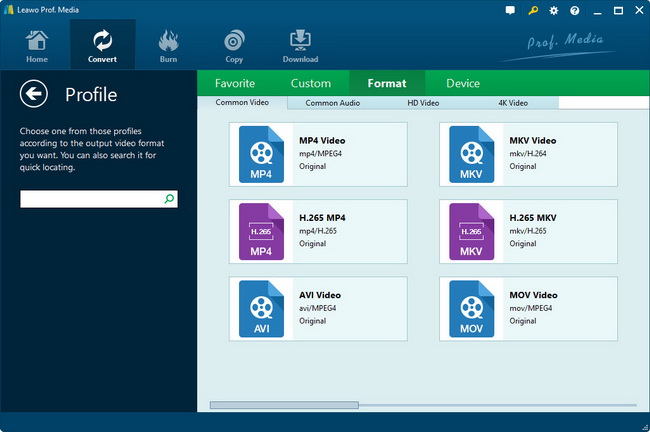
Step 5: Choose video format for output.
Leawo Mac iPad Converter offers optimized profiles for iPad along with profiles for common video and audio formats.

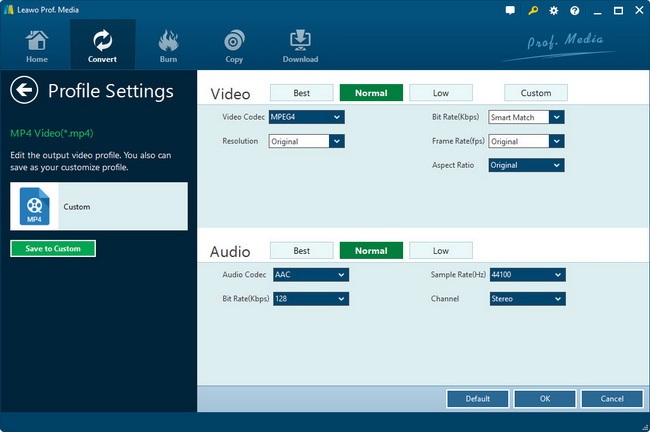
Each profile is connected with a set of parameters which are found by clicking "Add Profile" button. Available parameters are Video Codec, Bit Rate, Video Size, Frame Rate, Aspect Ratio, Sample Rate, etc.

After choosing the desired output profile for iPad, return to the main interface and click the Start button on the bottom right. You may enable one of the two after-done actions.

Learn more about Leawo Mac iPad Converter.
Products
- MorePackage Solutions
- Total Media Converter Ultimate
- Video Converter Ultimate/Pro
- Blu-ray Video Converter
- Easy iPad Converter Suite
- Easy iPhone Converter Suite
- Easy iPod Converter Suite
- MoreVideo/HD Video Tools
- All-in-One Video Converter
- HD Video Converter
- Free AVI Converter
- Free MP4 Converter
- Free FLV Converter
- Free YouTube Downloader
- Video to DVD Creator
- Blu-ray Creator
- iTransfer
- Video Editor
- More DVD/Blu-ray Tools
- Blu-ray Ripper
- Blu-ray Copy
- Blu-ray to MKV Converter
- DVD Ripper
- DVD Copy
- DVD to AVI Converter
- DVD to MP4 Converter
- MoreUtilities
- Data Recovery for Mac
- Photo Recovery for Mac
- SWF Compressor for Mac
- MoreMac Converters
- Video Converter Pro for Mac
- Mac HD Video Converter
- Video Converter for Mac
- Blu-ray Ripper for Mac
- DVD Ripper for Mac
- DVD Creator for Mac
- YouTube Downloader for Mac
- iAm Ringer for Mac
- Mac Video to MP4 Converter
- Mac DVD to MP4 Converter
- MorePortable Device Tools
-
WinMac
- iPad Video Converter for Win
- DVD to iPad Converter for Win
- Free iPod Video Converter for Win
- DVD to iPod Converter for Win
- Free iPhone Video Converter for Win
- DVD to iPhone Converter for Win
- Mac Video to iPad Converter
- Mac DVD to iPad Converter
- Mac Video to iPod Converter
- Mac DVD to iPod Converter
- Mac Video to iPhone Converter
- Mac DVD to iPhone Converterc
- MorePowerPoint Converters
- PowerPoint to DVD Pro
- PowerPoint to DVD Std
- PowerPoint to Video (Free/Pro)
- PowerPoint to FLV
- PowerPoint to iPad
- PowerPoint to YouTube