Bookmark and Share Home > Mac Products > Mac 3GP Converter
User Guide for Mac 3GP Converter

User Guide of Leawo Mac 3GP Converter

Leawo Mac 3GP Converter can convert all types of video formats to 3GP video file that can be played on cell phones. This 3GP converter for Mac supports most common video formats such as MP4, MOV, 3GP, AVI, RM, MPEG, ASF and FLV as well as popular audios like MP3, AAC, WAV, etc. Leawo 3GP Mac Converter has various practical features such as batch Mac video to 3GP conversion, setting video brightness, contrast, saturation, video crop, video trim, video watermark, and joining multiple files into one.

What is 3GP?
3G stands for the third generation, a generic wireless industry term for high-speed mobile data delivery over mobileular networks. 3GP is a multimedia container format that defined by the Third Generation Partnership Project (3GPP) for use on 3G mobile phones but can also be played on some 2G and 4G phones.

Want to convert videos to 3GP file with Leawo Mac 3GP converter to enjoy your colorful digital life? Now here comes the step-by-step tutorial to show you how to use this Leawo Mac 3GP converter. Before this user guide, please download and install Leawo Mac 3GP Converter first!

Step 1: Do the essential settings
Click "Add " button to load video files you want to convert.
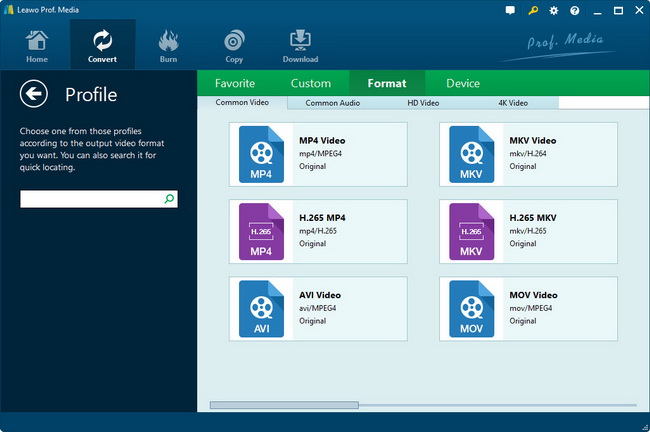
Select each file and choose the output format in "Profile".
Select video and audio quality that you need.
Set an output folder by "Output" for the destination files.
Leawo Mac 3GP Converter main interface

Step 2: Video Effect Settings
Click Edit button button to crop, adjust and watermark video to satisfy your needs.

Crop: Click "Crop" button to crop the video file to extract the black sides or unnecessary segment from the original video file.
crop functions in Leawo Mac 3GP Converter
Trim: Click "Trim" button. Now trim video duration by setting start time and end time to keep the segment you want.
video trim functions of Leawo Mac 3GP Converter
Effect: Click "Effect" button to set video brightness, contrast, and saturation for better output quality.
set effect for output video in Leawo Mac 3GP Converter
Watermark: Check "Enable Watermark", and click "Image Watermark" or "Text Watermark" to add watermark to the video, then adjust the Transparency, Margin, and Watermark Size.
Watermark video via Leawo Mac 3GP Converter

Step 3: Attached Video Settings
1. Click “Options” button to adjust the image, if necessary.

There are two buttons for you to adjust the image according to your need. One is “General” button, the other is “Thumbnail” button.
other options for Leawo Mac 3GP Converter, capture thumbnail
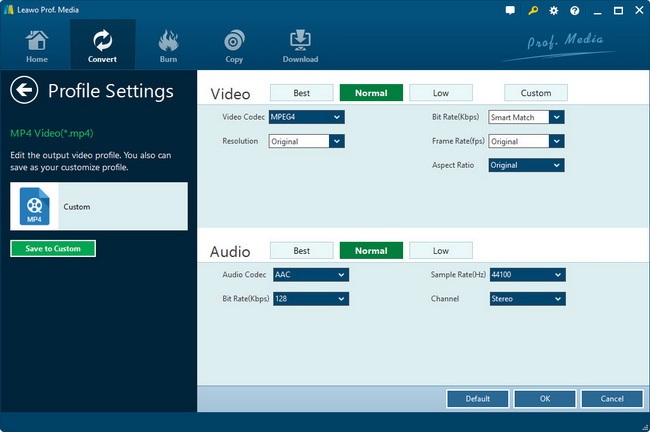
2. Click "Settings" button to set audio and video parameters:
Video: Set video encoding settings by selecting a video codec, a frame rate, a bit rate and a video size, etc.
Audio: Set audio encoding settings by selecting an audio codec, sample rate, an audio channel, a bit rate, etc.
Profile, parameters settings for output 3GP file
3. Merge file:
If you want to join several files into one, just select the checkbox merge multiple video to 3gp on Mac on the main interface, and then you will join videos on Mac or Windows and only get one output file instead of multiple files.

Step 4: Convert Videos
When you have got ready for the settings for the added videos in the video converter program, you can click start converting video to 3GP or 3G2 button to start conversion. Just for a while, the conversion would finish and be enjoyed freely.

Download Leawo Mac 3GP Converter: http://www.leawo.com/mac-3gp-converter

Back to top

Ready To Try and Buy

Download Intel Version Download PowerPC   Only $25.00

Mac 3GP Converter

Products

MorePackage Solutions
Easy Media Converter Suite
Blu-ray Video Converter Suite
Easy DVD Converter Suite
Easy Video Converter Suite
Easy AVI Converter Suite
Easy iPad Converter Suite
Easy iPhone Converter Suite
Easy iPod Converter Suite
Easy YouTube Converter Suite
MoreVideo/HD Video Tools
All-in-One Video Converter
HD Video Converter
AVCHD Converter
MTS/M2TS Converter
MKV Converter
Mobile Video Converter
Free AVI Converter
Free MP4 Converter
Free 3GP Converter
Free FLV Converter
Free YouTube Downloader
Video to DVD Creator
More DVD/Blu-ray Tools
Blu-ray Ripper
Blu-ray Copy
DVD Ripper
DVD Copy
DVD to AVI Converter
DVD to MP4 Converter
DVD to FLV Converter
MoreMac Converters
iAm Mac Total Converter
Mac HD Video Converter
Mac Video Converter
DVD Ripper for Mac
Mac FLV to Video Converter
Mac DVD to FLV Converter
Mac Video to AVI Converter
Mac DVD to AVI Converter
Mac Video to MP4 Converter
Mac DVD to MP4 Converter
Mac Video to 3GP Converter
Mac DVD to 3GP Converter
MorePortable Device Tools
Win
Mac
iPad Video Converter for Win
DVD to iPad Converter for Win
Free iPod Video Converter for Win
DVD to iPod Converter for Win
Free iPhone Video Converter for Win
DVD to iPhone Converter for Win
Free PSP Video Converter for Win
DVD to PSP Converter for Win
Mac Video to iPad Converter
Mac DVD to iPad Converter
Mac Video to iPod Converter
Mac DVD to iPod Converter
Mac Video to iPhone Converter
Mac DVD to iPhone Converterc
Mac Video to PSP Converter
Mac DVD to PSP Converter
MorePowerPoint Converters
PowerPoint to DVD Pro
PowerPoint to DVD Std
PowerPoint to Video (Free/Pro)
PowerPoint to FLV
PowerPoint to iPad
PowerPoint to YouTube