How to Convert FLV to video for iPod?
Leawo Free FLV Converter
Download and convert FLV to video and audio in pop formats. More...
Download Free Version
Buy Pro Version
FLV (Flash Video) is a file format used to deliver video over the internet using Adobe Flash Player and, is the most popular file format. Almost all video sharing sites are supporting to play videos in FLV format, that's because 98% of all internet users have installed Adobe Flash Player on their computers, and the webmasters hope the videos on their sites can be viewed by as many as people.
Because the Video sharing sites are becoming more and more popular, everyday, we can find there are uncounted people on internet asking questions about: how to download videos from video sharing sites?; how to convert the downloaded videos (FLV) or FLV to videos for playing on digital players or uploading to internet?.
Both Leawo Free FLV Converter and Leawo FLV Converter Pro are just the ease-to-use programs, which offer free FLV downloaders for downloading FLV files from internet, can easily convert FLV to video in popular formats like AVI, MP4, MPEG, MOV, WMV, DV, etc. for playback digital players or uploading to internet. Below is the user guide about how to convert FLV to iPod videos with Leawo FLV Converter Pro for playback on iPod.
Step 1: Open Leawo FLV Converter Pro, and input the FLV files which you want to convert to iPod videos.

Step 2: Choose a FLV file and then click the “Customize” button to edit it for conversion (This functionality only is available on Pro edition, and this step can be skipped.).
Get a part of FLV video for conversion.

Remove the unwanted segments
Better or lower the video and audio quality by moving relevant bar rightward or leftward.


Add text-watermark onto the video

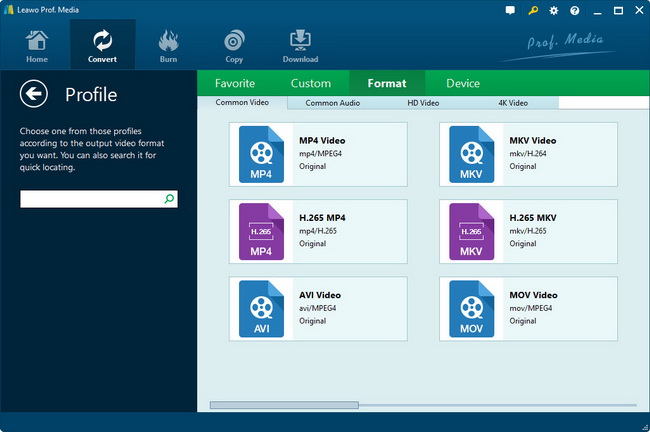
Step 3: Set the output video format to be iPod video .MP4.

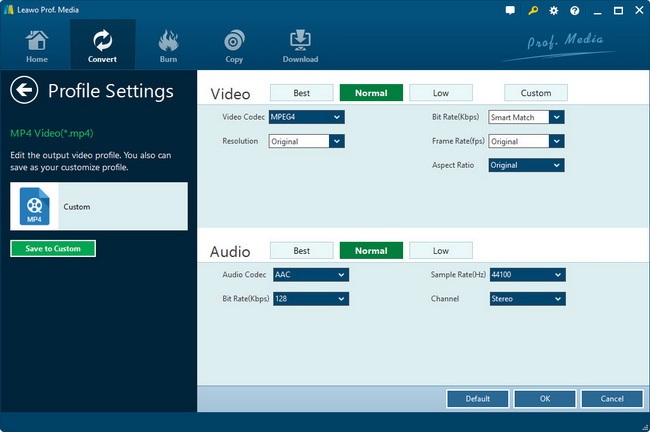
Set the output video and audio quality.

Click the “Settings” button to set other parameters about the video on the following interface. (This function only is available on the Pro edition)

Step 4: Click the big button to convert the FLV to iPod video .MP4. And then you could get the converted iPod videos.

The tutorial about how to download FLV files from YouTube
The tutorial about converting YouTube videos to iPod videos.

Products
- MorePackage Solutions
- Media Converter Suite
- Free AVI Converter Suite
- Free iPod Converter Suite
- Free MP4 Converter Suite
- Free iPhone Converter Suite
- MoreFLV Converter
- Free YouTube Downloader
- Free FLV Converter
- Free Video to FLV Converter
- Free Video Accelerator
- More Video Converter
- All-in-one video converter
- Video to DVD Creator
- iPad Video Converter
- Free AVI Converter
- Free MP4 Converter
- Free 3GP Converter
- Free iPod Converter
- Free iPhone Converter
- Free PSP Converter
- MoreDVD Converters
- All-in-one DVD Ripper
- Free DVD to iPod Converter
- Free DVD to iPhone Converter
- Free DVD to Zune Converter
- Free DVD to PSP Converter
- Free DVD to AVI Converter
- Free DVD to 3GP Converter
- Free DVD to MP4 Converter
- MorePowerPoint Solutions
- PowerPoint to DVD
- PowerPoint to Video
- PowerPoint to FLV
- MoreMac Converter
- Mac Video Converter
- Mac FLV Converter
- Mac MP4 Converter
- Mac iPod Converter
- Mac iPhone Converter
- Mac AVI Converter
- Mac 3GP Converter
- Mac PSP Converter
- YouTube Downloader for Mac
- DVD Ripper for Mac
- Mac DVD to FLV Converter
- Mac DVD to MP4 Converter
- Mac DVD to iPod Converter
- Mac DVD to iPhone Converter
- Mac DVD to AVI Converter
- Mac DVD to 3GP Converter
- Mac DVD to PSP Converter
- All-in-one Converter for Mac