Leawo Video Converter is an all-inclusive FLV to video converter that can convert FLV to 3GP/3GPP/3GPP2 for cell phones and convert FLV to other popular video in variety of formats. With the help of this FLV to 3GP converter, you can feel free to convert FLV to 3GP for various cell phones. In addition to the primary function to convert FLV to 3GP, this FLV converter can also help to get your video quality improved, allow you to edit FLV videos before you convert FLV to 3GP, and let you convert 2D FLV to 3D videos for unlimited 3D movie enjoyment. Convert FLV to 3GP can never be so easier with Leawo FLV to 3GP Converter. Leawo Mac Video Converter would help you convert FLV to 3GP videos on Mac.
Full Guide

Add source FLV files
Launch Leawo FLV to 3GP Converter and click "Add Video" icon to input source FLV files.
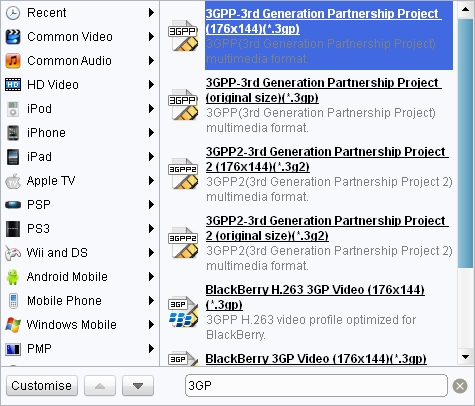
Set 3GP as the target Profile
In Profile panel (click the icon before 3D button on Mac FLV to 3GP converter), choose 3GP as output profile for your mobile phones.
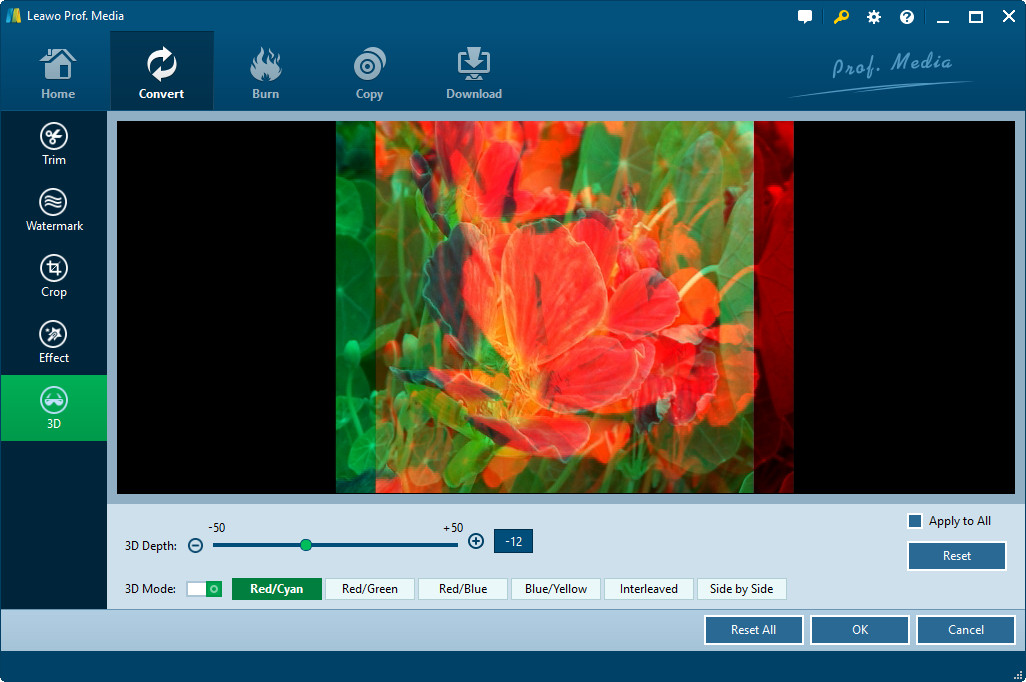
Settings on 2D to 3D conversion (optional)
Click the 3D button to select 3D effect according to your own 3D devices when you want to convert 2D FLV to 3GP 3D video for your own mobile phones and preview 3D effect in the 3D panel.

Convert FLV to 3GP video
Click the convert button to start to convert FLV to 3GP video. After the FLV to 3GP conversion finished, you can stream FLV video to your mobile phone and watch FLV video in 3GP video format on various mobile phones.
Extended Knowledge
3GPP and 3GPP2 are the new worldwide standards for the creation, delivery and playback of multimedia over 3rd generation, high-speed wireless networks. Defined by the 3rd Generation Partnership Project and 3rd Generation Partnership Project 2 respectively, these standards seek to provide uniform delivery of rich multimedia over newly evolved, broadband mobile networks (3rd generation networks) to the latest multimedia-enabled wireless devices. 3GPP and 3GPP2 are based on the MPEG-4 standard which was derived from Apple's QuickTime. QuickTime 6.5 includes supporting for key components of the 3GPP and 3GPP2 specifications.
Related Articles
