
“How do I rip a DVD to Xoom and convert a DVD to Moto Xoom? I have a few DVD disc collections of my favorite and would like to watch these DVD movies on the Xoom tablet. I have tried some DVD tools like HandBrake but it failed to do this, saying that not supported media file. I have no idea what to do next to watch DVD movies on Xoom. Do you know any DVD to Xoom converter tool to rip DVD to Xoom tablet? Thanks.”
As a main competitor to iPad, Xoom has been a wonderful tablet and gained a lot of traffic in the world. In this guide, we would like to introduce you 3 different DVD to Xoom converter tools to help you rip DVD movies to Xoom tablet for unlimited playback.
Part 1: Best DVD to Xoom Converter - Leawo DVD Ripper
To watch DVD movies on Xoom tablet, you need a wonderful DVD ripper tool that could handle both encrypted and non-encrypted DVD discs. Leawo DVD Ripper offers you the best user experience for converting DVD movies to Xoom tablet compatible videos. As a professional DVD ripping software tool, Leawo DVD Ripper helps you decrypt, rip and convert DVD movies to video and audio files in over 180+ formats for various devices, like DVD movie to MP4 video, DVD to AVI, DVD to MKV, DVD to MOV, DVD to MP3, etc.
You could even rip and convert DVD to YouTube or other online video sharing sites, or convert DVD movies for editing in professional video editing tools like iMovie, FCP, etc. What’s more, with Leawo DVD Ripper, you could edit DVD movies before converting, select subtitles and audio tracks, achieve movie-only ripping, etc.
Firstly, you need to download and install Leawo DVD Ripper on your computer. Get source DVD movies ready for converting. If you want to rip DVD disc for Xoom tablet, insert your DVD disc into the disc recorder drive. Then, follow the below steps to learn how to convert DVD to Xoom tablet video.
Note: Leawo DVD Ripper is a module built into Leawo Prof. Media.
Step 1: Add source DVD movie
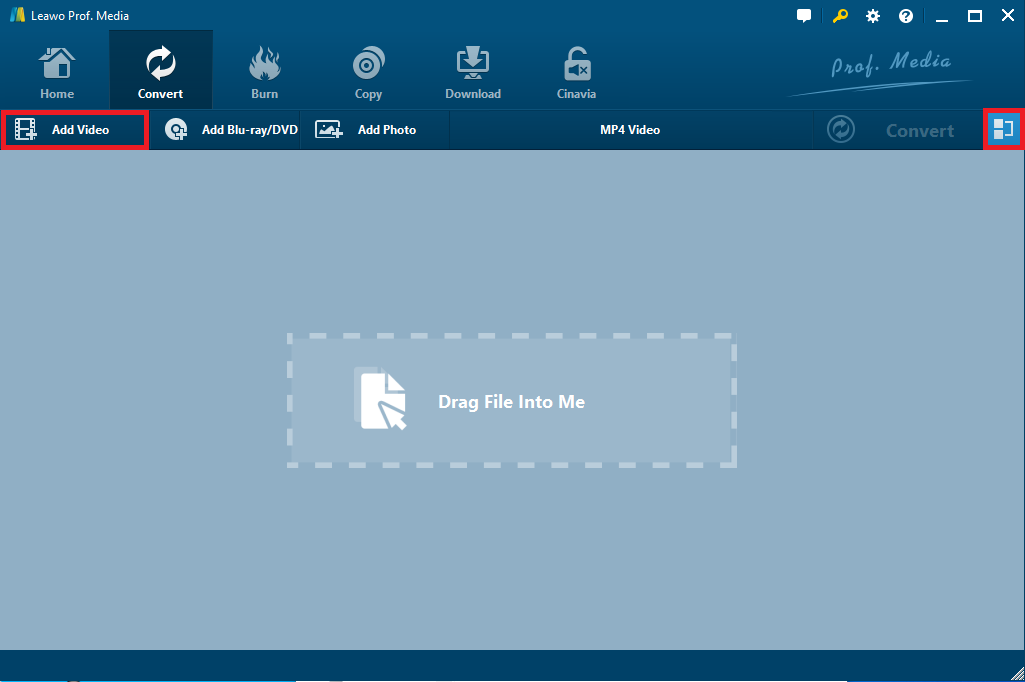
Launch Leawo Prof. Media and then open the “Convert” module to enter the “Convert” module. Then, click “Add Blu-ray/DVD” button to add either disc from disc drive or DVD movie from folder. You could also click the “Add iso file” to add DVD ISO image file.
Note: Leawo DVD Ripper offers 3 different DVD content loading modes. Full Movie mode enables you to load all content in source DVD for converting, while Main Movie mode enables you to select one title for loading and converting. In Custom Mode, you will be able to select multiple titles for loading and converting. Choose one according to your needs.
Step 2: Choose output format
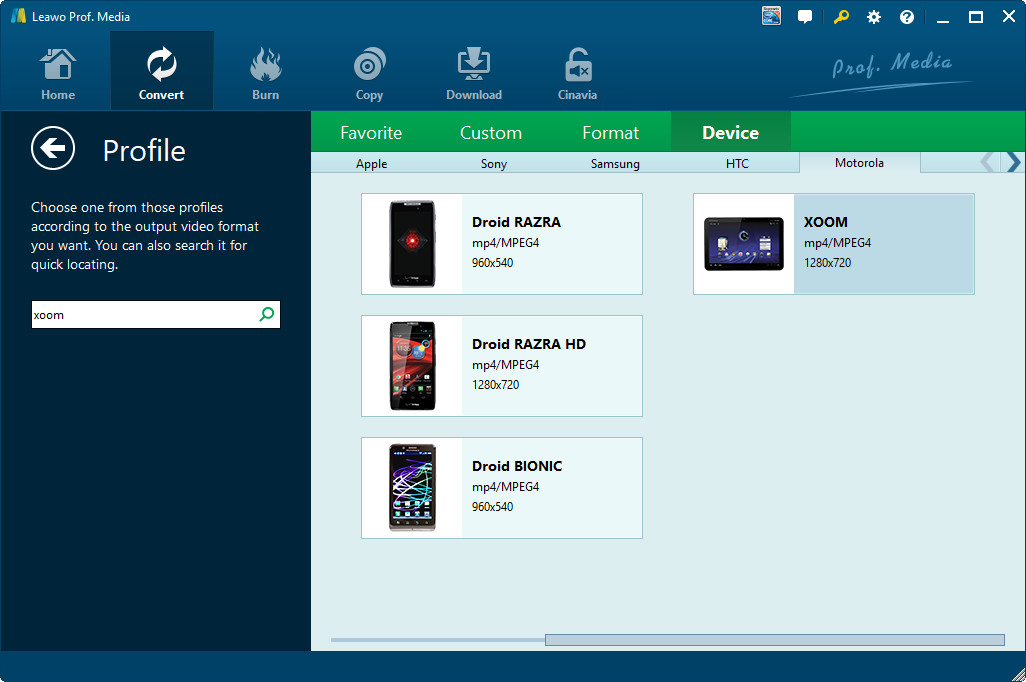
Click the drop-down box (named “MP4 Video” by default) right before the big green “Convert” button on the sub-menu bar, and choose “Change” to choose output format. You need to choose an output format for Xoom. You could choose output format from “Format > Common Video” group like MP4 Video or Xoom from “Device > Motorola” group.
Step 3: Adjust output video parameters
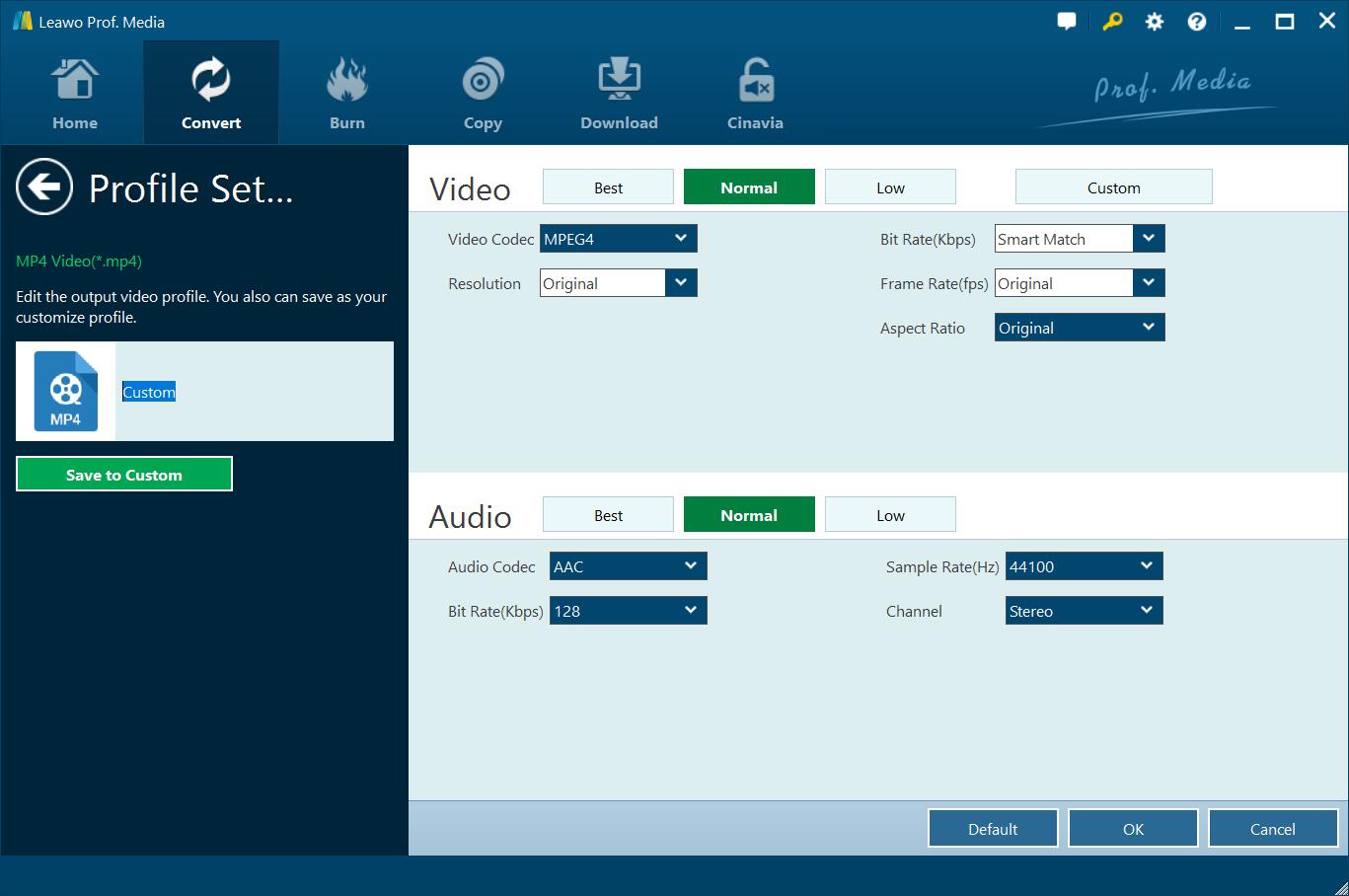
You could adjust the output video and audio parameters to make the output files meet your Xoom tablet better. After setting output format, open the drop-down button right before the big green “Convert” again and then choose “Edit” option to enter the “Profile Settings” panel, where you could adjust video and audio parameters of output format, including: video codec, quality, bit rate, frame rate, aspect ratio, channel, audio codec, resolution, etc.
Step 4: Set output directory
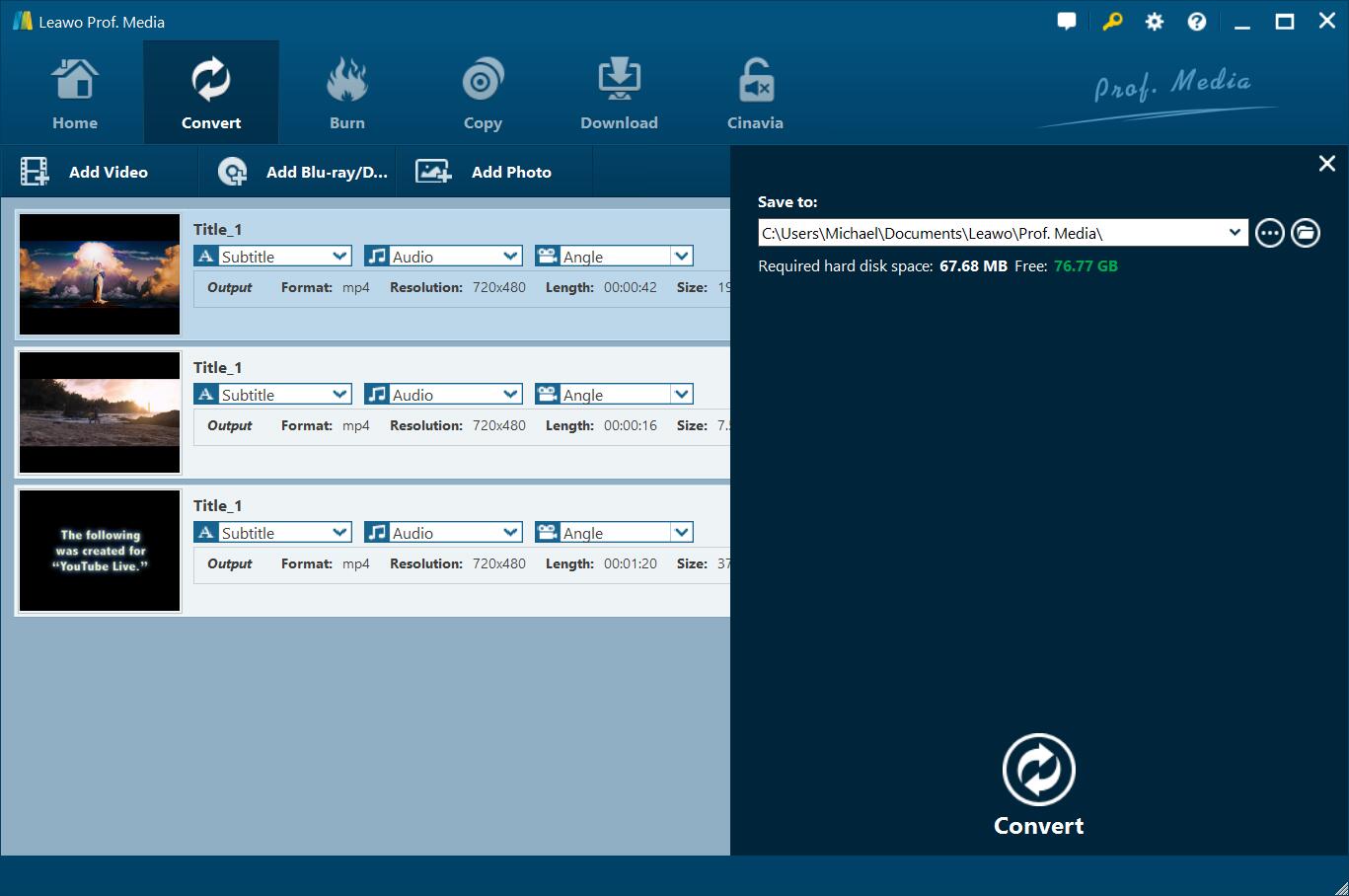
After setting output format and adjusting the parameters, click the big green “Convert” button on the sub-menu bar and then set output directory in the “Save to” box.
Step 5: Start converting DVD to Xoom video
After that, click the bottom “Convert” button on the pop-up sidebar. Leawo DVD Ripper would then start converting DVD movies to Xoom video files immediately. You could then view the entire DVD to Xoom video conversion process.
After converting, you could then import converted DVD movies to Xoom tablet for unlimited DVD movie playback on Xoom tablet as you like.
Part 2: Convert DVD to Xoom with Format Factory
There are quite a few wonderful DVD converter tools that offer free but practical DVD converting solutions. Format Factory is one of them. Format Factory is a comprehensive media converter. Apart from converting media files to a wide range of formats, this free software also rips home-made DVD movies to video files in MP4, AVI, WMV, ISO, etc.

It’s quite easy to rip and convert DVD movies for Xoom tablet with the help of Format Factory. Follow the below steps to learn how to convert DVD to Xoom video with Format Factor in detail:
-
Download and install Format Factory on your computer. Get source DVD movies ready for converting.
-
Launch Format Factory and then from the left panel, select one video format that is compatible with Xoom tablet, say MP4 video, from the “Video” tab.
-
On the next screen, you will need to import your video files to Format Factory. Click on “Add File” button to browse and add source DVD movie for converting.
-
From the “Profile” drop-down list, you can select video quality and size. You can also set Video Stream, Audio Stream, Additional Subtitle, Watermark, Bitrate, and more. Basically, the default setting should work fine.
-
From the top tool bar, click on “Start” button and wait for the conversion to finish.
Then, you only need to wait for the conversion to complete. Format Factory will help you easily get DVD to Xoom video conversion completed. But if you bought DVDs at the store, it is likely that some kind of encryption is imposed on DVD. Typically, Format Factory doesn't rip encrypted DVD disc.
Part 3: Convert DVD to Xoom with AisoSoft DVD Converter
Aisosoft Free DVD Converter is used for backing up DVDs or for converting your DVDs to other formats so you can play it in your mobile devices or media players. With Aisosoft Free DVD Converter, you could:
-
Convert movies to other formats like AVI, WMV, DivX, MP4, MPEG1, MPEG2, H.264/AVC, 3GP, VCD, SCVD DVD , FLV, MP3, WAV.
-
Convert DVD, rip DVD to AVI,WMV, DivX, MP4, MPEG1, MPEG2, H.264/AVC, 3GP, VCD, SCVD DVD , FLV, MP3, WAV.
-
Convert video, rip DVD to videos/audios playable on players
-
Convert DVD, video and audio files for many digital devices like PSP, PS3, iPod, iPhone, XBox360, Zune, Apple TV, Archos, iRiver PMP, Epson Player, Creative Zen, Xoom, Sony Walkman, Commodore PMC, Palm TX, GameBoy, SmartDisk, WindowsMobile Smartphone, Nokia, BlackBerry, KeiTai, LG, SonyEricsson, Samsung mobile phone.
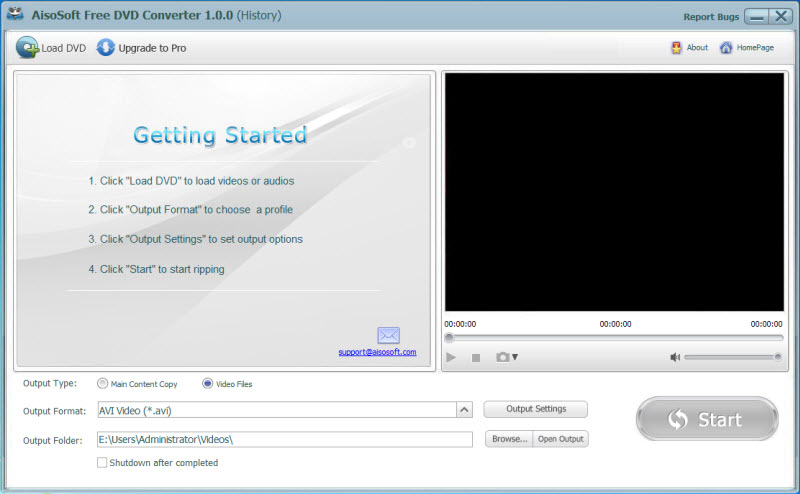
Download and install Aisosoft Free DVD Converter on your computer. And get source DVD movies ready for converting. Then, follow the below steps to learn how to convert DVD to Xoom video with Aisosoft Free DVD Converter:
-
Kick off Aisosoft Free DVD Converter and click the “Load DVD” option to browse and load source DVD movies.
-
After loading source DVD movies, you could view the DVD titles, play back DVD movies, view info, etc.
-
Click the “Output Format” box to choose output format like MP4 that is compatible with Xoom tablet.
-
If you need, you could click the “Output Settings” button to adjust the output video and audio parameters.
-
In the “Output Folder” box, specify an output directory to save output Xoom video files.
-
Finally, click the bottom right “Convert” button to start converting DVD movies to Xoom videos within Aisosoft Free DVD Converter.
It won’t take you long to get the results. However, it should be noted that Aisosoft Free DVD Converter has no work on encrypted DVD movies, and it has been discontinued for long. Therefore, you may need luck to get this program downloaded and installed.
Part 4: Comparison and Conclusion
The below comparison table would show you the differences between the above 3 DVD to Xoom converters.
| Features |
Leawo DVD Ripper |
Format Factory |
Aisosoft Free DVD Converter |
|
Convert DVD to video |
Yes |
Yes |
Yes |
|
Convert encrypted DVD |
Yes |
No |
No |
|
Play back DVD movies |
Yes |
No |
No |
|
Get rid of disc region |
Yes |
No |
No |
|
Select subtitles and audio tracks |
Yes |
No |
No |
|
Trim DVD movie length |
Yes |
No |
No |
|
Crop DVD video size |
Yes |
No |
No |
|
Add image or text watermark |
Yes |
No |
No |
|
Adjust video effect |
Yes |
No |
No |
|
2D DVD to 3D video |
Yes |
No |
No |
|
Rotate DVD video |
Yes |
No |
No |
|
Merge DVD movies into one |
Yes |
No |
No |
|
Availability |
Windows and Mac |
Windows |
Not available any more |
|
Cost |
Paid and free trial |
Free |
Free |
Obviously, you could get everything that makes your DVD ripping more enjoyable with Leawo DVD Ripper. However if you don’t want to spend money on DVD to video converter tools, Format Factory is a wonderful choice. As to Aisosoft Free DVD Converter, it’s been discontinued and you’d better turn to the other 2 DVD converters.
 Mar. 05, 2020 by


 Prof. Media
 Blu-ray Ripper
 Blu-ray Copy
 iOS Data Recovery
 [12/29/23] MAX Downloader V15.0.0
 10,000,000 people are using Leawo!
 All Transactions are protected!
 30-Day Money Back Guarantee!