
It is well known that 3D movies are more and more popular among people which can bring amazing and impressive movie experience. To get the best experience of 3D movies, HTC Vive is the best. The HTC Vive is different from otherVR systems, for it gives you the freedom to roam around a room. While other systems only allow you some movement, HTC Vive uses lasers mounted on the wall to map your location and movement around the physical space, integrating this into the virtual space, which allows for freedom of movement that other systems currently don't offer. However, 3D Blu-ray is not the supported playback file format by HTC Vive. For people who have collected many 3D Blu-ray discs and hope to directly watch 3D Blu-Ray on HTC Vive, it is definitely a big trouble that.
Then it comes to the question, is it possible to watch 3D Blu-Ray on HTC Vive? For this goal, I want to share this post with you. In the post, you can find three tools to help you rip 3D blu-ray to HTC Vive, then you will feel it is really a piece of cake to watch 3D Blu-Ray on HTC Vive.
Part 1: Best 3D Blu-ray to HTC Vive Converter -- Leawo Blu-ray Ripper
In fact, what you need is one professional 3D Movie Converter for VR Headsets which can rip 3D blu-ray to HTC Vive friendly 3D MP4 videos for smooth watching. Luckily, Leawo Blu-ray Ripper has the ability to get that big goal done. I have been a big fan for Leawo Blu-ray Ripper for many years, I am ultimately sure it won’t let you down.
Leawo Blu-ray Ripper can remove can not only help you rip 3D blu-ray to HTC Vive, but it also help remove 3D Blu-ray copy protection, support any 3D Blu-ray movies, output multiple 3D videos, best of all, you even can create your own 3D library by converting 2D Blu-ray to 3D videos. What is more, you can adjust 3D depth, video codec, video resolution, video bitrate, audio codec, etc to get a compatible 3D video for your 3D TVs. In one word, being the best3D Blu-ray to HTC Vive Converter, this Blu-ray DVD ripper program could rip 3D blu-ray to HTC Vive with ease. Now it is time to learn how to rip 3D blu-ray to HTC Vive with Leawo Blu-ray Ripper.
Step 1. Download and install the Leawo Prof. Media software suite from the official website, launch Leawo Prof. Media and open the “Convert” module on the menu bar. Insert your 3D Blu-ray disc into an external Blu-ray drive that has been plugged into the computer, click on the button of “Add Blu-ray/DVD” for loading. Selecting the loading mode you need from 3 modes: Full Movie, Main Movie or Custom Mode. After loading, Select subtitles and audio tracks.


Step 2. In a drop-down box with the name “MP4 Video” beside the button “Add Photo”. Click on the drop-down box to bring out a small panel, click on “Change” button>> ”Profile” to select “MP4” as output profile under the “Format” group.
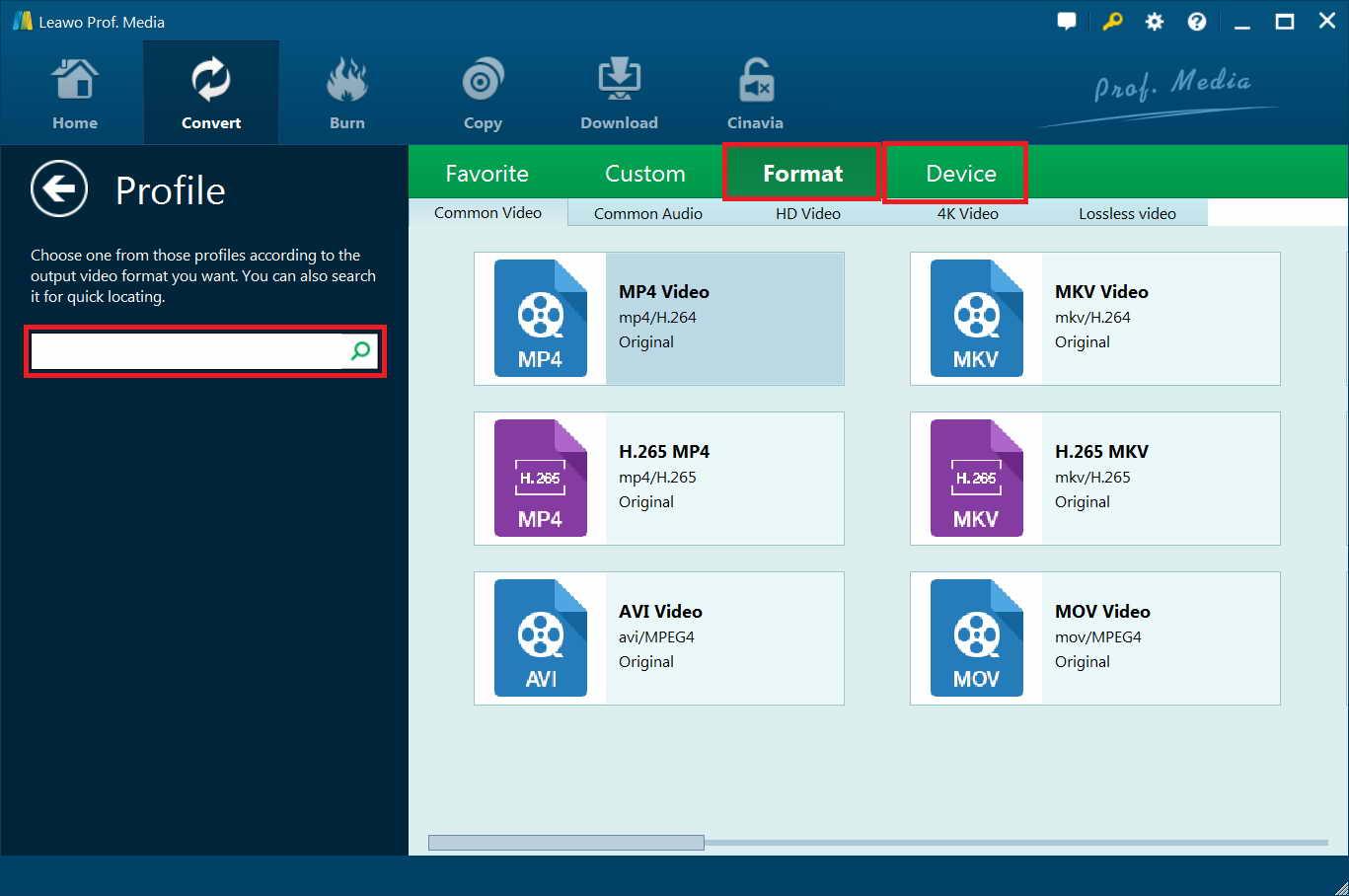
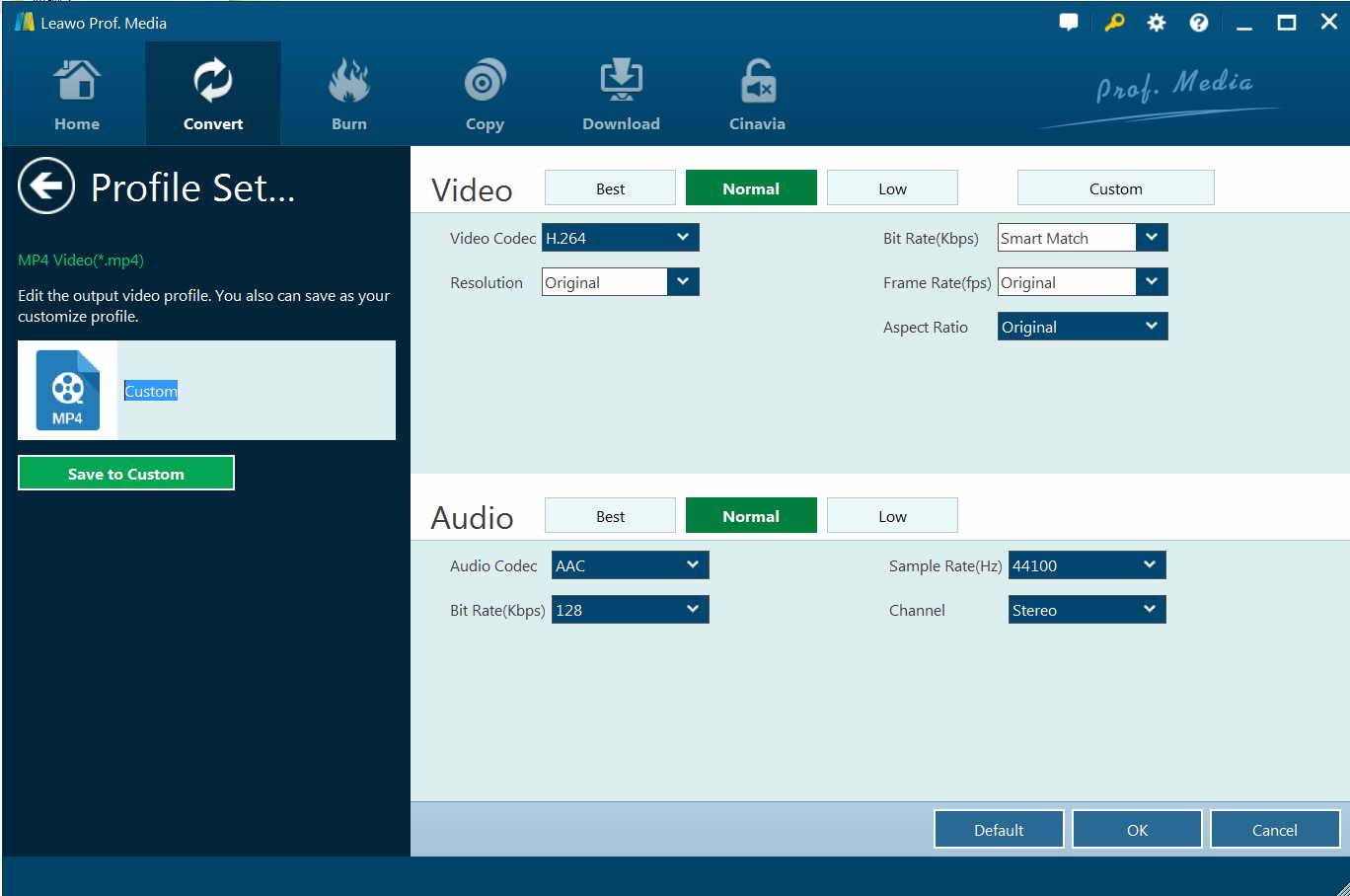
Step 3. If you want, you can also configure the parameter like Video Codec, Resolution, Aspect Ratio, Frame Rate and more for output files by clicking on “Edit” button next to “Change” button on the Profile Settings panel.
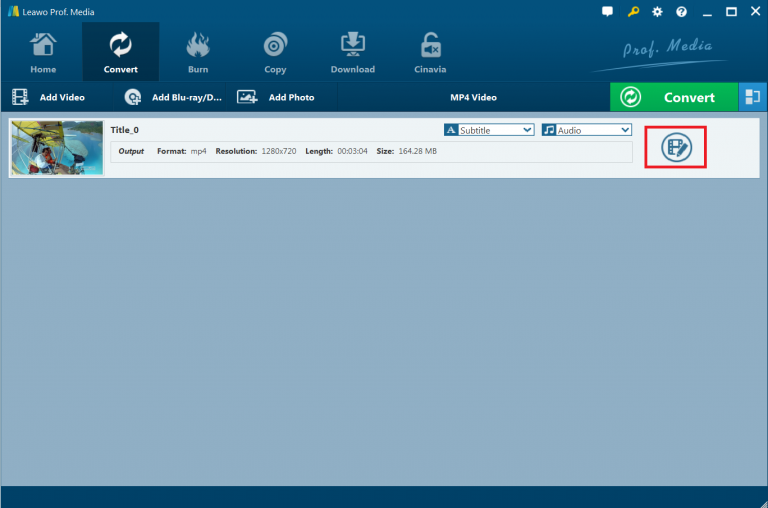
Step 4. Next, right click on the loaded 3D Blu-ray files and choose the option “Edit” on the right end side of the file, then you will go into the editing panel of the video.
Step 5. Press on “3D” tab, then slide the button of 3D mode to green. Select 3D effect and apply it to your ultimate video file. Generally, there are six types of 3D effects available, including Red/Cyan, Red/Green, Red/Blue, Blue/Yellow, Interleaved, and Side by Side. Choose the option “Side by Side” for your 3D movie file. In addition, you also can make adjustments on 3D depth to get a better 3D movie effect. Finally, choose the option “Apply to all” to get the 3D movie effect applied to your 3D video files.

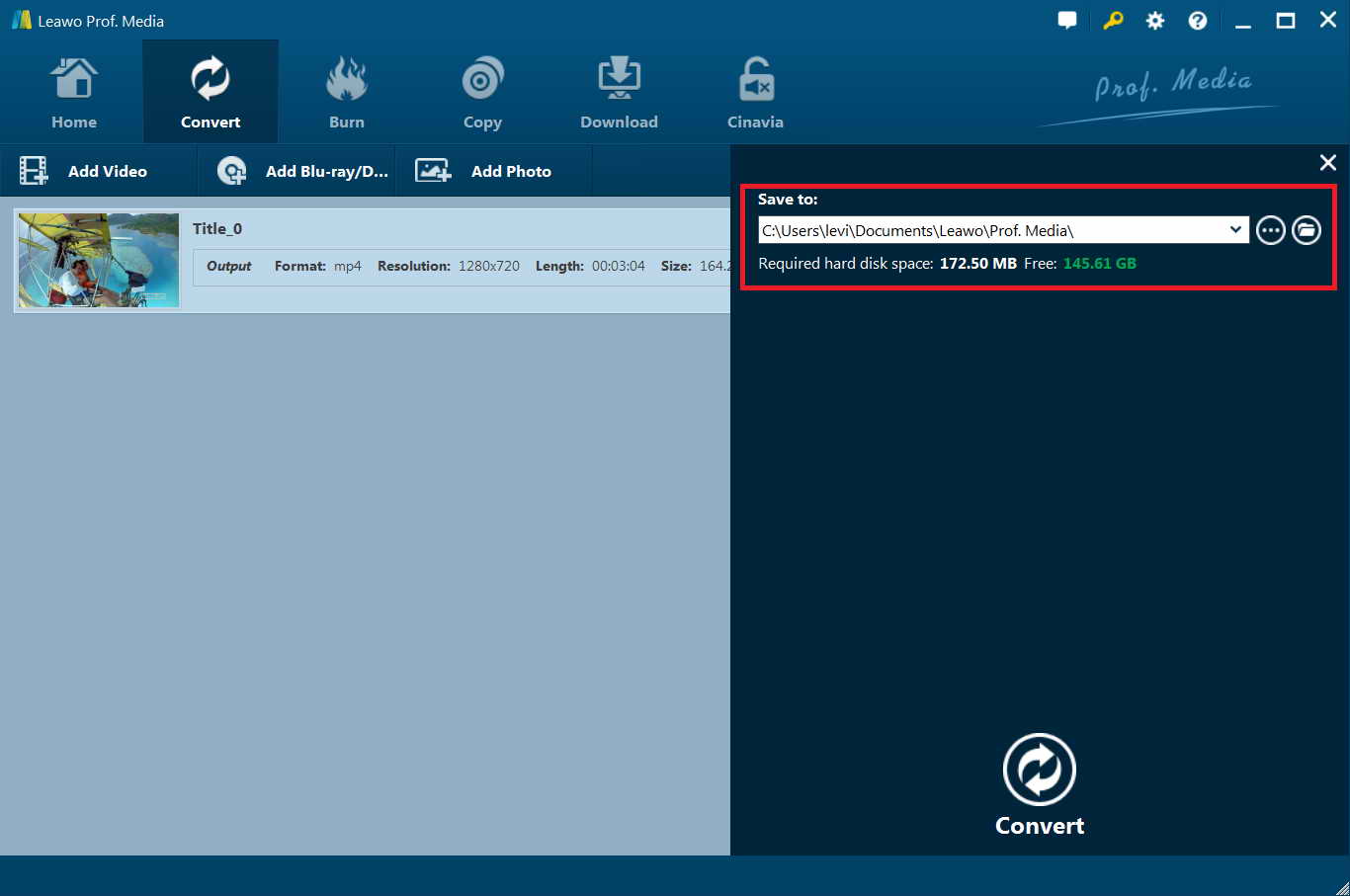
Step 6. In the end, hit on the button of “Convert” at the top of the screen and then you will see a sidebar pop up in the right part of the screen. Navigate to the folder icon and then click on it to choose one proper location to store the ripped videos. Hit the “Convert” button at the bottom of the sidebar to start to rip 3D blu-ray to HTC Vive.
Part 2: Rip 3D Blu-ray on HTC Vive with VidMore Blu-ray Ripper
Vidmore Blu-ray Ripper is not a bad choice if you are looking for a program to rip 3D blu-ray to HTC Vive. You can rip Blu-ray to MP4/MKV/AVI/WMV/M4V/MOV/FLV and more video formats with 12x fast converting. And you also can convert Blu-ray disc/folder/ISO file to 4K/1080p HD, and 2D/3D video with zero quality loss. To save more your time, it supports batch conversion. Learn how to rip 3D blu-ray to HTC Vive with Vidmore Blu-ray Ripper.
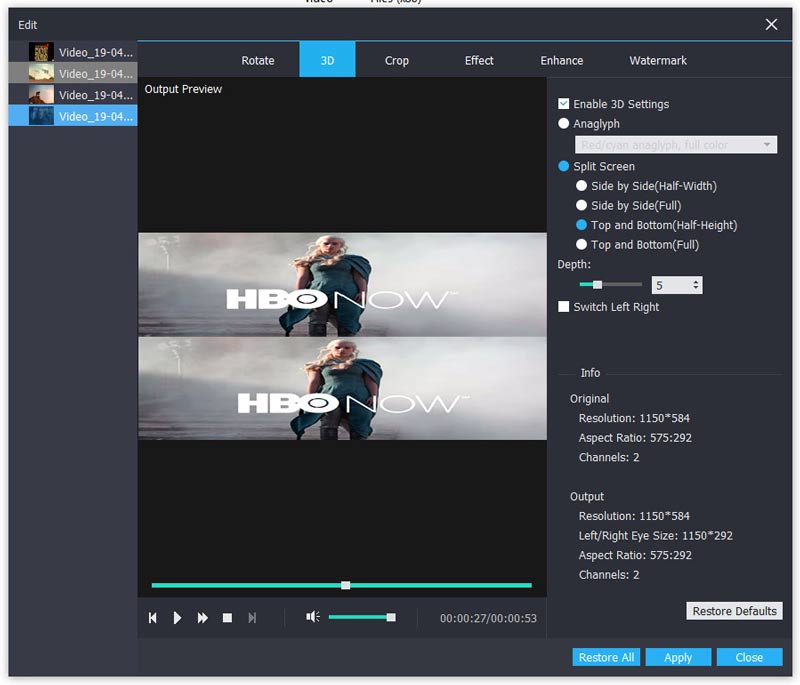
Step 1. Download and install VidMore Blu-ray Ripper on your computer. Insert your Blu-ray disc into the Blu-ray drive to help you rip 3D blu-ray to HTC Vive. Launch VidMore Blu-ray Ripper and then click “Load Blu-ray” button under the “Ripper” module to choose to load either Blu-ray disc or Blu-ray folder.
Step 2. Click the file format or device presets on the right side of the Blu-ray disc and choose the desired video format.
Step 3. Click “Edit” on the top toolbar. In the new popping-up window, you can click “3D” to access its 2D to 3D converter. Firstly, mark before “Enable 3D Settings”. Later, you can customize 3D effects with “Anaglyph”, “Split Screen”, “Depth”, “Switch Left Right” and other options. Click “Apply” to convert the video to 3D.
Step 4. At last, click “Convert” in the interface to rip 3D blu-ray to HTC Vive.
Part 3: Rip 3D Blu-ray on HTC Vive with Xilisoft Blu-ray Ripper
Xilisoft Blu-ray Ripper Ultimate has the capability to convert Blu-ray to a wide range of file formats with preset conversion settings for specific output formats. As for 3D conversion abilities, the tool not only converts 3D Blu-ray videos to standard video or 3D format videos but also help create 3D format videos from standard Blu-ray videos to watch on 3D Video Players, 3D TV, 3D Virtual Reality Devices, 3D Projector or 3D Home Theater receivers. Note: Only Xilisoft Blu-ray Ripper Ultimate is capable of ripping 3D blu-ray to HTC Vive, not the Standard and Platinum version. This is the step by step guide of Xilisoft Blu Ray Ripper Ultimate to show you how to how to rip 3D Blu-ray on HTC Vive.
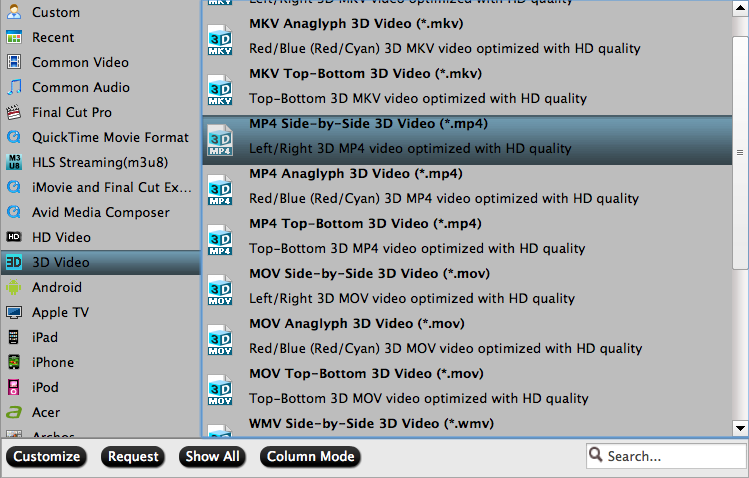
Step 1. Install and download Xilisoft Blu-ray ripper on your computer and launch it. Then you will be guided to the main interface of Xilisoft Blu-ray ripper.
Step 2. Import Blu-ray disc to the program by clicking the button “Add Blu Ray FolderLoad Blu-ray Disc” from the toolbar or selecting the option “File> Add Folder>Load Blu-ray Disc” from the main menu, then you can load the files to Xilisoft Blu-ray ripper.
Step 3. Click Format and choose 3D MP4, 3D MKV, 3D MP4 etc. Each 3D video format is with different 3D video effect, for example: Select “MP4 Side-by-Side 3D Video(*.mp4)” or “MP4 Top-Bottom 3D Video(*.mp4)”, etc.
Step 4. After that, click on “Browse…” button to locate a target folder to save the converted video files. After selected output profile, you only need to check the files you want to convert in the file list and hit the “Convert” button to start the video conversion
Then you can watch 3D Blu-Ray on HTC Vive successfully.
Part 4: Comparison and Conclusion
To help you get a better understanding of the three wonderful tools, below we have made a comparison chart of the above mentioned 3D Blu-ray to HTC Vive Converter. Then you are able to figure out which one is the most suitable program for you to get your 3D Blu-ray ripped to HTC Vive.
|
Programs |
Leawo Blu-ray Ripper |
VidMore Blu-ray Ripper |
Xilisoft Blu-ray Ripper(standard) |
|
Operating System |
Windows and Mac |
Windows |
Windows and Mac |
|
Disable DRM |
Support |
N/A |
N/A |
|
Rip Blu-ray/DVD ISO image file to video |
Support |
N/A |
N/A |
|
Select subtitles and audio tracks |
Support |
N/A |
N/A |
|
Handle 4K Blu-ray discs |
Support |
N/A |
N/A |
|
Supported various kinds of output formats |
Support |
limited |
limited |
|
Video editing |
Support |
Support |
N/A |
|
Parameter preset |
Support |
Support |
N/A |
|
Result Quality |
Without Quality Loss |
Without Quality Loss |
No assurance |
In conclusion, Leawo Blu-ray ripper would bring you lots of benefits other than ripping Blu-ray disc, you will love its powerful function and convenient operation. Despite of ripping 3D blu-ray to HTC Vive, Leawo Blu-ray Ripper is also capable of ripping and converting Blu-ray/DVD to MP4, ripping Blu-ray/DVD to AVI, converting Blu-ray/DVD to WMV, etc... and extract audio off Blu-ray/DVD to save in MP3, AAC, FLAC, etc. .
 Mar. 25, 2020 by


 Prof. Media
 Blu-ray Ripper
 Blu-ray Copy
 iOS Data Recovery
 [12/29/23] MAX Downloader V15.0.0
 10,000,000 people are using Leawo!
 All Transactions are protected!
 30-Day Money Back Guarantee!