-
Top 10 Funniest and Best Apps for iPhone and iPod Touch of 2012
Posted on July 31st, 2012 No commentsThe long anticipated next Apple iPhone, maybe named as iPhone 5, has been confirmed to be released this fall, mostly at the September 12th event as reported recently. Even though the detailed features of the next Apple iPhone have not been unveiled, upon the iPhone 4S, we can get a lot of apps to add fun to our iPhone. In this post, I would like to share some funny and wonderful apps for iPhone and iPod Touch which are emerged this year so far. These apps could include ones for killing time, image and video editing apps, email tools, user interface optimizing apps, and utilities that could speed up common iPhone tasks to improve your iPhone and iPod performance. With the help of these practical apps, you could get a more productive iPhone or iPod Touch. Some of these apps could be installed directly on your iPhone, while still some other apps need to be installed on your computer as assistant.
 Sparrow: If you need a gesture based email client to replace your Mail app, Sparrow would be your right choice. You only need to have a Gmail, Google Apps or IMAP account. This app enables you to pull down the inbox list to refresh your inbox and also you can swipe across a message to reply, archive and delete emails. This app has full support for Gmail’s archive, labels, and priority inbox features. $2.99
Clear: Clear makes use of gestures in a very Apple-esque way to manage your task list. List items are displayed in a heatmap by priority and you create new items by pinching items apart, dragging from the top of the list or tapping at the bottom. To mark items as done you just swipe left or right. Clear is very intuitive with no buttons or switches to act as a simple task manager without advanced features like setting time or location-based alerts. $2.99
Draw Something: Draw Something is a funny app to help you kill time with your friends or family. You challenge your friends to guess the word you are drawing and you get game currency for each guess, depending on the word difficulty. Starting with simple sketches, you can get more colors and drawing tools for your Draw Something masterpiece as you own more coins. Free
iPhoto: If you need a photo editing tool on your iPhone, you can refer to iPhoto for iPhone. iPhoto is packed with effects, filters and adjustments for your photos. The app organizes your mobile photo library and integrates with Facebook, Twitter and Flickr. You can also send photos wirelessly to other iOS devices running iPhoto in the foreground with the wireless beaming feature enabled. $4.99
SloPro: Strictly, this app is a video recording and editing tool. SloPro is a perfect video shooting app to help you take 60fps slow-motion video in 720p HD with your iPhone 4S only. The built-in editor allows you to select in an out points where the video will be slowed down. It’s free to get this app, but the recorded and edited videos would be covered with watermark. You can spend $1.99 to update it to remove the watermark and export results to the camera roll or iTunes.
Video Editor: This app is useful for you to edit images and videos on your computer and then transfer the edited videos to your iPhone or iPod Touch freely. It provides different effects, transitions and titles, as well as other editing features for you.
Frameographer: Also as a video editing tool, Frameographer helps you create stop motion and time-lapse videos in a simple and straight-forward way. Since staging such videos can be time-consuming, the app lets you stop a project and resume it at a later time. You can easily delete unwanted frames and change the frames per second. But this app is very power consumptive. $2.99
The Daily for iPhone: As a popular app on iPad, the iPad-only newspaper The Daily has also transitioned to the iPhone this year. It’s a separate, less expensive to subscribe version of The Daily, which is free of charge if you already subscribe to the iPad version. The layout is like a mix of Facebook and Sparrow, and unlike the tablet version, you also get a selection of free ad-supported stories every day. What’s more, it’s free.
FreezePaint: A quite fun and unique app to merge parts of a photo with another. You can freely create images you like with pictures you have. You simply take a photo, swipe your finger on the part of the picture you want to keep and then take another picture with the chosen frozen parts overlaid. Free
iTranslate Voice: iTranslate Voice is a translation app on your iPhone, looks a bit like Siri. You can choose the target language through flags provided, press the flag button and speak what you want to be translated. The app gives fairly accurate results. For accurate translation, it’s better for you to say simple sentences. You can also type text to translate. There’re 30 languages are included. Make sure you have connected to the internet. $0.99
Well, how do you think of these apps? Quite useful and practical, right? If you have some other better advices, feel free to share with us here in the comment part.
займ на карту rusbankinfo.ru
-
3 Methods to Set Timing and Speed of PowerPoint When Saving PowerPoint as Video
Posted on June 28th, 2012 No commentsUsually when we create a PowerPoint slideshow, to make it look better we would add animations, transitions, music and video clips. The problem is that how to make all these effects and components sync with each other. So here in this article we will discuss about 3 methods to help you set timing and speed of PowerPoint so that you can make a perfect video for uploading to YouTube or watching on iPad with others.
Method 1: Set Slide Transitions
Open your PowerPoint file and select each of the music and video files you have inserted. Click “Playback” tab, in the “Video Options” group, remember to set the video “Start: Automatically“. This setting enables the music and video clips to play automatically even after PowerPoint to video conversion.

Now, click “Transitions” tab on the Ribbon, uncheck the “On Mouse Click” option so that the slide will jump to next slide automatically. Then set a “Advance Slide” timings in “After” section.

Method 2: Rehearse Timings
Another way to control the slide speed is to preview the whole PowerPoint presentation and rehearse the timings for each slide. Click “Slide Show” tab on the Ribbon, choose “Rehearse Timings” in the “Set Up” group to tools.

Then you will enter the “PowerPoint Show” mode, with a timing setting dialog box on the top left. You need to pretend you are doing the PowerPoint presentation now and click “Right Arrow” to save the timing for the slide and jump to next slide. Pause and reset the timing anytime as you need.
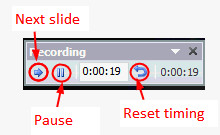
The advantage of “Rehearse Timings” function is that you can set the timing for each slide and animation really accurate. The disadvantage is that it will take quite a long time.
Method 3: Set timing in PowerPoint converter
After setting the timings using method 1 or method 2, you can then save PowerPoint as video directly in PowerPoint 2010 or using PowerPoint to video converter. Leawo PowerPoint to DVD Pro support converting PowerPoint to popular video formats besides burning to DVD or Blu-ray Discs.
Run the program and import the PowerPoint file you want to save as video. Click the “Customize” button below the preview window.
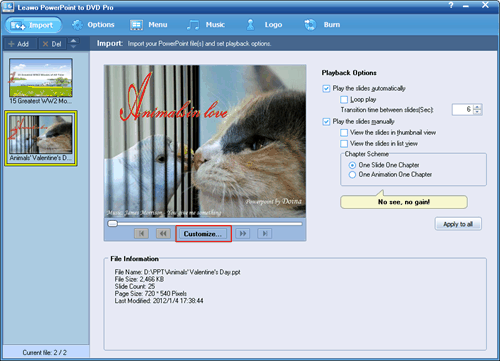
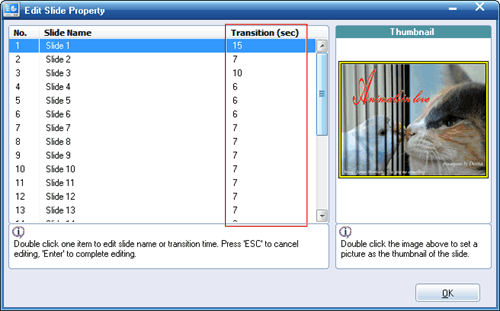
In the pop up window, if the original PowerPoint file has transition settings, the transition timing of each slide is listed there. If not, the transition section will be blank. Double click and enter a desired timing as you want whether or no.
-
How to Finish PowerPoint Presentation Effectively
Posted on June 14th, 2012 No commentsPeople always say PowerPoint is a very easy-to-use tool to make presentations, but leave an impressive impact on the audience is not. Your presentation will be soon forgotten if you are unable to end it with a convincing touch. A good PowerPoint presentation doesn’t merely mean a few good slides, but how to present the PowerPoint in an effective way. In what is to follow, we will run through a few tips to finish PowerPoint presentation effectively and hope it help to improve your next PowerPoint presentation.

Focus on the core content
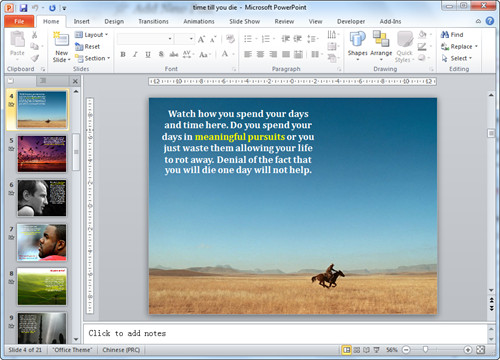
The last few slides are expected to be a concise summary of the whole presentation content or come naturally to the aim of the presentation. So when creating the last few slides, remember not to deviate from the core aim. For presentation of introducing a new product, you should make the audience believe they can benefit from the product.

Add Powerful Multimedia Impact
One of the best ways to end a PowerPoint presentation is to use powerful multimedia content with appealing sound and visual effects like adding YouTube video in PowerPoint. Many a times a message delivered with eye-catching graphics and a gripping background score can result in a convinced audience, as compared to a mute presentation.
Control the bullet points
It is old-fashioned to list bullet points on one slide. Replace the bullet points with images and illustrative words. So if you need to present a point, you can put an image on the left side of slide and list the points on the right. Do remember to add animations so that the points will drop in one at a time.
Put numbers into context
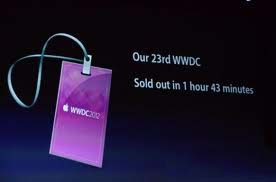
In PowerPoint you can make your numbers or statistics into a table or further a chart that shows clearly the contrast with others. However, when you explain these numbers, remember to put them into a specific context so that audience will easily remember it. For example, Cook said there were 400 million accounts on Apple’s App Store. This is just a number, what makes it meaningful is what he said next, “That makes it the store with the largest number of credit cards anywhere on the Internet.”

The sequence and timing of slides
Any experienced presenter will add animations, transitions and hyperlinks in his PowerPoint presentation. That means his presentation is more than just switch from one picture to another. The content are moving and audience are following the presenter’s guide to go through the touching content. So double check to make sure that all slides are in proper sequence and that the timing of the slides is accurately adjusted.
Hope the above presentation tips will help you to capture the attention of your audience and finish your PowerPoint presentation in a satisfactory way.
займ на карту rusbankinfo.ru
-
How to keep Fonts and Videos in PowerPoint 2010
Posted on May 30th, 2012 No commentsPeople always say PowerPoint is an easy-to-use tool for making PowerPoint presentations. That depends. After you have learnt all those PowerPoint skills and tried yourself, the answer is yes. But for many people, problem happens all the time, especially when you need to send the PowerPoint to others. In this article we will show you how to deal with the font and video problem in PowerPoint.
1. Font in PowerPoint
Different computers are likely to have different fonts, especially when the two computers have different languages. If you send a PowerPoint presentation to another computer, the font differences may cause some formatting issues.
Microsoft has offered the solution, but not enabled by default. Below is how to keep the fonts you have used in the PowerPoint file.
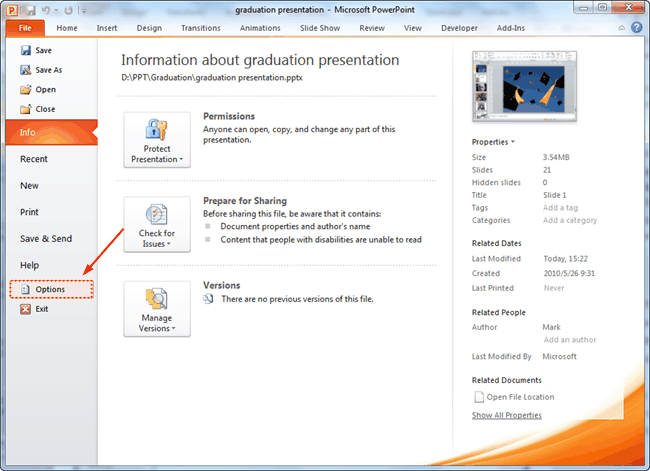
Step 1: Start by clicking “File” on the top-left and then click “Options” on the left pane.
Step 2: Once you have the PowerPoint Options window open, select the “Save” tab and then check the “Embed fonts in the file” checkbox.
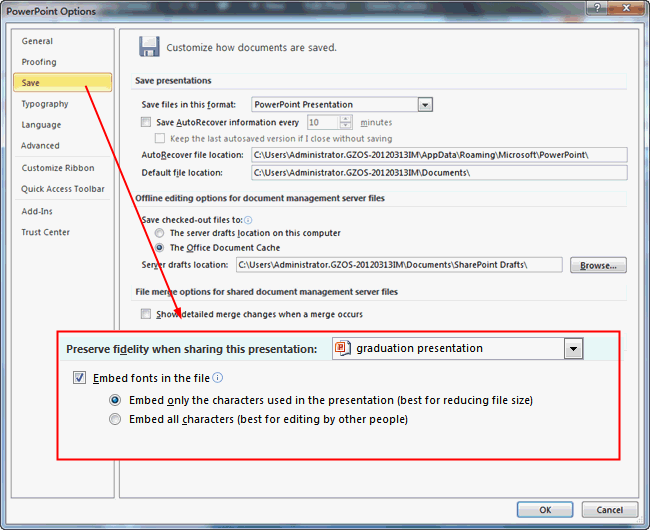
Step 3: You then have the option to include all of the characters (increases the file size) or only the characters used (reduces the file size).
2. Video in PowerPoint
Unlike pictures and music, videos are usually bigger in size and in order to keep the output PowerPoint file small. The video may not be embedded, but hyperlinked. That is to say, the video is still on your computer, so the receipt cannot view the video on his computer.
The following method will show you how to make use the Windows Media Player to play video in PowerPoint. The advantages are that you can easily control the video path and options like play, pause, skip and volume of the player in PowerPoint.
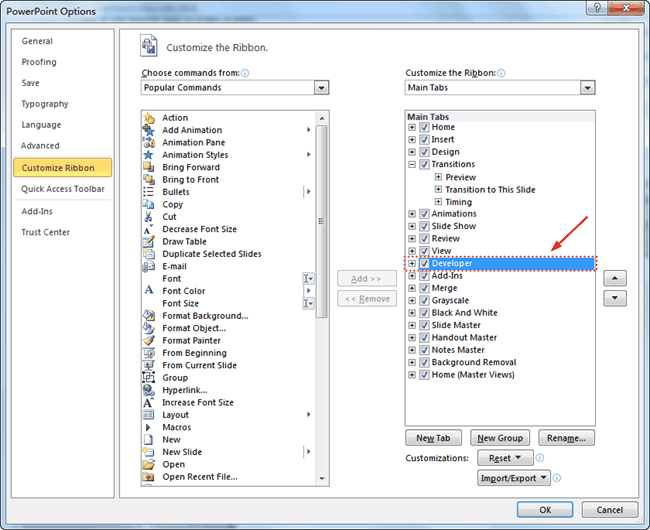
Step 1: Enable the “Developer” tab. In the PowerPoint Options → Customize the Ribbon → select the Developer option.
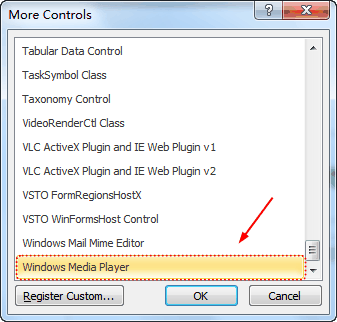
Step 2: Under the Developer tab, click the “More Controls” icon and a dialog window will pop up.

Step 3: In the More Controls dialog box, select “Windows Media Player“, and click “OK” to apply. Drag you mouse to draw a frame for the player.
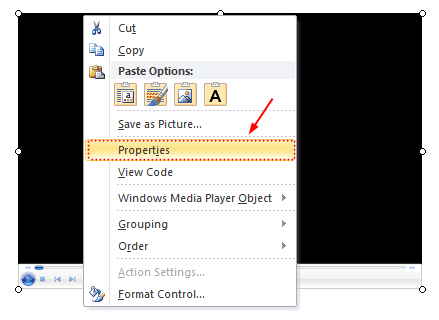
Step 4: Right click the frame and choose “Properties“.
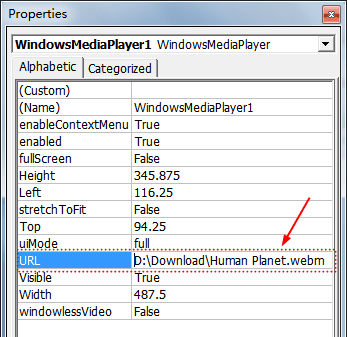
Step 5: Input the full path and name of video file in “URL” option.
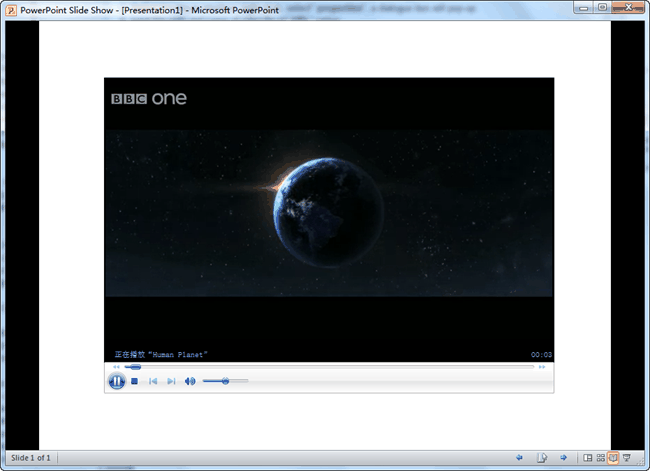
Then you can view the video in PowerPoint using Windows Media Player with all its control options.
займ на карту rusbankinfo.ru
-
Free Method to Make PowerPoint to Video Using Windows Live Movie Maker
Posted on May 24th, 2012 No commentsAlthough PowerPoint is widely used in our lives and generally regarded as the best program to make presentations, yet if you want to share your PowerPoint on YouTube, you will find that you can’t. Because YouTube accepts only video formats like MP4, FLV, AVI, WebM and so on. One of the solutions is to convert PowerPoint to video.
Leawo PowerPoint to Video converter helps you to save PowerPoint as video formats like MP4, FLV, AVI, WMV, MOV, MKV, etc. and preserve animation, transition, music and video clips in the PowerPoint files.

A time-effective method, but not free method. If you like, you can use the Windows Live Movie Maker to create a movie from your PowerPoint slideshow or photos. You can get the Windows Live Movie Maker here for free. Then follow the steps below to turn your PowerPoint to video using Windows Live Movie Maker.
Part 1: Save PowerPoint as pictures
PowerPoint formats are not supported by Windows Live Movie Maker, so you need to save PowerPoint slides as pictures first.
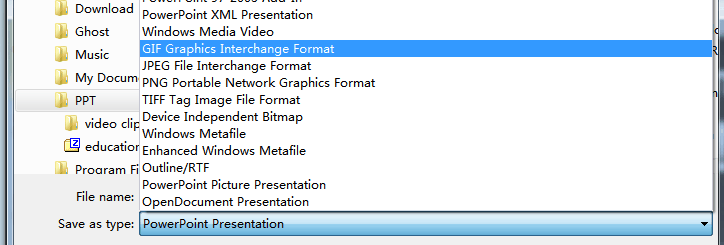
Step 1: Open your PowerPoint and click “Save As”, in the popup windows, choose an image format as “Save as Type”, like JPEG, GIF, PNG, TIFF.
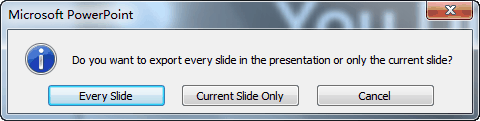
Step 2: A prompt will show up, choose “Every Slide” to save all the PowerPoint slides as pictures.
Part 2: Create video using Windows Live Movie Maker
After saving PowerPoint as pictures, all the features like animation, transition, music and video clips will be removed. But don’t worry, they can be added again in the Windows Live Movie Maker, although not exactly the same as the original.
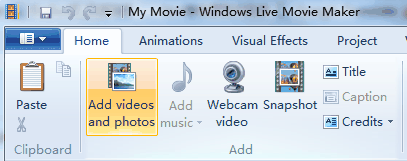
Step 1: Import the pictures into Windows Live Movie Maker. Click “Home” → “Add videos and photos” and import all the output PowerPoint pictures.
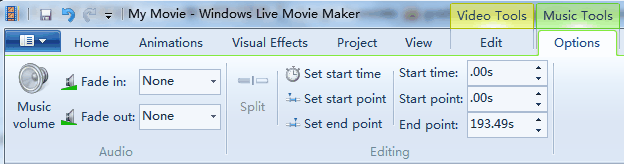
Step 2: Add background music. Click “Add music” to insert songs as background music. Because the timeline has been removed in Windows Live Movie Maker, you have to go to “Options” of “Music Tools” to set the timing of the songs.
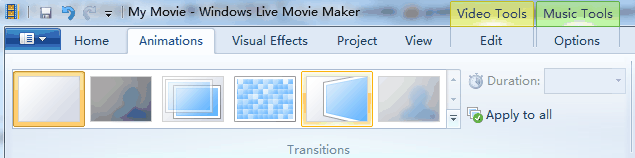
Step 3: Add animations to the pictures.
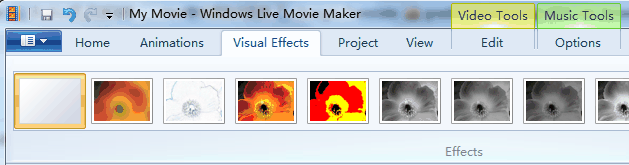
Step 4: Add visual effects. These visual effects can be found in the picture format of PowerPoint.
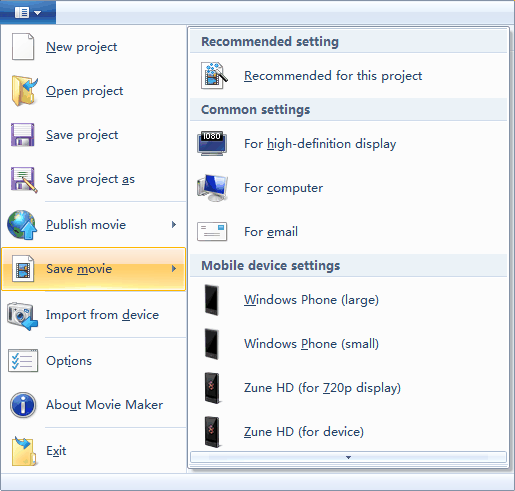
Step 5: Save the movie. The output video format is WMV.
The function of Windows Live Movie Maker is limited, but it does provide a free method to save your PowerPoint as video for publishing on YouTube.
займ на карту rusbankinfo.ru




Recent Comments