-
Free Method to Make PowerPoint to Video Using Windows Live Movie Maker
Posted on May 24th, 2012 No commentsAlthough PowerPoint is widely used in our lives and generally regarded as the best program to make presentations, yet if you want to share your PowerPoint on YouTube, you will find that you can’t. Because YouTube accepts only video formats like MP4, FLV, AVI, WebM and so on. One of the solutions is to convert PowerPoint to video.
Leawo PowerPoint to Video converter helps you to save PowerPoint as video formats like MP4, FLV, AVI, WMV, MOV, MKV, etc. and preserve animation, transition, music and video clips in the PowerPoint files.

A time-effective method, but not free method. If you like, you can use the Windows Live Movie Maker to create a movie from your PowerPoint slideshow or photos. You can get the Windows Live Movie Maker here for free. Then follow the steps below to turn your PowerPoint to video using Windows Live Movie Maker.
Part 1: Save PowerPoint as pictures
PowerPoint formats are not supported by Windows Live Movie Maker, so you need to save PowerPoint slides as pictures first.
Step 1: Open your PowerPoint and click “Save As”, in the popup windows, choose an image format as “Save as Type”, like JPEG, GIF, PNG, TIFF.
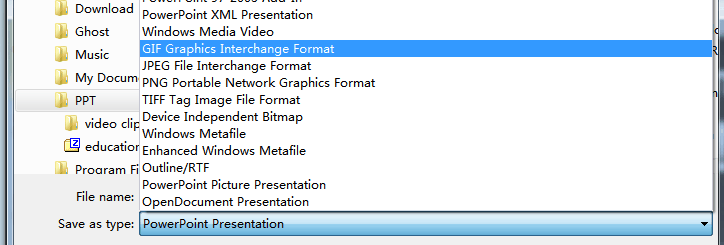
Step 2: A prompt will show up, choose “Every Slide” to save all the PowerPoint slides as pictures.

Part 2: Create video using Windows Live Movie Maker
After saving PowerPoint as pictures, all the features like animation, transition, music and video clips will be removed. But don’t worry, they can be added again in the Windows Live Movie Maker, although not exactly the same as the original.
Step 1: Import the pictures into Windows Live Movie Maker. Click “Home” → “Add videos and photos” and import all the output PowerPoint pictures.
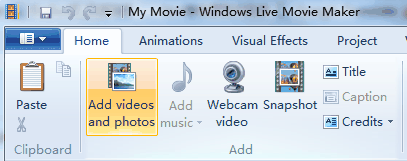
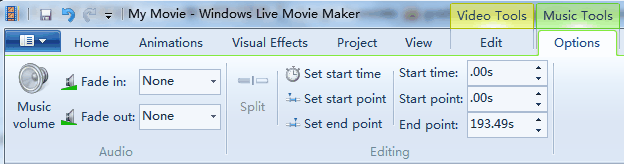
Step 2: Add background music. Click “Add music” to insert songs as background music. Because the timeline has been removed in Windows Live Movie Maker, you have to go to “Options” of “Music Tools” to set the timing of the songs.
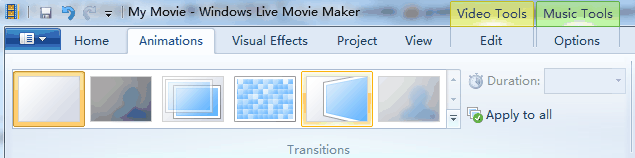
Step 3: Add animations to the pictures.
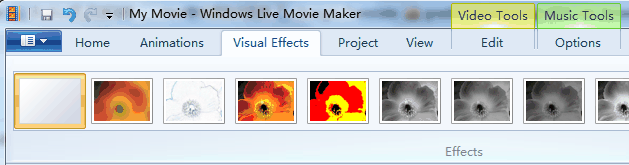
Step 4: Add visual effects. These visual effects can be found in the picture format of PowerPoint.
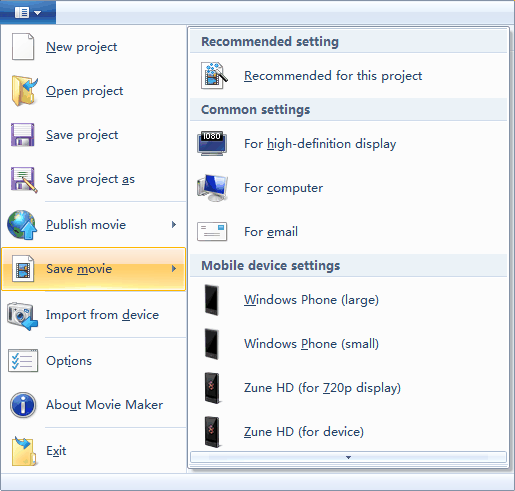
Step 5: Save the movie. The output video format is WMV.
The function of Windows Live Movie Maker is limited, but it does provide a free method to save your PowerPoint as video for publishing on YouTube.
займ на карту rusbankinfo.ru
-
How to Make a Photo Album using PowerPoint 2010
Posted on May 15th, 2012 No commentsYou may have taken a number of precious photos from time to time. In the past you may print it out and carefully put them in the family photo album book, but now they may be lying silently in your digital camera or one folder on your hard drive. Why not make a photo album with PowerPoint 2010, which helps you store and display these photos in a digital way?
Why choose PowerPoint? Microsoft PowerPoint should be installed on most of the computers, so you don’t need to find and buy other software to make a photo album. Besides, you should be familiar with PowerPoint so you don’t need to learn how to use it. PowerPoint is consisted of several slides, which are easy to be organized for you to tell a story in the right order. Besides, you can also add dynamic effects like animation, transition, background music, video clips and more to your PowerPoint photo album.
Now let’s take a look at the steps to make a photo album in PowerPoint 2010.
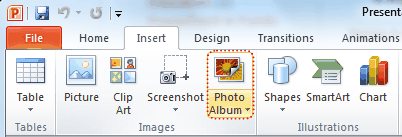
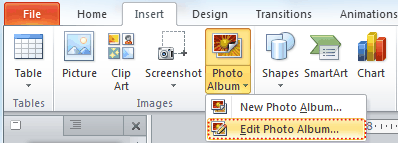
1. Open PowerPoint program, point to Insert tab, click the Photo Album button.
2. In the pop up window, click File/Disk button and choose the photos you want to include in the photo album from your hard drive. (The Photo Album function enables you to insert multiple photos to PowerPoint at a time.)
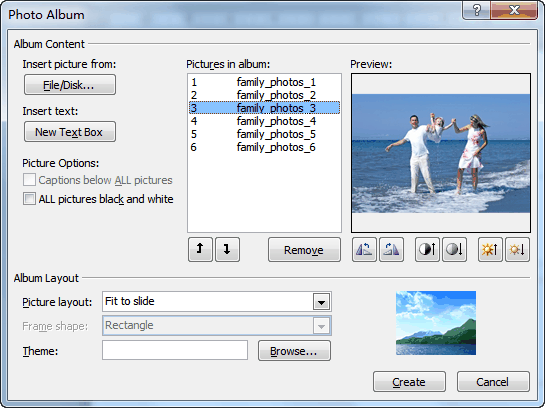
You will see the selected photos in the Picture in Album list. You can change the order by choosing a photo and clicking the Move Up or Move Down button. Below the preview of the photo, there are six buttons, which you can use to adjust the rotation, contrast and brightness of each photo.
Click Create to insert the photos.
3. The photo album can be editable, any time you want to change the photo, order or effect, you can click Edit Photo Album. On the left of the preview, you can select Captions below All pictures to add subtitle for your album.
To add title for each photo, you should click Picture layout and choose x picture with title.
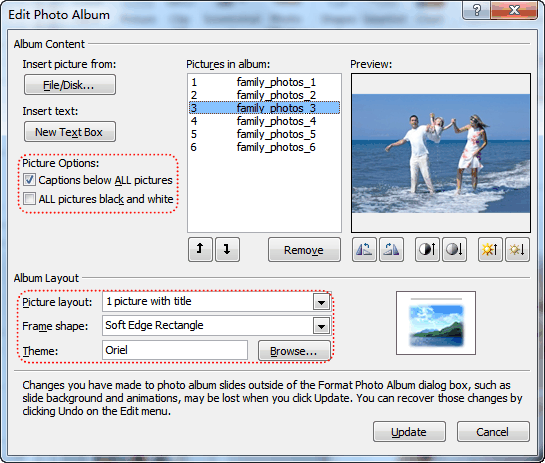
Click Update to apply the changes.
4. Apply a theme to your album
You can directly select an PowerPoint embedded theme by clicking Browse, or choose a theme from the Design tab of PowerPoint.
5. Add animation, transition, background music and video clips to the PowerPoint photo album.
Now you have finished your own photo album using PowerPoint 2010. Do you want to share your photo album with others? You can upload your self-made photo album to YouTube and let other people enjoy the happiness with you. To upload your photo album to YouTube, you should convert PowerPoint to video formats that YouTube accepts. Tool you need: Leawo PowerPoint to Video Converter.
Want to store your photo album permanently? In order to store the photo album forever and prevent from being edited, you can burn it on a DVD disc. Leawo PowerPoint to DVD Burner helps you store photo album on DVD disc for playback on TV whenever you like.
-
How to Insert Any YouTube Video to Any PowerPoint
Posted on May 11th, 2012 No commentsAssume you’re making a PowerPoint presentation for the class next week, you may need to insert some video clips to demonstrate your point. And YouTube is the most ideal place for you to find the video materials you need. You don’t have to worry about the resources for everyday millions of people are uploading videos, some of them are self-made, to YouTube to share with people around the world. The only problem is that YouTube doesn’t allow people to freely download these videos. So if you want to add YouTube video to your PowerPoint, some tools are needed, fortunately, they are free tools.
Before we start, we need to be clear about the following. Currently the 3 most common video formats of YouTube video are MP4, FLV and WebM, and none of them are supported by PowerPoint. Only in PowerPoint 2010 can you add MP4 video. The precondition is that you have QuickTime Player installed on your computer. PowerPoint do support many video formats, but it will never be wrong to use AVI and WMV video format, because both are created by Microsoft itself.
So now we have divided the YouTube video to PowerPoint process into 3 parts: download YouTube video, convert YouTube video to AVI or WMV, and insert YouTube video to PowerPoint.
1. Download YouTube video
Try search “download YouTube video” in Google and you will find billion of results. Lots of YouTube download software will be suggested. But why not use these totally free tools:
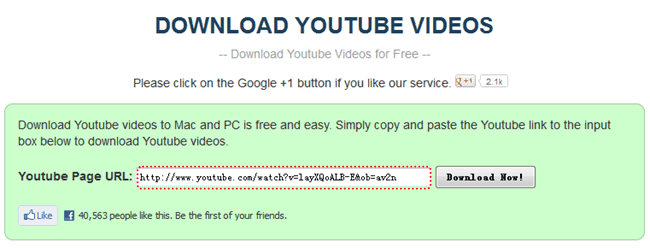
Online application – Some websites can help you to find the YouTube video download link for you to directly download, such as http://downloadyoutubevideo.org/. Simply copy and paste the YouTube video URL in the column and click “Download Now”, wait for a while to get the download link.
Firefox + add-on – If you’re a Firefox user, you can simply add these add-ons to your Firefox and when you watch the YouTube video, Firefox will analyze the webpage and find the download link for you. Such add-ons are like DownloadHelper, NetVideoHunter and Easy YouTube Video Downloader, etc.
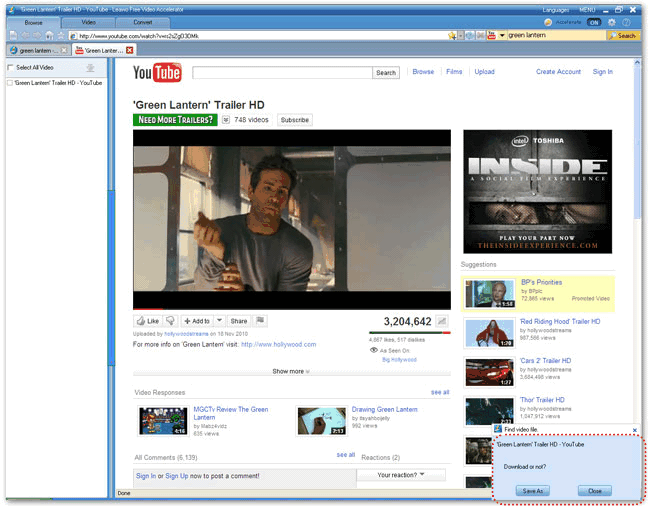
Free YouTube Downloader – Watch the YouTube with the embedded web browser and it will capture the download link automatically. Download any flash videos on web pages.
2. Convert YouTube video to AVI/WMV
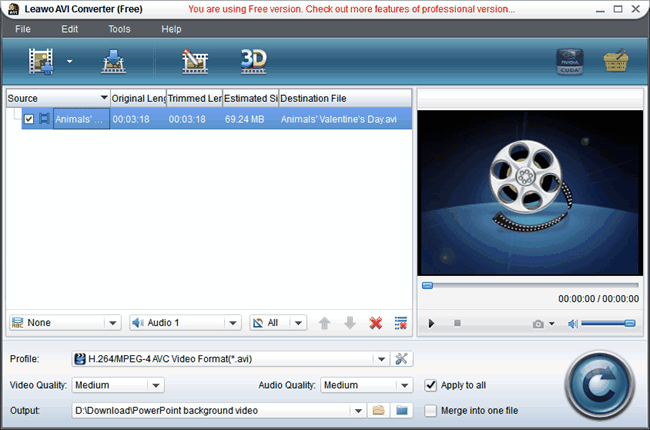
By converting YouTube video to AVI you can put YouTube video on your PowerPoint. There are all kinds of all-in-one video converter which can convert between all popular video formats. We don’t need that complicated function, so here is a Free YouTube to AVI Converter which converts video formats like MP4, WMV, MOV, M4V, MPEG, RMVB, etc. to AVI format for your PowerPoint.
3. Insert YouTube video to PowerPoint
Run PowerPoint program, click “Insert” → “Video” → “Video from File”, browse the converted YouTube video and then you can add it to your PowerPoint slide.
On the contrary, if you created a wonderful PowerPoint presentation and want to share on YouTube with others, here is another tool for you to turn PowerPoint into video format.
займ на карту rusbankinfo.ru
-
Google Docs: Expand Your PowerPoint Presentation Experience
Posted on April 13th, 2012 No commentsWhen we want to create a presentation document, we would probably think of the almighty Microsoft PowerPoint. In the past, it’s the best way and the only way. But now we have a lot more options. There are many free alternative ways for us to choose to make presentations like Open Office, Libre Office, Kingsoft Office, SlideRocket and today’s star Google Docs. And they can be divided into two groups: software you need to install on your computer and online applications. Google Docs is the spokesman for all those online PowerPoint-like applications which enables you to view, create and sharer PowerPoint online.
What can Google Docs do?
1.Create PowerPoint presentations online.
First login Google Docs with your Gmail account. Gmail account gives access to Google Docs and other Google services. Your Google Docs homepage is like this, click the “Create” button on the left to start creating a presentation online.
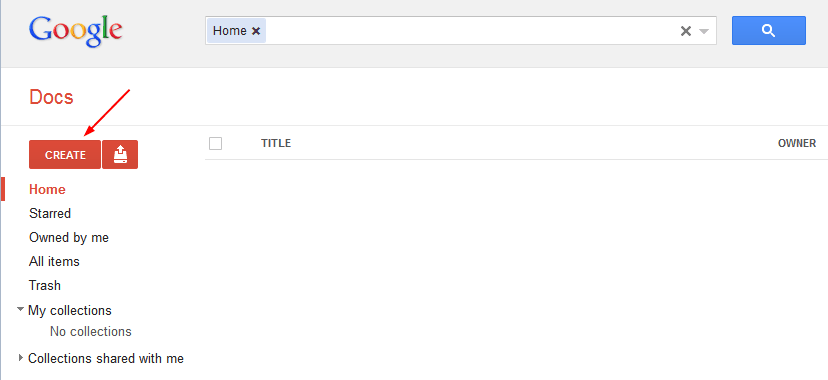
Google Docs is corresponding to Microsoft Office, so it can create Document (Word), Presentation (PowerPoint), SpreadSheet (Excel) and more other document files.
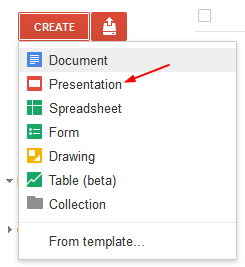
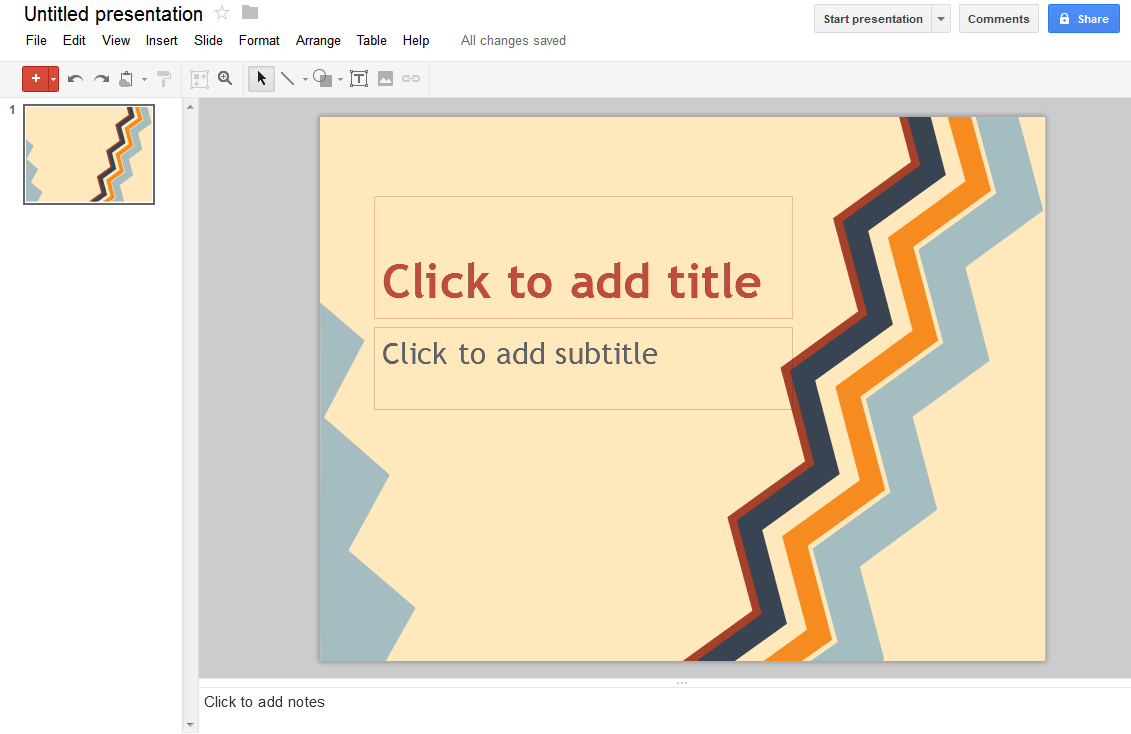
Click “Presentation” and you will enter this presentation page. With concise interface the Google products always have, you have nearly all the tools you need here to make a good presentation, like add pictures, video clips, transitions, animations, etc. But it’s a pity that you cannot insert music in Google Docs.
2.Save as PPTX format compatible with Microsoft PowerPoint.
After you have finished, you can download your presentation to your computer as PPTX format. PPTX is the latest format for PowerPoint 2007 and PowerPoint 2010 so your Google Docs presentation will be compatible with PowerPoint 2007 & 2010. This simple function seems nothing, but it is very useful in fact. Imagine that you need to create a PowerPoint presentation for school, but you don’t have Microsoft Office. Then you can create in Google Docs, download as PPTX and bring to school computer to play. Together with PowerPoint to video converter, you can even publish your Google Docs to YouTube.

3.Download as PDF format
If you search PowerPoint to PDF, you will find that there is great demand that people need to save PowerPoint as PDF format for all kinds of advantages that PDF format has. PowerPoint 2010 supports save as PDF directly, but for those PowerPoint 2007 or 2003 users, they will need a converter to save PowerPoint as PDF file. Now Google Docs serves as another solution to convert PowerPoint to PDF for free.
4.Upload Microsoft PowerPoint
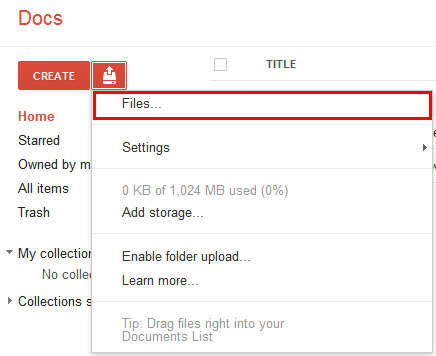
Bring Microsoft PowerPoint and Google Docs even closer, upload PowerPoint files to Google Docs for viewing, editing and sharing with others. Adjacent to the “Create” button, click the “Upload” icon, and choose “Files” from the drop-down menu. Then select the PowerPoint file you want to upload and click “Open”.
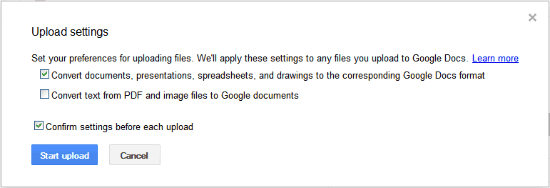
Check the “Convert documents, presentations, spreadsheets, and drawings to the corresponding Google Docs format” box if you need to edit the PowerPoint in Google Docs. Click “Start Upload”.
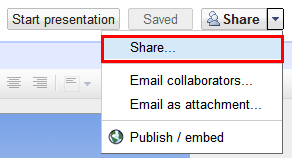
Now you can edit the uploaded PowerPoint file in Google Docs, like reset images, background music, etc. Let’s skip that part and directly click “Share” to publish it online.
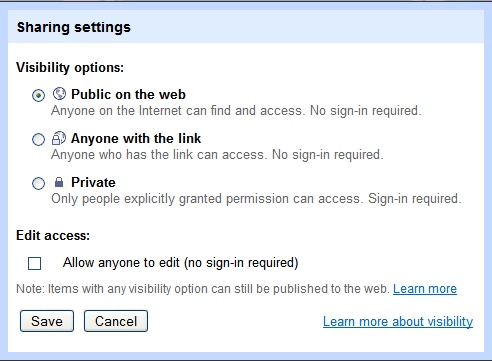
In the pop up dialog box, click “Change” in the “Private” line to choose who has access to the PowerPoint presentation.
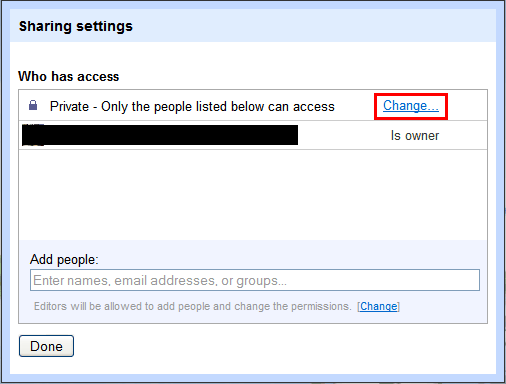
Now you can choose who can view or edit the PowerPoint file.
Have fun with all the best functions that Google Docs provides. What else can Google Docs do?
займ на карту rusbankinfo.ru
-
How to Convert PowerPoint 2007 to Video Complete with All Effects
Posted on April 9th, 2012 No commentsAccording to the theory of content marketing, we should share the high-quality, relevant and valuable information via all medias to drive profitable customer action. Due to the prosperity of modern Internet which shares information at a fast speed ever before and popularity of mobile computing like iPad, iPhone, Android smartphone or tablets, people are able to get information anywhere they want.
Among all the mediums that convey information, video is surely the most energetic one. The largest and most popular video sharing website YouTube is the best example. People on the planet are pleased to share their videos on YouTube for all kinds of reasons. Because of its Google backing, video on YouTube has the priority to be shown in the front of Google’s result list. So we don’t have to do the match about the benefits of converting PowerPoint to video for publishing on YouTube anymore.
How to convert PowerPoint 2007 to video
PowerPoint 2007 is the last version that hasn’t the embedded PowerPoint to video saving function. And since PowerPoint 2007 is still widely used around the world, there is demand to convert PowerPoint 2007 to video.
Tools Required: Leawo PowerPoint to Video Converter offers perfect solution to convert PowerPoint 2007 presentations to various video formats such as MP4, FLV, AVI, WMV, VOB, MKV, 3GP, etc., complete with original PowerPoint effects.
Get the PowerPoint 2007 to video converter and install on your computer.
 (For Windows NT/2000/XP/Vista/7)
With intuitive interface, we are going to convert PowerPoint 2007 to video in only 4 steps:
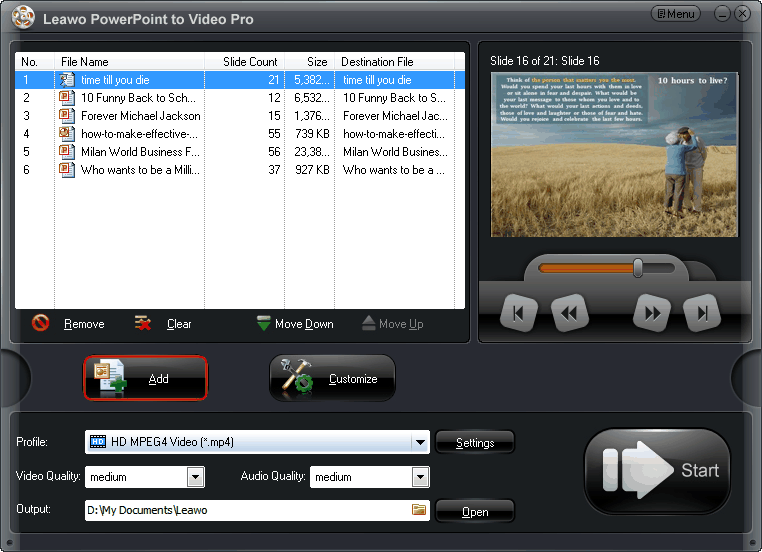
Step 1: Import PowerPoint files.
Run the program and click “Add” button to import your PowerPoint files. Batch conversion is supported for converting multiple PowerPoint files to videos at a time. You can preview each PowerPoint file at the Preview section on the right side.
Step 2: Select an output video format.
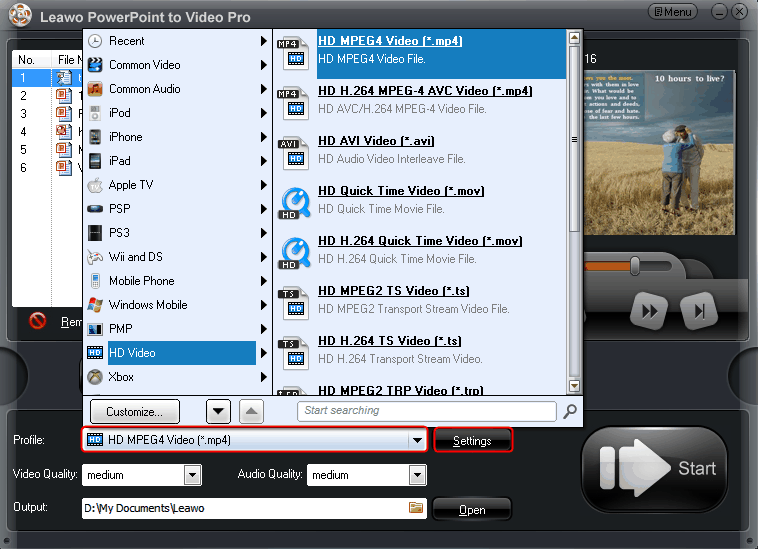
Click on the dropdown menu of “Profile” and then move your mouse pointer to “HD Video” and choose “HD MPEG4 Video (*.mp4)” from the sub-list as output video format for high quality.
Step 3: Adjust audio and video parameters.
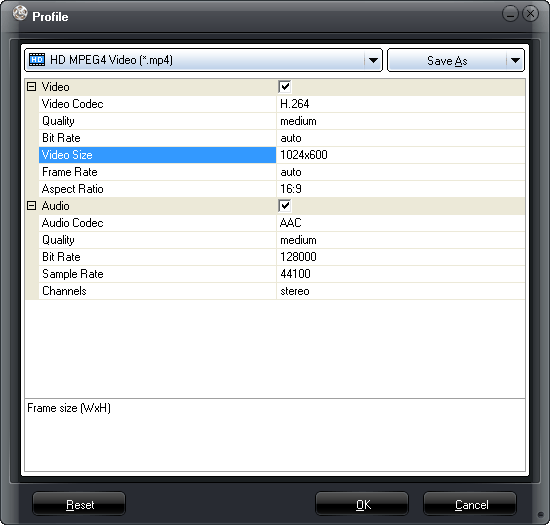
If you want, you can click “Settings” icon to adjust every audio and video parameter like audio codec, bit rate, frame rate, sample rate and audio channel, etc. Then click “OK” to apply your settings or click “Save As” to save your settings as a new profile for future usage so that you don’t need to adjust the settings again.
Step 4: Convert PowerPoint to video.
When all the settings are done, click “Start” to start conversion.
That’s it! Convert PowerPoint 2007 to video with all the fonts, languages, animations, transitions, music and video clips, etc. for sharing on YouTube. Any new ideas on this topic?




Recent Comments